

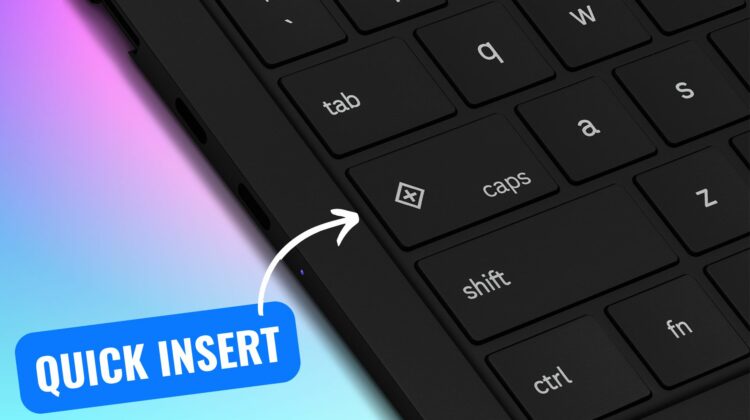
When I provide Chromebook training to teachers, one of my favorite jokes is asking my audience to locate the caps lock key on their Chromebook keyboard. Long-time Chromebook users will immediately realize the joke as Chromebooks feature a “search” key where the caps lock key is normally located.
Officially called the launcher button (or Search or Everything Button), this key has typically opened up the Chromebook app drawer. After more than 10 years, Google has decided to retire this unique key which Robby covered in his round up of Google’s fall ChromeOS updates.
But don’t worry, we’re not returning to the days of TYPING IN ALL CAPS. Google is upgrading the search key to become the Quick Insert key. The Quick Insert key will expand what you can do on your Chromebook and will dynamically change based on what you are doing.

Here is what the Quick Insert key can do:
- Insert emoji
- Insert GIFS
- Trigger “help me write” powered by Gemini*
- Toggle caps lock
- Insert a link from your browser history
- Insert a date
- Perform simple calculations and unit conversions
*only available on Chromebook Plus devices
The Samsung Galaxy Chromebook Plus is the first device that will feature the new insert key, but Google has shared that more new devices will include this update starting in 2025.
What about existing devices?
You don’t need to go out and buy a new Chromebook to test out the features of the insert key. Google has already added a new configuration that you can use to convert your existing launcher button to function like the insert button. You can either remap your launcher key to the new Quick Insert function or leave it as the Launcher + F shortcut Google has shipped with ChromeOS 129.
While change can be hard, I view this change as an upgrade, not an elimination. Dedicating an entire key to the app drawer seems a little excessive. Expanding the capabilities of this prime keyboard real estate makes a lot of sense. One Google executive even commented that the insert key has become as essential to him as the ability to copy and paste text. I’m eager to get my hands on the new Samsung Chromebook to give it a try.
Join Chrome Unboxed Plus
Introducing Chrome Unboxed Plus – our revamped membership community. Join today at just $2 / month to get access to our private Discord, exclusive giveaways, AMAs, an ad-free website, ad-free podcast experience and more.
Plus Monthly
$2/mo. after 7-day free trial
Pay monthly to support our independent coverage and get access to exclusive benefits.
Plus Annual
$20/yr. after 7-day free trial
Pay yearly to support our independent coverage and get access to exclusive benefits.
Our newsletters are also a great way to get connected. Subscribe here!
Click here to learn more and for membership FAQ

