
• Skip to main content
  • Skip to primary sidebar
  • Deals
  • Features
  • Guides
  • Chromebooks
  • Videos
  • Podcast
  • More +
    • Reviews
    • Unboxing
    • Upcoming Devices
    • Chromebook Plus
    • Chrome
    • ChromeOS
    • Chrome OS Flex
  • Search
  • Sign Up
  • Log In
Chrome Unboxed – The Latest Chrome OS News

Chrome Unboxed - The Latest Chrome OS News

A Space for All Things Chrome, Google, and More!

  • Deals
  • Features
  • Guides
  • Chromebooks
  • Videos
  • Podcast
  • More +
    • Reviews
    • Unboxing
    • Upcoming Devices
    • Chromebook Plus
    • Chrome
    • ChromeOS
    • Chrome OS Flex
  • Search
  • Sign Up
  • Log In

Google Home app adds wireless device speed testing in its latest update

September 14, 2021 By Michael Perrigo View Comments

Support our independent tech coverage. Chrome Unboxed is written by real people, for real people—not search algorithms. Join Chrome Unboxed Plus for just $2 a month to get an ad-free experience, access to our private Discord, and more. Learn more about membership here.
START FREE TRIAL (MONTHLY)START FREE TRIAL (ANNUAL)

Earlier this year, the Google Home app received a redesigned Wifi section that included more of the old Wifi app’s tricks. Since Google was busy phasing it out in favor o the all-in-one experience for all of the smart tech in your home, this made sense. The ability to prioritize a connection so that it receives more bandwidth where you’d want to use a device for gaming, or the ability to troubleshoot network issues among others were all tossed in for good measure.

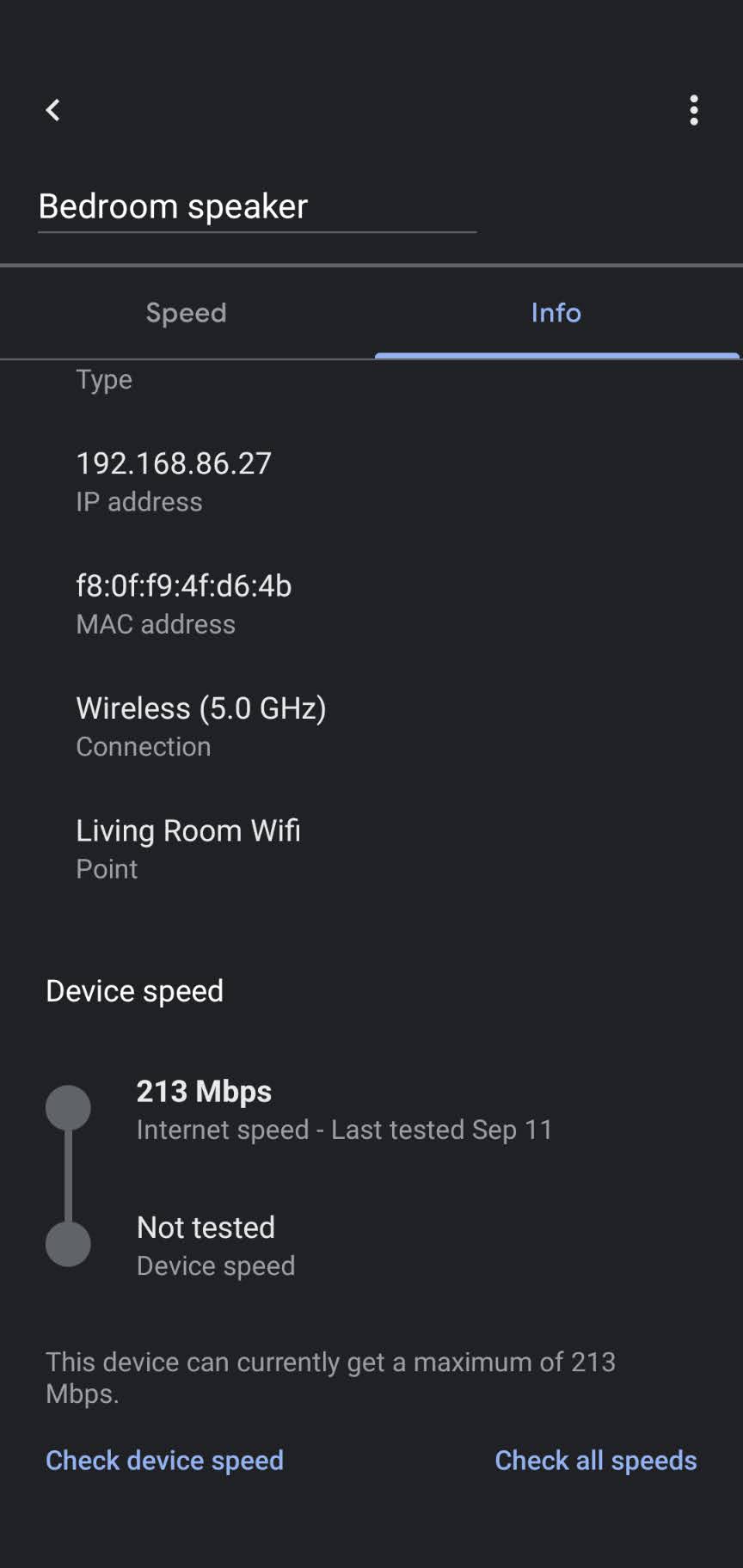
Now, in version 2.43 of the app, the option to test your device’s wireless connection speed is being adopted. To try this out for yourself, just visit the Wifi section, select ‘Devices’, choose any device like your TV, Nest Audio, Camera, etc., and then tap the ‘Info’ tab. Scrolling to the bottom will reveal a ‘Check device speed’ option that’s recently been placed there. Tapping it will pull up the familiar device speed test animation where you’ll await your results!
Xremove ads

An option to ‘Check all speeds’ also exists here, and you can tap that too, but if you’re just trying to diagnose a specific device, you’ll want to stick to the former initially. Honestly, this is a feature I’ve sorely missed when the company decided to transition users completely over to Home from the Google Wifi app.

Anyway, once you do get said results, they will be displayed directly above the connection speed test buttons. Your ‘Last tested’ date will appear along with the device’s Mbps and the Internet speed as well. ISP access preferences are also being added according to 9to5Google’s APK Insights report on this app update. This would allow your ISP to “access and manage your Wifi network and any Google Wifi or Nest Wifi router or point in your network (including ones added later to the network or ones not obtained from your ISP”.

Featured Videos

Xremove ads

While not yet rolled out, this latter feature would help providers troubleshoot issues on behalf of the user, but access can be revoked if you wish from the Home app. I can see how many more technical homeowners would prefer to keep their ISP’s hands out of their business since that’s why they got a Google or Nest Wifi to begin with.

SUBSCRIBE TO UPSTREAM

Get Chrome Unboxed delivered straight to your inbox

Upstream is our flagship, curated newsletter with the top stories, most click-worthy deals, giveaways, and trending articles from Chrome Unboxed sent directly to your inbox a few times a week. Join 31,000+ subscribers.

SUBSCRIBE HERE!

Filed Under: Apps, Nest, New & Upcoming Features, News, Smart Home

About Michael Perrigo

Known as "Google Mike" to his customers, Michael worked at Best Buy as a Chromebook Expert who dedicated his time to understanding the user experience from a regular Chromebook owner's perspective. Having spent nearly 20 years meeting you face-to-face, he strives to help you understand your technology through carefully crafted guides and coverage, relentlessly seeking out the spark in what's new and exciting about ChromeOS.

Primary Sidebar

Xremove ads

Deals

The touchscreen Lenovo Chromebook Slim 3 is a steal at under $200

By Robby Payne
March 16, 2026

Google TV Streamer and Remote held in front of a wall-mounted TV

The premium Google TV Streamer 4K is back down to $80

By Joseph Humphrey
March 16, 2026

The best Chromebook deals today

By Robby Payne
March 16, 2026

Pixel Buds Pro 2 running

I still love the Pixel Buds Pro 2 and they are $60 off right now

By Joseph Humphrey
March 13, 2026

The Lenovo Chromebook Slim 3 is the one to get, starting at just $139 right now

By Robby Payne
March 6, 2026

More Deals

Xremove ads

Reviews

Acer Chromebook Plus Spin 514 Review: Kompanio Ultra power in a convertible

By Robby Payne
December 24, 2025

My review after 6 weeks with the Lenovo Chromebook Plus 14 [VIDEO]

By Robby Payne
August 11, 2025

One week with the best small Android tablet you can buy, and I’m sold

By Robby Payne
May 9, 2025

Best Chromebooks of 2024 [VIDEO]

By Robby Payne
November 28, 2024

Samsung Galaxy Chromebook Plus Review: Samsung is back! [VIDEO]

By Robby Payne
October 28, 2024

More Reviews

Xremove ads

Guides

This Chromebook trackpad shortcut is definitely not new, but is blowing my mind

By Robby Payne
March 11, 2024

How to reduce broadcast delay on YouTube TV to stop live spoilers

By Robby Payne
December 8, 2023

Windows PC keyboard and Chromebook

How to use a Windows keyboard with a Chromebook

By Joseph Humphrey
December 8, 2023

How reset and revert your Chromebook to the previous version of Chrome OS

By Robby Payne
November 29, 2023

My Chromebook Plus features disappeared: here’s how I fixed it

By Robby Payne
November 24, 2023

More Guides

TWITTER · FACEBOOK · INSTAGRAM · YOUTUBE · EMAIL · ABOUT

Copyright © 2026 · Chrome Unboxed · Chrome is a registered trademark of Google Inc.
We are participants in various affiliate advertising programs designed to provide a means for us to earn fees by linking to affiliated sites.

PRIVACY POLICY