

• Skip to main content
  • Skip to primary sidebar
  • Deals
  • Features
  • Guides
  • Chromebooks
  • Videos
  • Podcast
  • More +
    • Reviews
    • Unboxing
    • Upcoming Devices
    • Chromebook Plus
    • Chrome
    • ChromeOS
    • Chrome OS Flex
  • Search
  • Sign Up
  • Log In
Chrome Unboxed – The Latest Chrome OS News

Chrome Unboxed - The Latest Chrome OS News

A Space for All Things Chrome, Google, and More!

  • Deals
  • Features
  • Guides
  • Chromebooks
  • Videos
  • Podcast
  • More +
    • Reviews
    • Unboxing
    • Upcoming Devices
    • Chromebook Plus
    • Chrome
    • ChromeOS
    • Chrome OS Flex
  • Search
  • Sign Up
  • Log In

Google Home app redesigns Home view to match Android home controls, improved privacy settings

March 23, 2022 By Johanna Romero View Comments

Image featuring the Google Home app logo and some of its controls

Support our independent tech coverage. Chrome Unboxed is written by real people, for real people—not search algorithms. Join Chrome Unboxed Plus for just $2 a month to get an ad-free experience, access to our private Discord, and more. Learn more about membership here.
START FREE TRIAL (MONTHLY)START FREE TRIAL (ANNUAL)

If you use any of Google’s family of smart home devices, you likely have the Google Home app installed on your mobile device. After all, it is required to set up all those Nest Mini speakers you’ve accumulated throughout the years. However, I can’t say that this is an app I regularly use as I’d much rather use the home controls that launched with Android 11, which are so conveniently located in my quick settings tiles and, in my opinion, offer a clearer view of power toggles.

It appears that Google may feel the same way, as they have announced that they will be rolling out similar style controls to the home view of the Google Home app over the next few weeks. The announcement states that these new controls should make it easier to control your connected devices with fewer taps while also bridging the look and feel of home controls on Android and Google Nest smart displays. Google states:

Xremove ads

On both Android and iOS, the new controls help you quickly find and understand the status of the devices in your home so you can dim your compatible lights or change the music volume in a snap. You can also tap to turn a device on or off, slide left or right to make adjustments, and long press for more controls.

Google Nest Community
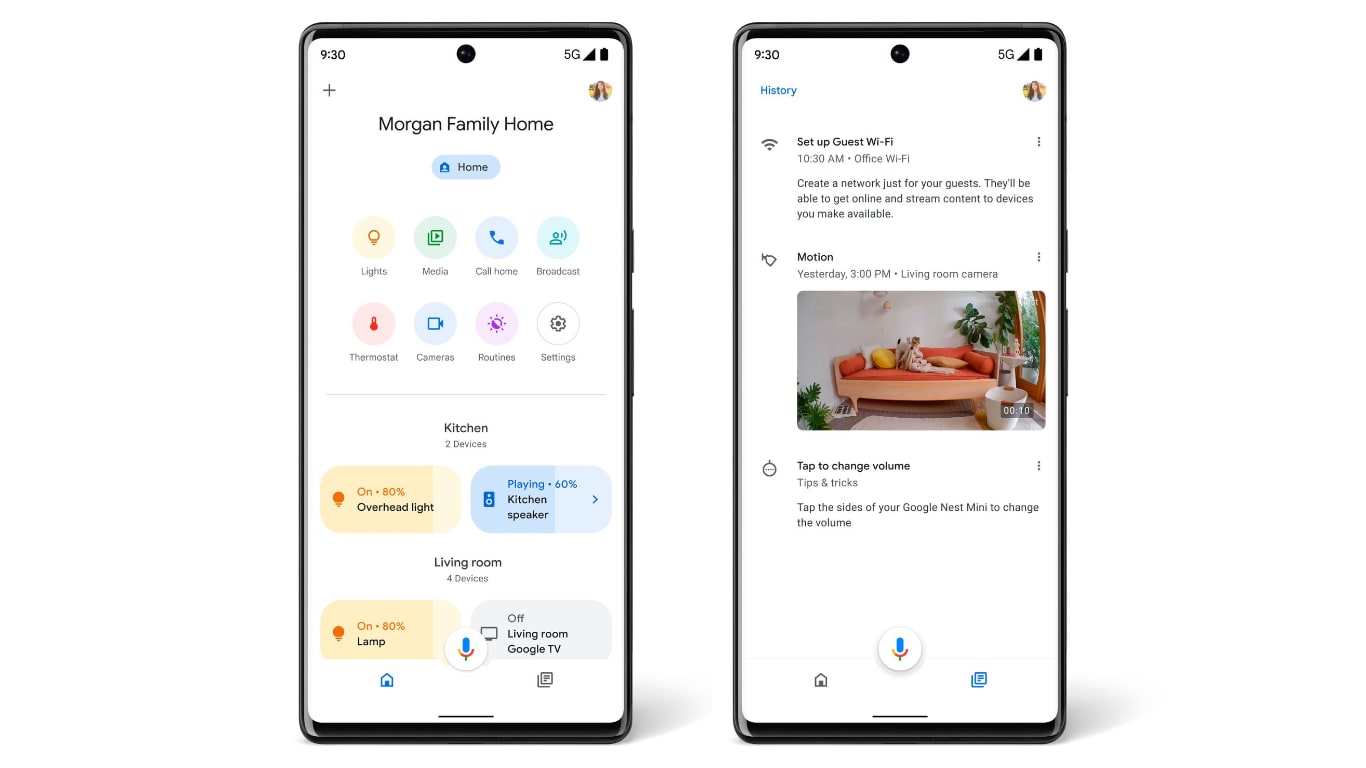
Redesigned Google Home app home view and home feed

But that’s not all coming to the app: This week, new centralized “Settings” will be rolling out to allow you to manage several things at once, such as privacy controls, home activity, and Assistant data. Later this month, the home feed will also undergo changes with a sorted and less cluttered view of the most recent activity in your smart home and grouping events that happened around the same time.

I must say that the changes announced sound very promising and may finally entice me to look more into what the Google Home app has to offer, instead of just using it as a hub for my Android home controls. From the announcement, it sounds like these will be staged rollouts that won’t happen all at once, but it is unclear if a new version of the Google Home app is forthcoming from the Play Store. We’ll continue to report on this once the changes roll out more widely.

Featured Videos

Xremove ads

SUBSCRIBE TO UPSTREAM

Get Chrome Unboxed delivered straight to your inbox

Upstream is our flagship, curated newsletter with the top stories, most click-worthy deals, giveaways, and trending articles from Chrome Unboxed sent directly to your inbox a few times a week. Join 31,000+ subscribers.

SUBSCRIBE HERE!

Filed Under: Android, Apps, New & Upcoming Features, News Tagged With: android, google home, google home app, google nest, home controls, nest

Primary Sidebar

Googlebook

Google’s classic ‘Text’ app is now an Android app for Googlebook on the Play Store

By Robby Payne
September 24, 2026

Why we can now rule out hardware or software bugs for the missing Lenovo Duet m

By Robby Payne
September 24, 2026

Best Buy is giving away free Pixel Buds 2a with any Googlebook pre-order

By Robby Payne
September 23, 2026

Every new Googlebook includes nearly $600 in free software perks

By Robby Payne
September 23, 2026

Our first real look at Googlebook OS in the wild features CapCut, Figma, offline downloads, and games

By Robby Payne
September 23, 2026

More Googlebook

Xremove ads

Deals

The best Chromebook deals today

By Robby Payne
September 2, 2026

The best Chromebook ever made is $350 off at Best Buy right now

By Robby Payne
August 21, 2026

The excellent, powerful Acer Chromebook Plus Spin 514 is $150 off right now

By Robby Payne
August 12, 2026

Acer’s new Chromebook 315 is wildly affordable and points to the real future of Chromebooks

By Robby Payne
August 11, 2026

You can score the massively upgraded ASUS CX54 Chromebook Plus for just $599 right now

By Joseph Humphrey
July 28, 2026

More Deals

Xremove ads

Reviews

Acer Chromebook Plus Spin 514 Review: the best convertible you can buy [VIDEO]

By Robby Payne
July 1, 2026

Lenovo Chromebook Plus 2-in-1 Review: pretty great in a vacuum

By Robby Payne
April 23, 2026

My review after 6 weeks with the Lenovo Chromebook Plus 14 [VIDEO]

By Robby Payne
August 11, 2025

One week with the best small Android tablet you can buy, and I’m sold

By Robby Payne
May 9, 2025

Best Chromebooks of 2024 [VIDEO]

By Robby Payne
November 28, 2024

More Reviews

Xremove ads

TWITTER · FACEBOOK · INSTAGRAM · YOUTUBE · EMAIL · ABOUT

Copyright © 2026 · Chrome Unboxed · Chrome is a registered trademark of Google Inc.
We are participants in various affiliate advertising programs designed to provide a means for us to earn fees by linking to affiliated sites.

PRIVACY POLICY