
• Skip to main content
  • Skip to primary sidebar
  • Deals
  • Features
  • Guides
  • Chromebooks
  • Videos
  • Podcast
  • More +
    • Reviews
    • Unboxing
    • Upcoming Devices
    • Chromebook Plus
    • Chrome
    • ChromeOS
    • Chrome OS Flex
  • Search
  • Sign Up
  • Log In
Chrome Unboxed – The Latest Chrome OS News

Chrome Unboxed - The Latest Chrome OS News

A Space for All Things Chrome, Google, and More!

  • Deals
  • Features
  • Guides
  • Chromebooks
  • Videos
  • Podcast
  • More +
    • Reviews
    • Unboxing
    • Upcoming Devices
    • Chromebook Plus
    • Chrome
    • ChromeOS
    • Chrome OS Flex
  • Search
  • Sign Up
  • Log In

Google Fit’s fresh new design makes it easier to track your steps

April 9, 2020 By Joseph Humphrey View Comments

Support our independent tech coverage. Chrome Unboxed is written by real people, for real people—not search algorithms. Join Chrome Unboxed Plus for just $2 a month to get an ad-free experience, access to our private Discord, and more. Learn more about membership here.
START FREE TRIAL (MONTHLY)START FREE TRIAL (ANNUAL)

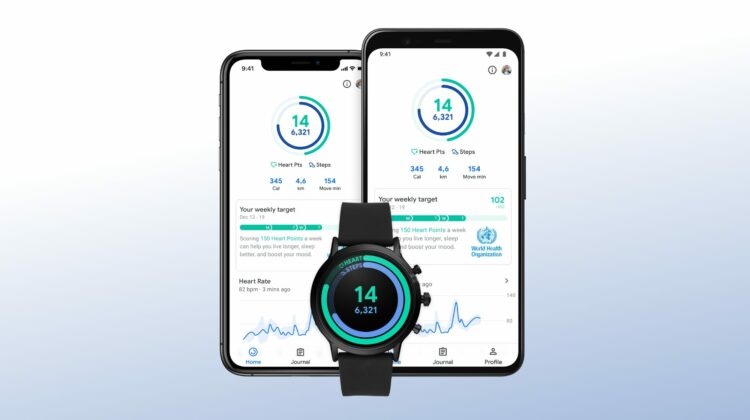
In a time when most of us are stuck at home and gyms are closed, it can be hard to stay active and healthy. Many companies are trying to lend a helping hand – like Peloton extending their free trial to 90 days – and now Google has entered the conversation with a fresh new design of the Google Fit app that has a more prominent focus on tracking your steps. Google announced the redesign of it’s Google Fit app in a blog post earlier this week and it will be arriving soon for Android, Wear OS, and iOS. 

The new Google Fit app brings some bright graphics and bold text to the design, which they say should make it easier to quickly check your activity goals. The main change, however, comes to the health rings at the top of the app. Google has decided to replace the confusing Move Minutes metric with a simple step count. The Move Minutes – which track your general activity level throughout the day – isn’t going away though and will still be accessible in the app. 

Xremove ads

The Heart Points metric has remained as the outside ring to help you track those activities that get your heart pumping, like a brisk walk, jogging, or a bike ride. Google says the app supports many activities that can be done at home to help you reach your 150 Heart Points that are recommended by the AHA and WHO.

Source: Google

For Wear OS users, the Heart Points Tile has been updated, along with other new Tiles to start a quick workout and to see progress on your daily goal. These are much-needed changes to the Wear OS interface and finally move the design away from the weird, geometric rings that have been around for a while.  The new Tiles look modern and are similar in design to the activity rings on the Apple Watch that, honestly, I think look great and motivate users to “Close Your Rings.”

Featured Videos

Xremove ads

Shop The Best Chromebooks of 2019 at Chrome Shop

“Many users track steps daily in Google Fit and in other apps, and it’s an important goal for them. We listened closely to our users and now both Heart Points and step count will be paired together as goals at the center of our app,” said Zak P., a Google Community Manager, in a blog post on Monday. “Whether you track steps or Move Minutes, the important thing for your health is to remember to keep moving throughout the day.”

Don’t let a quarantine and the stress of the coronavirus keep you from being healthy and active. Try out the new Google Fit app and find activities that help you stay physically and mentally healthy. Google said the updated app should start rolling out this week for all platforms. If you’re new to Google Fit, download the app on your Android phone or iPhone.

Xremove ads

SUBSCRIBE TO UPSTREAM

Get Chrome Unboxed delivered straight to your inbox

Upstream is our flagship, curated newsletter with the top stories, most click-worthy deals, giveaways, and trending articles from Chrome Unboxed sent directly to your inbox a few times a week. Join 31,000+ subscribers.

SUBSCRIBE HERE!

Filed Under: Apps, News

About Joseph Humphrey

Joe has been a part of Chrome Unboxed since 2016 when he started helping Robby produce YouTube videos. Although normally behind the scenes, Joe has spent countless hours editing reviews and unboxings of many, many Chromebooks. Now a Partner in Unboxed Media, Joe is constantly thinking strategically about the Chromebook industry and how Chrome Unboxed can continue to innovate in the space.

Primary Sidebar

Xremove ads

Deals

Save $40 on the Google Pixel Watch 4 before the Spring Sale ends

By Joseph Humphrey
April 24, 2026

The best Chromebook deals today

By Robby Payne
April 20, 2026

Deal Alert: the excellent Lenovo Chromebook Plus 2-in-1 returns to $429

By Robby Payne
April 20, 2026

Lenovo Legion Tab Gen 3 drops to $399, ahead of the much pricier Gen 5 release

By Joseph Humphrey
April 18, 2026

How to get 50% off YouTube Premium for a full year with Google One

By Robby Payne
April 16, 2026

More Deals

Xremove ads

Reviews

Lenovo Chromebook Plus 2-in-1 Review: pretty great in a vacuum

By Robby Payne
April 23, 2026

Acer Chromebook Plus Spin 514 Review: Kompanio Ultra power in a convertible

By Robby Payne
December 24, 2025

My review after 6 weeks with the Lenovo Chromebook Plus 14 [VIDEO]

By Robby Payne
August 11, 2025

One week with the best small Android tablet you can buy, and I’m sold

By Robby Payne
May 9, 2025

Best Chromebooks of 2024 [VIDEO]

By Robby Payne
November 28, 2024

More Reviews

Xremove ads

Guides

This Chromebook trackpad shortcut is definitely not new, but is blowing my mind

By Robby Payne
March 11, 2024

How to reduce broadcast delay on YouTube TV to stop live spoilers

By Robby Payne
December 8, 2023

Windows PC keyboard and Chromebook

How to use a Windows keyboard with a Chromebook

By Joseph Humphrey
December 8, 2023

How reset and revert your Chromebook to the previous version of Chrome OS

By Robby Payne
November 29, 2023

My Chromebook Plus features disappeared: here’s how I fixed it

By Robby Payne
November 24, 2023

More Guides

TWITTER · FACEBOOK · INSTAGRAM · YOUTUBE · EMAIL · ABOUT

Copyright © 2026 · Chrome Unboxed · Chrome is a registered trademark of Google Inc.
We are participants in various affiliate advertising programs designed to provide a means for us to earn fees by linking to affiliated sites.

PRIVACY POLICY