

• Skip to main content
  • Skip to primary sidebar
  • Deals
  • Features
  • Guides
  • Chromebooks
  • Videos
  • Podcast
  • More +
    • Reviews
    • Unboxing
    • Upcoming Devices
    • Chromebook Plus
    • Chrome
    • ChromeOS
    • Chrome OS Flex
  • Search
  • Sign Up
  • Log In
Chrome Unboxed – The Latest Chrome OS News

Chrome Unboxed - The Latest Chrome OS News

A Space for All Things Chrome, Google, and More!

  • Deals
  • Features
  • Guides
  • Chromebooks
  • Videos
  • Podcast
  • More +
    • Reviews
    • Unboxing
    • Upcoming Devices
    • Chromebook Plus
    • Chrome
    • ChromeOS
    • Chrome OS Flex
  • Search
  • Sign Up
  • Log In

Google explains how to clean your Pixel Buds Pro 2 for improved audio

March 25, 2025 By Robby Payne View Comments

Support our independent tech coverage. Chrome Unboxed is written by real people, for real people—not search algorithms. Join Chrome Unboxed Plus for just $2 a month to get an ad-free experience, access to our private Discord, and more. Learn more about membership here.
START FREE TRIAL (MONTHLY)START FREE TRIAL (ANNUAL)

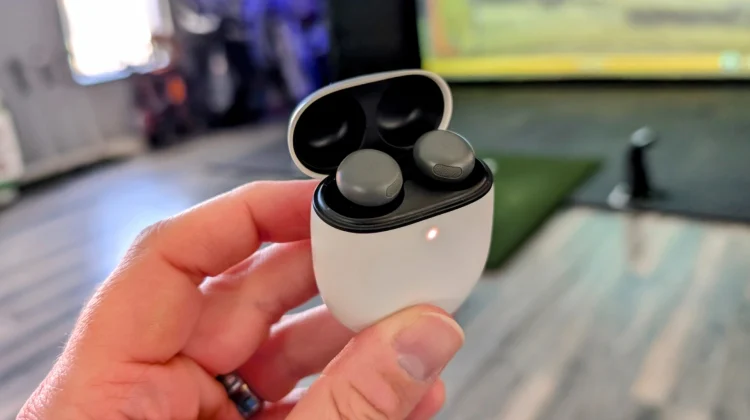
Google has recently provided a pretty thorough breakdown of how to clean a very specific portion of the Pixel Buds Pro 2: the often-overlooked “rear vent mesh.” This isn’t about cleaning the visible mesh around the ‘G’ logo; instead it’s about the mesh located on the top of each earbud near the area that faces inward when worn.

Google says the accumulation of earwax, dirt, dust, and other debris in this area, as well as the small opening on the outer part of each earbud can significantly degrade audio quality. Google’s cleaning guidance should (in theory) address some audio issues and unwanted noise that some users have apparently experienced.

Xremove ads

The prescribed cleaning procedure involves a few key items: an extra-soft toothbrush, two separate cups, and micellar water. Micellar water, known for its ability to attract both water and oily substances, is commonly used for makeup removal and is readily available online or at local retailers. Here’s a breakdown of Google’s recommended steps:

  1. Preparation: Fill one cup with regular water and the other with micellar water, using just enough liquid to dip the toothbrush.
  2. Micellar Application: Dip the toothbrush into the micellar water, ensuring the bristles are fully saturated.
  3. Initial Cleaning: Holding an earbud, gently brush the rear vent mesh in a deep, circular motion for approximately 15 seconds.
  4. Drying: Blot the earbud on a paper towel to remove excess moisture from the mesh. Repeat steps 2 and 3 twice for thorough cleaning.
  5. Rinsing: Dip the toothbrush in micellar water, then rinse it in the regular water cup. Swirl the brush to remove any residual earwax.
  6. Final Clean: Brush the mesh once more with deep, circular motions for 15 seconds.
  7. Final Drying: Blot the earbud on a paper towel and allow it to air dry for up to two hours to ensure complete dryness.

Google emphasizes the importance of avoiding Q-tips, detergents, sprays, or alcohol. These alternatives can leave residue and potentially push debris further into the mesh. Additionally, cleaning should not be performed while the earbuds are charging.

Featured Videos

Xremove ads

Notably, these instructions are also applicable for deep cleaning the other mesh areas on the outer parts of the Pixel Buds Pro 2 as well as the mesh behind the ear tip as well. So, if you inspect your earbuds and see a bit of build up in any of those areas, follow Google’s steps and you may find a noticeable uptick in your sound quality afterwards.

VIA: 9to5 Google

SUBSCRIBE TO UPSTREAM

Get Chrome Unboxed delivered straight to your inbox

Upstream is our flagship, curated newsletter with the top stories, most click-worthy deals, giveaways, and trending articles from Chrome Unboxed sent directly to your inbox a few times a week. Join 31,000+ subscribers.

Xremove ads
SUBSCRIBE HERE!

Filed Under: Accessories, Pixel Buds

About Robby Payne

As the founder of Chrome Unboxed, Robby has been reviewing Chromebooks for over a decade. His passion for ChromeOS and the devices it runs on drives his relentless pursuit to find the best Chromebooks, best services, and best tips for those looking to adopt ChromeOS and those who've already made the switch.

Primary Sidebar

Googlebook

Lenovo Googlebook leak reveals the name of Google’s new laptop operating system

By Robby Payne
September 11, 2026

Googlebook will automatically organize your files using on-device AI ‘Collections’

By Robby Payne
September 11, 2026

Lenovo Googlebook i 15 confirmed via Bluetooth SIG ahead of NYC media event

By Robby Payne
September 10, 2026

HP Googlebook 14c specs confirmed by Energy Star: Snapdragon X Elite and 32GB RAM

By Robby Payne
September 9, 2026

How many years of updates Googlebook gets could make or break it on Day One

By Robby Payne
September 8, 2026

More Googlebook

Xremove ads

Deals

The best Chromebook deals today

By Robby Payne
September 2, 2026

The best Chromebook ever made is $350 off at Best Buy right now

By Robby Payne
August 21, 2026

The excellent, powerful Acer Chromebook Plus Spin 514 is $150 off right now

By Robby Payne
August 12, 2026

Acer’s new Chromebook 315 is wildly affordable and points to the real future of Chromebooks

By Robby Payne
August 11, 2026

You can score the massively upgraded ASUS CX54 Chromebook Plus for just $599 right now

By Joseph Humphrey
July 28, 2026

More Deals

Xremove ads

Reviews

Acer Chromebook Plus Spin 514 Review: the best convertible you can buy [VIDEO]

By Robby Payne
July 1, 2026

Lenovo Chromebook Plus 2-in-1 Review: pretty great in a vacuum

By Robby Payne
April 23, 2026

My review after 6 weeks with the Lenovo Chromebook Plus 14 [VIDEO]

By Robby Payne
August 11, 2025

One week with the best small Android tablet you can buy, and I’m sold

By Robby Payne
May 9, 2025

Best Chromebooks of 2024 [VIDEO]

By Robby Payne
November 28, 2024

More Reviews

Xremove ads

TWITTER · FACEBOOK · INSTAGRAM · YOUTUBE · EMAIL · ABOUT

Copyright © 2026 · Chrome Unboxed · Chrome is a registered trademark of Google Inc.
We are participants in various affiliate advertising programs designed to provide a means for us to earn fees by linking to affiliated sites.

PRIVACY POLICY