


Support our independent tech coverage. Chrome Unboxed is written by real people, for real people—not search algorithms. Join Chrome Unboxed Plus for just $2 a month to get an ad-free experience, access to our private Discord, and more. Learn more about membership here.
START FREE TRIAL (MONTHLY)START FREE TRIAL (ANNUAL)
Google Docs will soon be getting a set of new assistive writing features, similar to what Grammarly currently offers, in selected Google Workspace and EDU tiers. These features will provide a variety of stylistic and writing suggestions to help improve your writing, such as:
- Alternate wording
- Using active voice
- Making sentence structure more concise
- Use of more inclusive language
- Potential inappropriate words
The setting for this feature will be found under Tools > Stylistic suggestions, where you will be able to select which option you want to turn on. The selected suggestions will trigger as you type your document using a purple underline and warn you about repeated or unnecessary words, the use of active voice vs. passive, or when your sentence may need to be shortened to make it more concise. Selecting the underline will show the specific suggestion being made and give you a chance to accept or reject it. Additionally, language that can be considered discriminatory or inappropriate will be flagged.
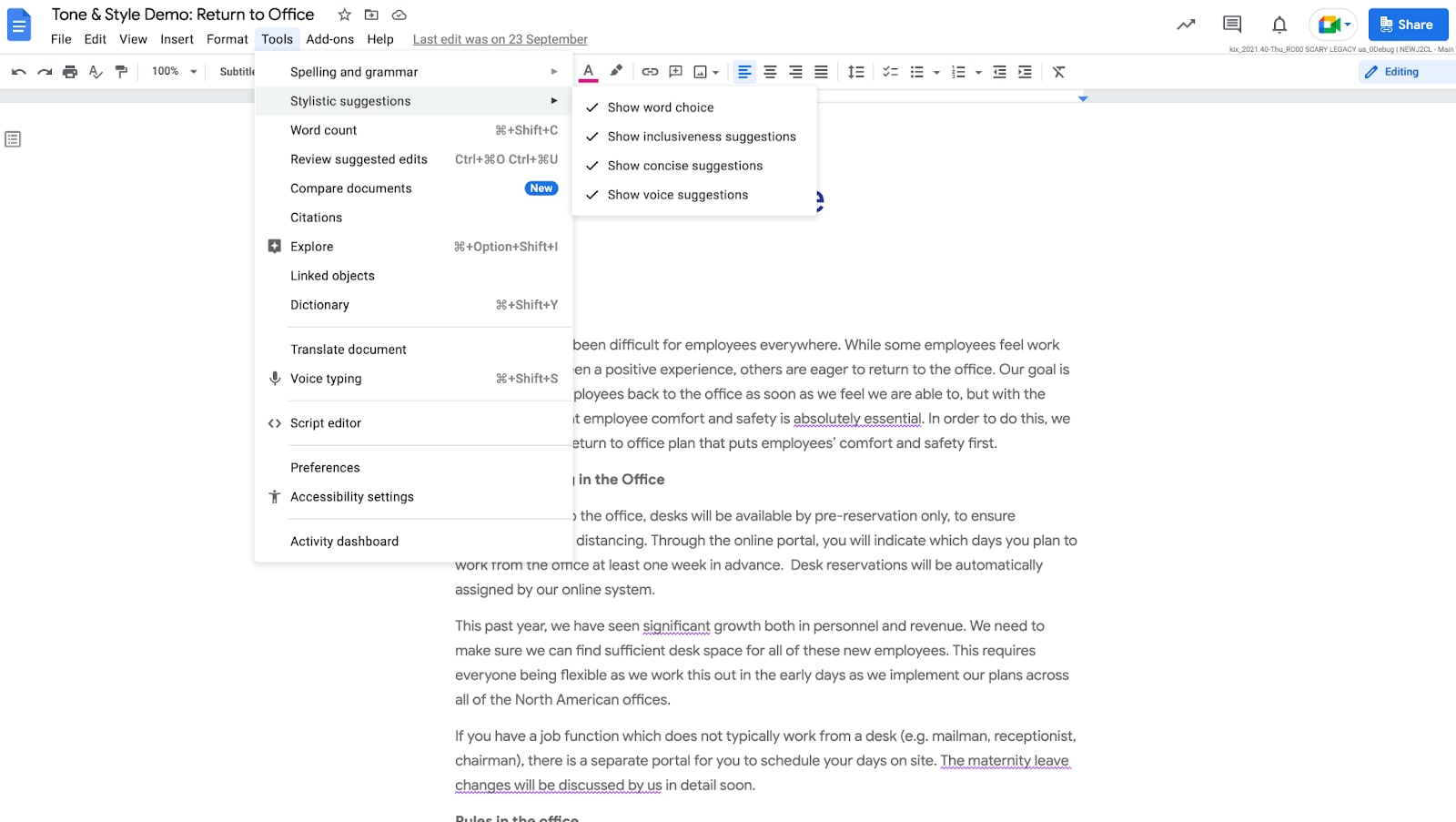
This feature will see a gradual rollout of up to 15 days starting on March 31st, 2022, for Rapid Release domains, while domains on the Scheduled Release track will begin seeing these changes on April 14th. Not all the features will reach every tier of Google Workspace and EDU plans, and it definitely doesn’t look like this is planned for personal accounts either. Below is the roadmap for the rollout:
Tone and Style
• Available to Business Standard, Business Plus, Enterprise Standard, Enterprise Plus, Education Plus
• Not available to Google Workspace Essentials, Business Starter, Enterprise Essentials,, Education Fundamentals, Frontline, and Nonprofits, as well as G Suite Basic and Business customers
Word Warnings
• Available to Business Standard, Business Plus, Enterprise Standard, Enterprise Plus, Education Fundamentals, Education Standard, Education Plus, Teaching and Learning Up
• Not available to Google Workspace Essentials, Business Starter, Enterprise Essentials, Frontline, and Nonprofits, as well as G Suite Basic and Business customers
While I wish this would have been made available to consumer Google accounts as well, I am glad to see that this is hitting the education space, as I think this is where it is most needed. As a mother of two, I wish this had been available when my kids were in elementary school or even middle school. While this cannot replace a good education, that could have saved me – and my kids’ teachers – many headaches while proofreading.
SUBSCRIBE TO UPSTREAM
Get Chrome Unboxed delivered straight to your inbox
Upstream is our flagship, curated newsletter with the top stories, most click-worthy deals, giveaways, and trending articles from Chrome Unboxed sent directly to your inbox a few times a week. Join 31,000+ subscribers.
