

Support our independent tech coverage. Chrome Unboxed is written by real people, for real people—not search algorithms. Join Chrome Unboxed Plus for just $2 a month to get an ad-free experience, access to our private Discord, and more. Learn more about membership here.
START FREE TRIAL (MONTHLY)START FREE TRIAL (ANNUAL)
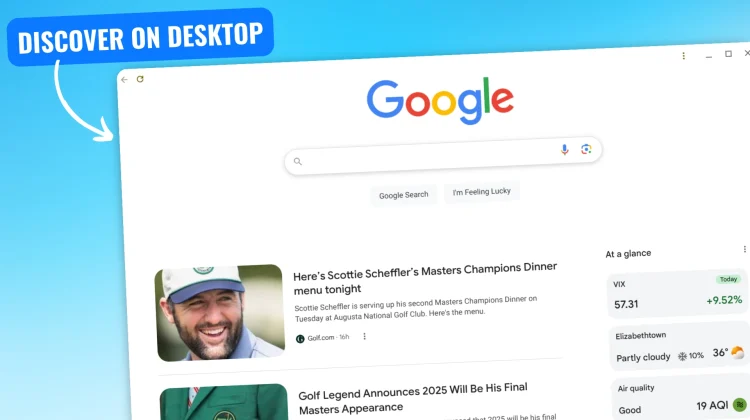
A small feature I’ve been wanting specifically for my Chromebook may finally be arriving in the form of a truncated-yet-functional Google Discover feed on the main google.com landing page. While we saw hints of this nearly a year and a half ago, I’ve never actually seen it in action on any of my accounts – until last night.
I just so happened to be logged in under a secondary, standard Google account and when navigating to google.com, I saw the discover feed and a quick pop-up message that introduced me to the new addition. I’ve never seen this before, and being someone who likes the Google Discover feed, I quickly hit the “Yes” button before snagging a screenshot. Rookie mistake.
A bit to my dismay, switching to other accounts didn’t yield the same results, so I’ve yet to see this pop-up notification again. However, when I log into that particular account, pull up the standard Google search page and scroll down, I have a shortened discover feed waiting for me.
I even made the google.com homepage a little PWA on my Chromebook, so when I want to quickly scroll through my Discover feed (well, the Chrome Unboxed account’s Discover feed, anyway), I can have it conveniently pinned to the shelf for quick access. And not only do you get some content in this space, you have the option to add in some At a glance features like finance, weather, sports, and air quality as well.

While not a direct replacement for the full Discover experience I get on my phone or on an Android tablet, I’m happy to see this feature possibly becoming available to more users soon. There’s no definite word from Google at the moment, so I’m still unsure if this arrival is indicative of a broader roll-out or just a fluke. I’m hopeful it’s the former.
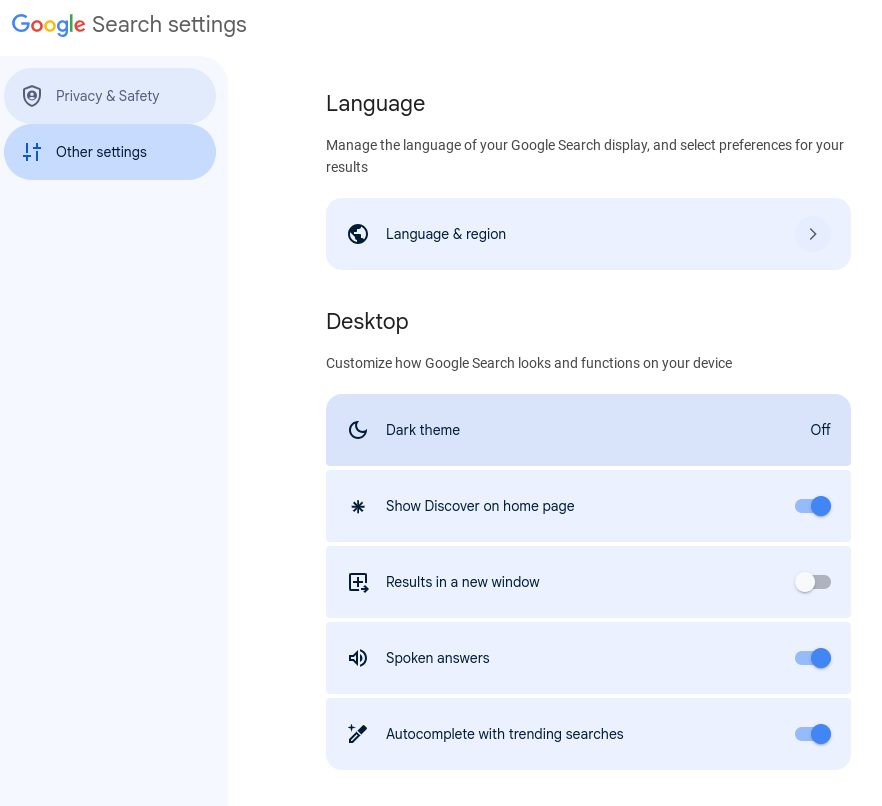
And don’t worry, you can easily switch off the feature if you don’t want it around. Just click on your Google profile image > More settings > Other settings > Show Discover on home page and switch it off. I was hoping that toggle would be there in my personal account, but no dice just yet. I’m hopeful, though, that we’ll see it show up sooner than later.
SUBSCRIBE TO UPSTREAM
Get Chrome Unboxed delivered straight to your inbox
Upstream is our flagship, curated newsletter with the top stories, most click-worthy deals, giveaways, and trending articles from Chrome Unboxed sent directly to your inbox a few times a week. Join 31,000+ subscribers.

