

Support our independent tech coverage. Chrome Unboxed is written by real people, for real people—not search algorithms. Join Chrome Unboxed Plus for just $2 a month to get an ad-free experience, access to our private Discord, and more. Learn more about membership here.
START FREE TRIAL (MONTHLY)START FREE TRIAL (ANNUAL)
While the steady stream of Googlebook leaks over the past few weeks has centered almost entirely on silicon benchmarks and chassis materials, we have not seen much of the actual desktop user experience. In fact, we don’t even know what the actual OS is called at this point – just 4 weeks from the Googlebook press event on September 15th.
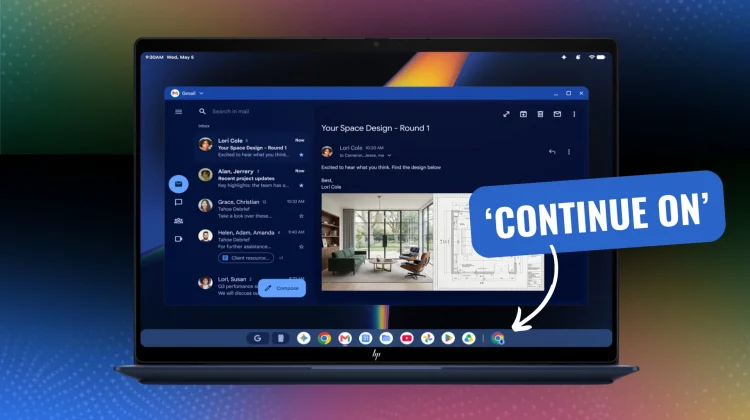
That changed yesterday thanks to a leaked press render shared by Evan Blass on X and reported by Android Authority. The image reveals a basic look at HP’s Googlebook 14c and sitting right on the bottom taskbar is our first concrete look at a flagship software feature: ‘Continue On’, Google’s native rival to Apple’s Handoff.
How ‘Continue On’ works
Looking closely at the desktop shelf in the leaked screenshot, there is a secondary Chrome browser icon with a distinct phone icon in the lower-right corner. This interface element provides a glimpse at how Googlebooks may handle phone-to-Googlebook browsing thanks to the already-outlined ‘Continue On’ feature debuted with Android 17. Based on that feature, we expect:
- State Synchronization Over Google Play Services: Rather than requiring manual tab sending or syncing via cloud history, ‘Continue On’ monitors active foreground app states on your paired Android phone over local Wi-Fi and Bluetooth Low Energy (BLE).
- One-Click Desktop Handoff: When you are actively reading an article, drafting an email, or browsing in Chrome on your phone, an active handoff target dynamically pins itself to the Googlebook dock. Clicking the badged icon launches the session on the desktop display right where you left off.
Some real-world context
For years, one of the biggest friction points when switching between an Android phone and a laptop has been the lack of seamless, low-latency continuity. While ChromeOS introduced basic Phone Hub features like recent tabs and notification mirroring, they were never fully integrated into the operating system like what we see with ‘Continue On’.
Hardware specs we’ve seen on the way for Googlebook like 64GB of RAM and powerful SoCs are great, but seamless software continuity is what will truly convince everyday users to stay inside the ecosystem. Between phone app streaming, synchronized notification handling, and now ‘Continue On’ dock integration, Google is building an ecosystem where owning an Android phone makes a Googlebook significantly more useful from the moment you open the lid.
We will definitely be on the lookout for live demos of ‘Continue On’ and so much more at Google’s September 15 Googlebook media showcase in NYC, so stay tuned for hands-on impressions as soon as I get time with the hardware and can share more.
SUBSCRIBE TO UPSTREAM
Get Chrome Unboxed delivered straight to your inbox
Upstream is our flagship, curated newsletter with the top stories, most click-worthy deals, giveaways, and trending articles from Chrome Unboxed sent directly to your inbox a few times a week. Join 31,000+ subscribers.

