

Support our independent tech coverage. Chrome Unboxed is written by real people, for real people—not search algorithms. Join Chrome Unboxed Plus for just $2 a month to get an ad-free experience, access to our private Discord, and more. Learn more about membership here.
START FREE TRIAL (MONTHLY)START FREE TRIAL (ANNUAL)
I’ve spent years on ChromeOS attempting to separate my work life and personal data as well as my creative endeavors through the use of profiles on my laptops, but unfortunately, the solution has never worked perfectly to my liking. As it turns out, so much segregation of data ended up making me less productive, and for all of the desire to keep things clean and tidy, I was left mixing everything into one pot and using it like most people.
This tends to work fine on my Chromebook because I have my Google account switcher, which can be found at the top-right of any Google service. So, if I want to swap between my Keep notes on one account or another, Gmail, Photos, Drive, and more, I need only select my image from the top of the browser and change to another account.
There are a few issues with this though, and the main one is that doing so will launch a brand new Chrome tab in the main browser, and I’ll be forced to close the previous window and also to pop the new tab out into its own standalone experience. Google still hasn’t figured out how to properly and automatically open related links in PWAs, and this feature has been on the rocks for what seems like years.
At the end of the day, even bothering with Progressive web apps or standalone web app experiences, in general, becomes more work than it’s worth and overall just a more manual process than it needs to be. While testing ways that Chromebook owners can get better use out of their web apps on Windows 10 and 11, I experimented with switching to Microsoft Edge for a week to see how the competition was using Chromium to their advantage.
What I found was that Edge had several features before Chrome, but that Chrome waited to implement them so that they could bring them to market in a more unique, personalized way. Shopping discounts, Collections, Tab groups, and so on, Chrome is just consistently behind in the race to make the most out of the shared source code, even if it is trying to be more innovative and clever along the way.
One feature that stood out to me during my time with Edge on Windows 11 really solidified my desire to have it on ChromeOS. As I previously mentioned, Google relies on either separate Chromebook logins or the web-based Google account switcher in order to separate your data and let you manage distinct profiles. However, Microsoft went another route entirely, and it honestly just made me feel like using web apps with multiple profiles finally felt like a complete experience.
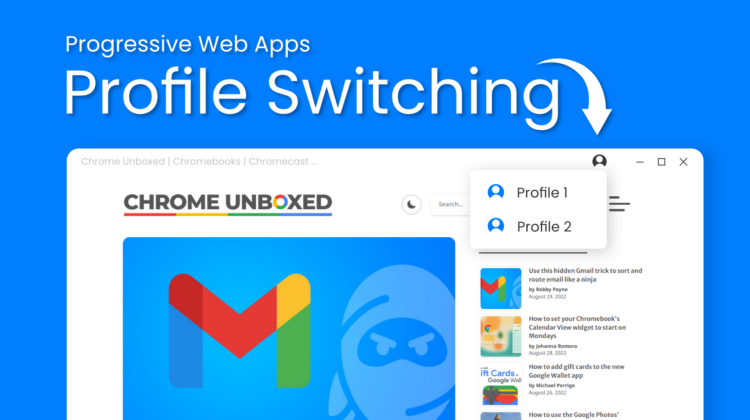
By implementing something called Web App Profiles, you can literally “install” a web app on multiple Edge browser profiles and switch between them with two quick clicks at the top of the browser wrapper! Not only that, but when you do, the same PWA window is utilized to load the second profile, making the web app feel like a true piece of desktop software, not just another browser tab.

If you install the same site or PWA on more than one Edge profile, we’ve introduced a profile switcher on the application title bar to switch between profiles from within your app. With this experiment, you’ll only see one application tile in Windows for that application. Also, when the application starts, it uses the last profile used by the application.
Switch profiles in web apps
Google may want to keep everything tied to your account with them, but it’s not only unviable as a solution overall but also means that you can’t swap between profiles in Chrome for specific web apps that are not Google-owned! With Edge, your PWAs are not biased, and you can have separate accounts for literally anything.
I get Google’s approach, but I don’t think it takes the whole picture into account and I don’t like it. I wish that the company would adopt this cool trick, especially since it’s not a Microsoft-specific thing, it’s a Chromium thing. Both companies are using the same exact source code, and it just makes a whole lot more sense to me to jump between your content in a more compact, neat, and efficient way without needing to juggle several browser tabs (or tell them each time to open up as standalone) or Chromebook logins. Additionally, it would prevent me from having to have three separate versions of PWAs (like Gmail and Keep) installed on my Windows 11 desktop.
With the upcoming implementation of LaCrOS in place of the built-in ChromeOS browser, Google may go this route, especially since you can’t use multiple logins simultaneously while LaCrOS is active (this could be a hint!), but for now, there’s no mention of an effort that reflects this. Let me know in the comments if you would prefer this PWA profile switching method to Google’s wrapper login or if you just use one account for everything personal or otherwise.
SUBSCRIBE TO UPSTREAM
Get Chrome Unboxed delivered straight to your inbox
Upstream is our flagship, curated newsletter with the top stories, most click-worthy deals, giveaways, and trending articles from Chrome Unboxed sent directly to your inbox a few times a week. Join 31,000+ subscribers.

