

Support our independent tech coverage. Chrome Unboxed is written by real people, for real people—not search algorithms. Join Chrome Unboxed Plus for just $2 a month to get an ad-free experience, access to our private Discord, and more. Learn more about membership here.
START FREE TRIAL (MONTHLY)START FREE TRIAL (ANNUAL)
For years, the Chrome browser has used a tray at the bottom of the screen to handle active and completed downloads: a unique quirk that has begun to age a bit in light of other browsers simply tucking them behind a button or another menu. However, the time has come for some cleanup of this behavior and Google has unveiled a change to the downloads experience (via 9to5 Google) that brings Chrome in line with browsers like Mozilla Firefox, Apple Safari, and Microsoft Edge when it comes to handling downloaded files.
The new download experience
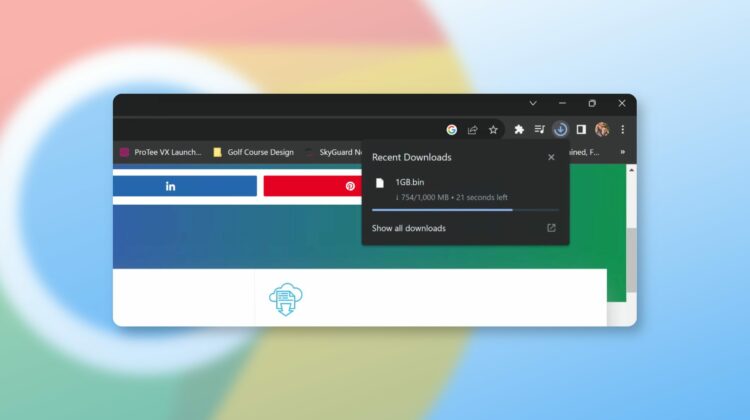
So, what’s the big change? Simple: the replacement of Chrome’s downloads bar with a new button up near the URL bar that delivers a more intuitive and simplified experience. The old download setup had issues that have bugged users for years, including:
- Taking up valuable screen space, especially on laptops.
- Remaining visible indefinitely without going away automatically.
- Being less interactive and consistent with the look and feel of other browsers’ UI.
The new downloads button (hinted at back in February), now appearing to the right of the address bar (Omnibox), should resolve these issues by offering a sleek and interactive experience that is far less intrusive and far more in-line with other modern browsers.
Now, when you start a download, an animated ring appears around the button, filling up as the download progresses. Upon completion, a small popup notifies you, and it goes away automatically, creating a clearer separation between the browser UI and web content. The new download tray includes some cool features, too, like:
- A list of all downloads from the past 24 hours, accessible in any browser window.
- Options to open the folder where a download resides, and actions like pause/resume, cancel, and retry.
- If desired, the ability to disable the popup from Settings > Downloads > “Show downloads when they’re done.”
- Continued access to the full list of downloads through the chrome://downloads page.
For those who want to still have control over how they manage their files, the ability to drag downloaded files to other locations, programs, or websites remains. Additionally, the new download tray also features better malware and virus warnings, providing context about blocked dangerous downloads.
Google Chrome’s new download tray is rolling out across Mac, Windows, Linux over the coming weeks, so be sure you are updated to try out Google’s new take on managing downloads. Whether you loved or hated the old download bar, Google’s new UI change should be a positive step towards handling downloads a bit more concisely across the board.
SUBSCRIBE TO UPSTREAM
Get Chrome Unboxed delivered straight to your inbox
Upstream is our flagship, curated newsletter with the top stories, most click-worthy deals, giveaways, and trending articles from Chrome Unboxed sent directly to your inbox a few times a week. Join 31,000+ subscribers.

