

• Skip to main content
  • Skip to primary sidebar
  • Deals
  • Features
  • Guides
  • Chromebooks
  • Videos
  • Podcast
  • More +
    • Reviews
    • Unboxing
    • Upcoming Devices
    • Chromebook Plus
    • Chrome
    • ChromeOS
    • Chrome OS Flex
  • Search
  • Sign Up
  • Log In
Chrome Unboxed – The Latest Chrome OS News

Chrome Unboxed - The Latest Chrome OS News

A Space for All Things Chrome, Google, and More!

  • Deals
  • Features
  • Guides
  • Chromebooks
  • Videos
  • Podcast
  • More +
    • Reviews
    • Unboxing
    • Upcoming Devices
    • Chromebook Plus
    • Chrome
    • ChromeOS
    • Chrome OS Flex
  • Search
  • Sign Up
  • Log In

Google Chat rolls out its new logo and ‘Home’ tab, making it easier to find everything but the app

November 9, 2023 By Michael Perrigo View Comments

  • Contents
  • The new Home page keeps you from getting lost
  • New Mentions and icon
  • Rollout

Support our independent tech coverage. Chrome Unboxed is written by real people, for real people—not search algorithms. Join Chrome Unboxed Plus for just $2 a month to get an ad-free experience, access to our private Discord, and more. Learn more about membership here.
START FREE TRIAL (MONTHLY)START FREE TRIAL (ANNUAL)

As with all Google updates, they take about six months to a year to materialize after being announced. The same can be said of Google Chat’s new four-colored Workspace-oriented logo and revamped homepage. Luckily, today is the day I can officially announce they’re going live. Let’s take a look at everything the company discussed on its Workspace Updates blog today.

Welcome ‘Home’

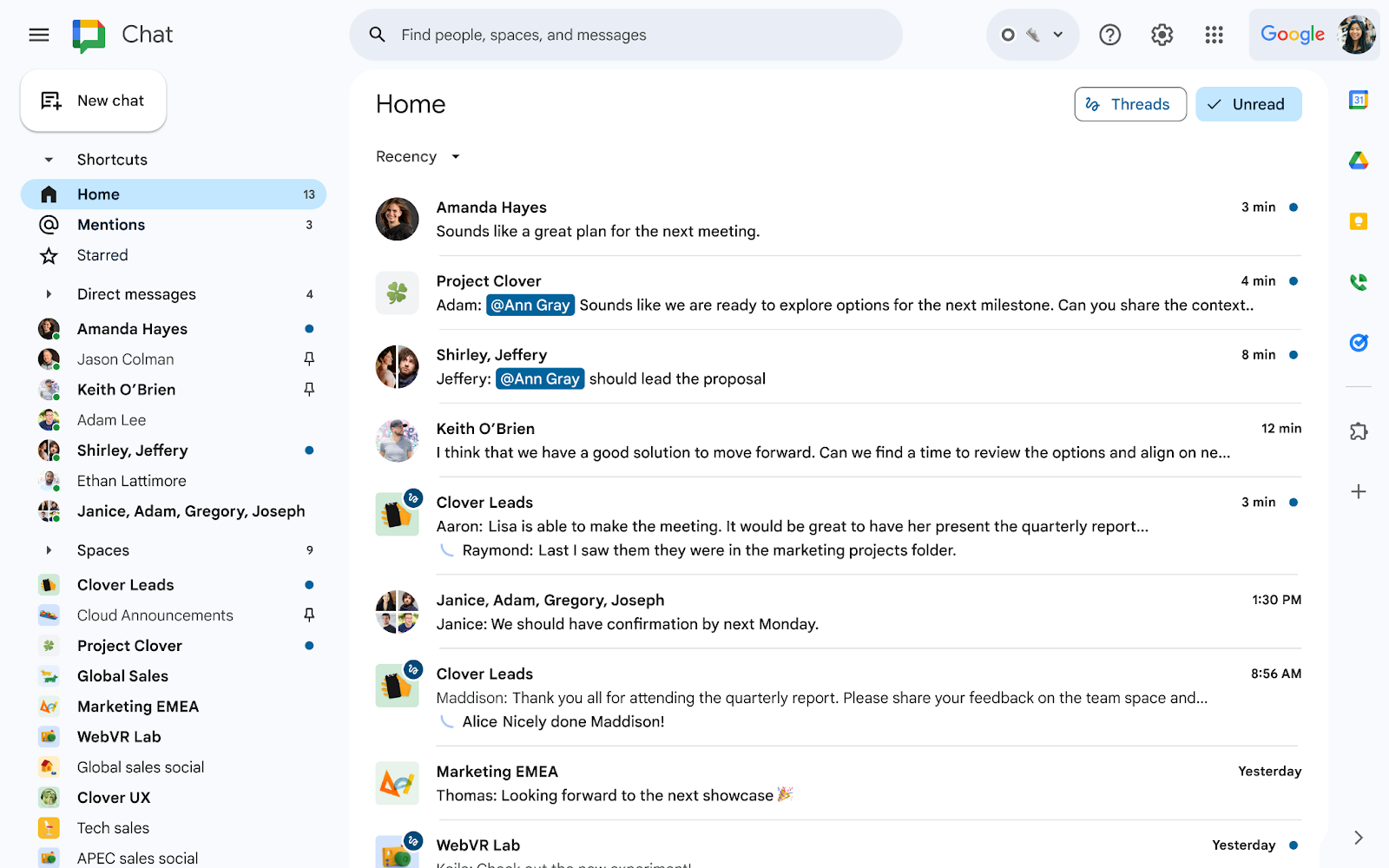
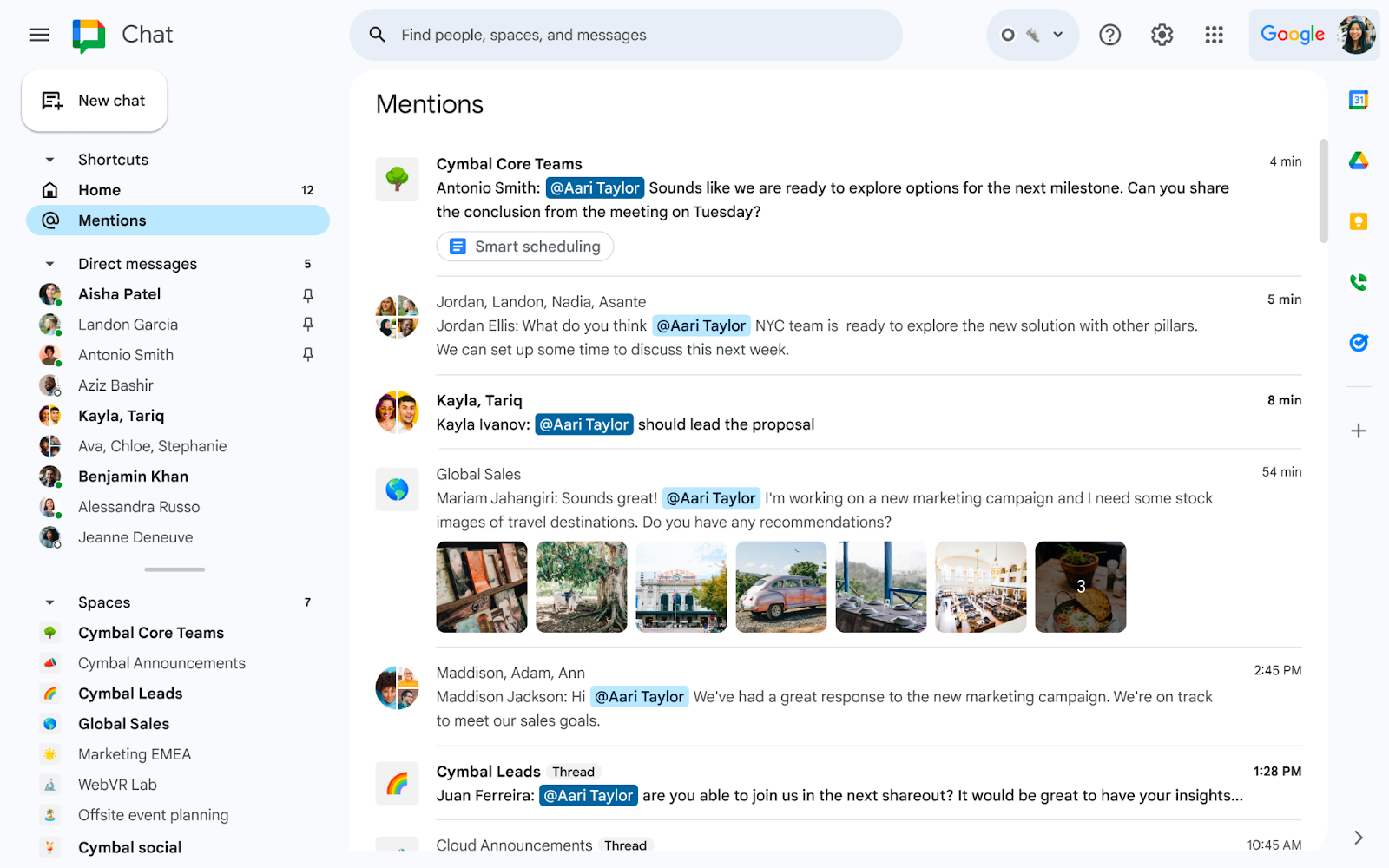
First up is the revamped navigation panel. I can’t tell you how hard it is to onboard a group of people to Chat without something like this, so I’m glad it’s finally being introduced. It has a few shortcuts, namely for ‘Home’, ‘Mentions’, and ‘Starred’. This will make it easier to jump to specific types of content. Additionally, your Direct messages are right below that, and of course, these can be starred to. Below even that are your ‘Spaces’ as usual. The whole thing just looks and feels much more streamlined now.
Xremove ads

Speaking directly of the new ‘Home’ shortcut, it brings everything together across all of your chats and spaces, so you can see any unread conversations or threads, see tasks assigned to you and more. This alone will help me onboard my organization to Spaces without them constantly asking “I have no idea where you pinged me and with what”.

Did we ‘Mention’ the new icon?

In addition to functional upgrades, Google Chat is getting a visual makeover. The new icon, aligning with the aesthetic of other Workspace products, adopts that hideously indistinguishable four color look you all hate. I think it’s universally agreed that this style makes it virtually impossible to find any of Google’s app in a sea of experiences in your app drawer. Gone is the “iconic” green chat bubble – oh well.
Featured Videos

Xremove ads

When you can expect these updates

These enhancements are tailor-made for you to stop hating Spaces – at least it feels that way. Whether you’re a Google Workspace customer or a user with a personal Google account, you’re getting everything discussed here!

The rollout begins on November 9, 2023, for Rapid Release domains, extending over 15 days for complete feature visibility. For those on Scheduled Release domains, expect to see these changes starting December 4, 2023. Let me know in the comments if you’re excited or irritated with the new icon update. I think everyone will agree the new ‘Home’ tab is well worth it.

Filed Under: Apps, Workspace

About Michael Perrigo

Known as "Google Mike" to his customers, Michael worked at Best Buy as a Chromebook Expert who dedicated his time to understanding the user experience from a regular Chromebook owner's perspective. Having spent nearly 20 years meeting you face-to-face, he strives to help you understand your technology through carefully crafted guides and coverage, relentlessly seeking out the spark in what's new and exciting about ChromeOS.

Primary Sidebar

Xremove ads

Deals

The best Chromebook deals today

By Robby Payne
April 20, 2026

Deal Alert: the excellent Lenovo Chromebook Plus 2-in-1 returns to $429

By Robby Payne
April 20, 2026

Lenovo Legion Tab Gen 3 drops to $399, ahead of the much pricier Gen 5 release

By Joseph Humphrey
April 18, 2026

How to get 50% off YouTube Premium for a full year with Google One

By Robby Payne
April 16, 2026

The Pixel 10a just dropped to $449, but here’s why you should buy the Pixel 10 instead

By Joseph Humphrey
April 13, 2026

More Deals

Xremove ads

Reviews

Lenovo Chromebook Plus 2-in-1 Review: pretty great in a vacuum

By Robby Payne
April 23, 2026

Acer Chromebook Plus Spin 514 Review: Kompanio Ultra power in a convertible

By Robby Payne
December 24, 2025

My review after 6 weeks with the Lenovo Chromebook Plus 14 [VIDEO]

By Robby Payne
August 11, 2025

One week with the best small Android tablet you can buy, and I’m sold

By Robby Payne
May 9, 2025

Best Chromebooks of 2024 [VIDEO]

By Robby Payne
November 28, 2024

More Reviews

Xremove ads

Guides

This Chromebook trackpad shortcut is definitely not new, but is blowing my mind

By Robby Payne
March 11, 2024

How to reduce broadcast delay on YouTube TV to stop live spoilers

By Robby Payne
December 8, 2023

Windows PC keyboard and Chromebook

How to use a Windows keyboard with a Chromebook

By Joseph Humphrey
December 8, 2023

How reset and revert your Chromebook to the previous version of Chrome OS

By Robby Payne
November 29, 2023

My Chromebook Plus features disappeared: here’s how I fixed it

By Robby Payne
November 24, 2023

More Guides

TWITTER · FACEBOOK · INSTAGRAM · YOUTUBE · EMAIL · ABOUT

Copyright © 2026 · Chrome Unboxed · Chrome is a registered trademark of Google Inc.
We are participants in various affiliate advertising programs designed to provide a means for us to earn fees by linking to affiliated sites.

PRIVACY POLICY