
• Skip to main content
  • Skip to primary sidebar
  • Deals
  • Features
  • Guides
  • Chromebooks
  • Videos
  • Podcast
  • More +
    • Reviews
    • Unboxing
    • Upcoming Devices
    • Chromebook Plus
    • Chrome
    • ChromeOS
    • Chrome OS Flex
  • Search
  • Sign Up
  • Log In
Chrome Unboxed – The Latest Chrome OS News

Chrome Unboxed - The Latest Chrome OS News

A Space for All Things Chrome, Google, and More!

  • Deals
  • Features
  • Guides
  • Chromebooks
  • Videos
  • Podcast
  • More +
    • Reviews
    • Unboxing
    • Upcoming Devices
    • Chromebook Plus
    • Chrome
    • ChromeOS
    • Chrome OS Flex
  • Search
  • Sign Up
  • Log In

Duet AI brings chat and file summaries, audio-first ‘Huddles’, and a visual redesign to Google Chat

August 29, 2023 By Michael Perrigo View Comments

Duet AI for Google Workspace just launched, and acts as your personal AI assistant and collaborator across Google’s services. In fact, it can even take notes and attend meetings on your behalf! At $30 per person per month, it is a steep investment, especially for small businesses, but it offers a no-cost trial for those eager to get started. The gist is that Duet AI wants to streamline your workflow so effectively that you might even get your evenings back. Okay, that’s just my interpretation, but it’s a pretty sweet selling point, wouldn’t you agree?
Google Workspace Blog

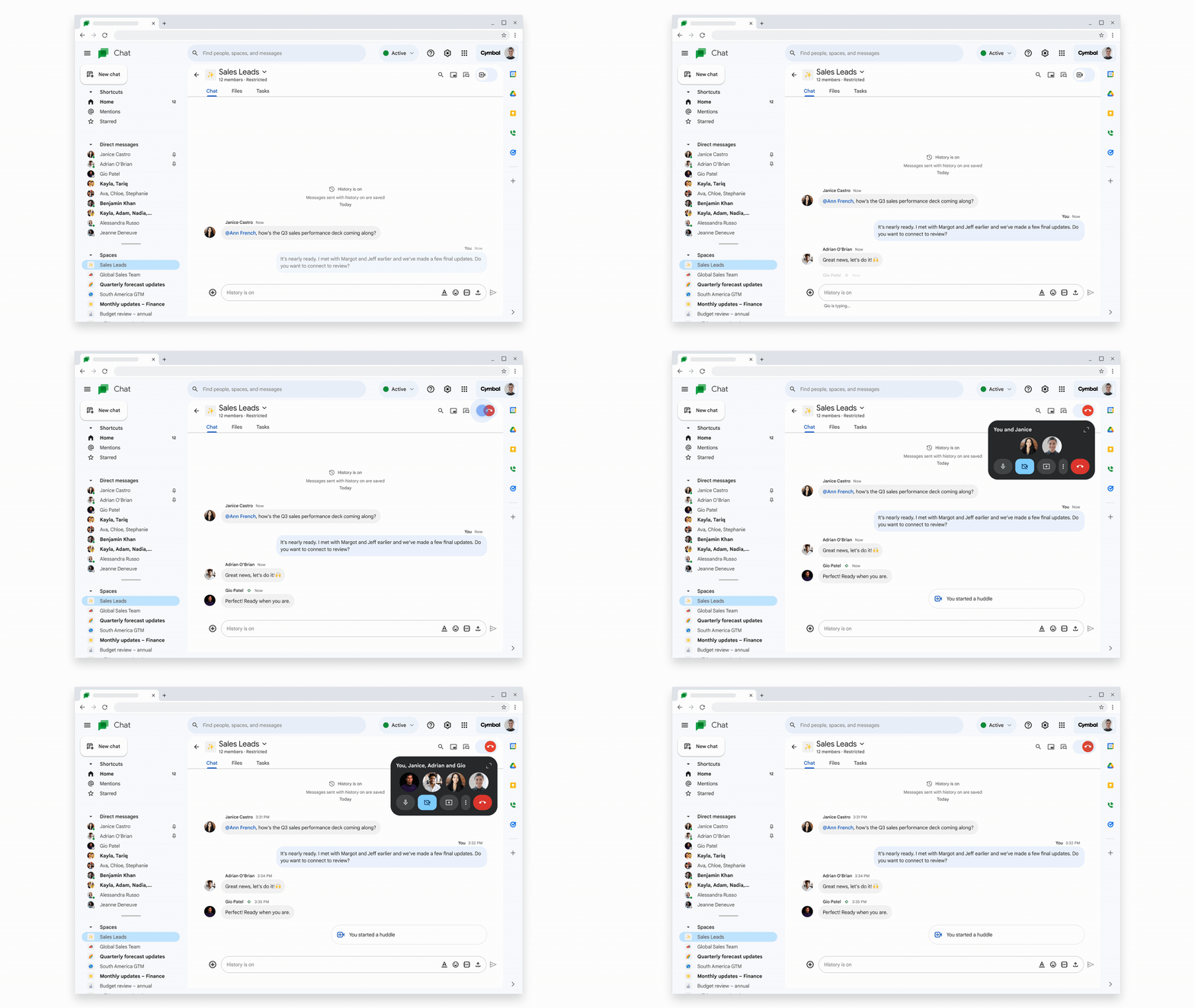
Now, here’s what’s coming to Google Chat specifically. The user interface has been refreshed as shown above. There are shortcuts for mentions and starred chats, direct messages, and of course Spaces as we covered recently On mobile, this will show up as the ‘Timeline‘ feature.

Xremove ads

More interestingly, a new feature called Huddles will act as a Google Meet-style audio-only integration in your Spaces. Think of it like you would Twitter Spaces. I suppose the idea is that you have less commitment for appearing on camera, but you can still relay your ideas verbally, hop in and out at will and sure, even toggle your camera if you need to.

Here’s what I’m most excited about. You know how you can get pings directly from Google Drive and other bots in Chat to make your life a bit easier? Well, Duet AI will be available as a direct message chat so you can get summaries for documents and chats, among other things. It’s like having a direct line to your virtual assistant (sorry, Google Assistant, you missed the boat…for now).

Featured Videos

Xremove ads

Lastly, Chat is supporting up to 500,000 participants in Spaces, which is kind of nuts. I’m not kidding when I say this since they were Google’s own words, but they’re literally trying to replace Google+ with Chat and Spaces. By allowing 500,000 people in any given space, you’re essentially creating a social network, but for a more tight-knit and internal group of individuals.

No matter how you feel about that last point, I’m sure you’ll agree this and the other features shown off here are pretty exciting. I love Chat and use Spaces for every aspect of my life. From home life to running my small business, it’s a part of my digital bullet journal – no, really!

Let me know in the comments if you’re going to invest in Duet AI, or if you agree that the price is too steep. I suppose if you’re an individual or a small team, it’s not much of an up charge, so it may be worth checking out, if only with the trial at first!

Xremove ads

Join Chrome Unboxed Plus

Introducing Chrome Unboxed Plus – our revamped membership community. Join today at just $2 / month to get access to our private Discord, exclusive giveaways, AMAs, an ad-free website, ad-free podcast experience and more.

Plus Monthly

$2/mo. after 7-day free trial

Pay monthly to support our independent coverage and get access to exclusive benefits.

Xremove ads
Start free trial

Plus Annual

$20/yr. after 7-day free trial

Pay yearly to support our independent coverage and get access to exclusive benefits.

Start free trial

Our newsletters are also a great way to get connected. Subscribe here!

Click here to learn more and for membership FAQ

Xremove ads

Filed Under: New & Upcoming Features, Workspace

About Michael Perrigo

Known as "Google Mike" to his customers, Michael worked at Best Buy as a Chromebook Expert who dedicated his time to understanding the user experience from a regular Chromebook owner's perspective. Having spent nearly 20 years meeting you face-to-face, he strives to help you understand your technology through carefully crafted guides and coverage, relentlessly seeking out the spark in what's new and exciting about ChromeOS.

Primary Sidebar

Xremove ads

Deals

The best Chromebook deals today

By Robby Payne
December 15, 2025

Save $220 on the powerful, versatile Acer Chromebook Plus Spin 714

By Robby Payne
December 10, 2025

The Google Pixel 9a just hit its lowest price ever at $150 off

By Joseph Humphrey
December 8, 2025

At $349, this Lenovo Chromebook Plus is one of the best value laptops you can buy

By Joseph Humphrey
December 3, 2025

The elusive 8GB Lenovo Chromebook Duet 11 is finally back in stock and down to $279

By Robby Payne
December 2, 2025

More Deals

Xremove ads

Reviews

My review after 6 weeks with the Lenovo Chromebook Plus 14 [VIDEO]

By Robby Payne
August 11, 2025

One week with the best small Android tablet you can buy, and I’m sold

By Robby Payne
May 9, 2025

Best Chromebooks of 2024 [VIDEO]

By Robby Payne
November 28, 2024

Samsung Galaxy Chromebook Plus Review: Samsung is back! [VIDEO]

By Robby Payne
October 28, 2024

Lenovo Chromebook Duet 11″ Review [VIDEO]

By Robby Payne
October 19, 2024

More Reviews

Xremove ads

Guides

This Chromebook trackpad shortcut is definitely not new, but is blowing my mind

By Robby Payne
March 11, 2024

How to reduce broadcast delay on YouTube TV to stop live spoilers

By Robby Payne
December 8, 2023

Windows PC keyboard and Chromebook

How to use a Windows keyboard with a Chromebook

By Joseph Humphrey
December 8, 2023

How reset and revert your Chromebook to the previous version of Chrome OS

By Robby Payne
November 29, 2023

My Chromebook Plus features disappeared: here’s how I fixed it

By Robby Payne
November 24, 2023

More Guides

TWITTER · FACEBOOK · INSTAGRAM · YOUTUBE · EMAIL · ABOUT

Copyright © 2025 · Chrome Unboxed · Chrome is a registered trademark of Google Inc.
We are participants in various affiliate advertising programs designed to provide a means for us to earn fees by linking to affiliated sites.

PRIVACY POLICY