



Support our independent tech coverage. Chrome Unboxed is written by real people, for real people—not search algorithms. Join Chrome Unboxed Plus for just $2 a month to get an ad-free experience, access to our private Discord, and more. Learn more about membership here.
START FREE TRIAL (MONTHLY)START FREE TRIAL (ANNUAL)
Millions of Google account users have been receiving unwanted spam files in Drive, and events on their Calendars from people they don’t know, and Google has done quite a bit to shut that down. In July, they made it to where you could block people from sharing files with you if they weren’t in your Contacts, and just last month, they expanded that capability to Docs, Sheets, and Slides. However, one of the worst offenders and one that the company hasn’t been able to combat against has been Google Calendar spam. Luckily, that changes today.
In a new Workspace Updates blog post, Google announced that it’s changing its “Automatically add invitations” setting to help you prevent unwanted invitations from being added to your calendar. You could always manually review invitations and deny them if they seemed like they came from an unknown source, but now, the ability to automate this process is being improved.
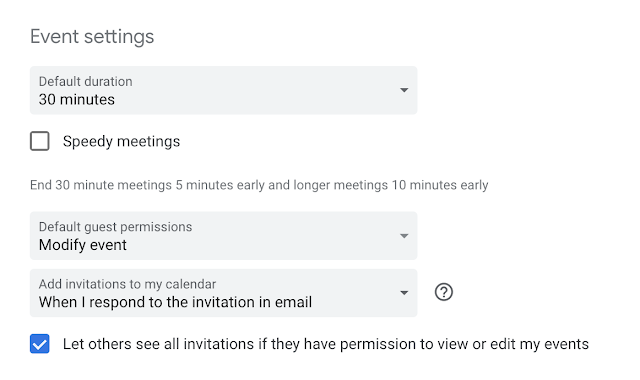
Now, you can choose between always having invitations added automatically, and only having them automatically added if you’ve RSVP’d in the email event invitations. Basically, this second setting will ensure not only that you don’t keep seeing random events on your schedule, but also that you only see events that are important to you.
Additionally, you should know that changing this setting only applies it to future events, not those past, and you’ll have to manually remove any previous spam you’ve received. Choosing the RSVP’d option also means that you will receive an email for all event invitations going forward (aside from event updates) even if the organizer has chosen not to send one upon the creation of the event.
Both Rapid Release and Scheduled Release domains will have access to these changes over the next two weeks, and there is no difference between their rollout time on this update as it’s too important to wait for. All Workspace tiers, G Suite Basic and Business customers, and individuals with standard Google Accounts are all included.
The sooner the company gets this spam issue under control, the sooner its ecosystem will be airtight again and pleasant to use for day-to-day business. Let me know in the comments if you’ve ever received any weird or random calendar events and if so, how often it occurs.
SUBSCRIBE TO UPSTREAM
Get Chrome Unboxed delivered straight to your inbox
Upstream is our flagship, curated newsletter with the top stories, most click-worthy deals, giveaways, and trending articles from Chrome Unboxed sent directly to your inbox a few times a week. Join 31,000+ subscribers.

