

Support our independent tech coverage. Chrome Unboxed is written by real people, for real people—not search algorithms. Join Chrome Unboxed Plus for just $2 a month to get an ad-free experience, access to our private Discord, and more. Learn more about membership here.
START FREE TRIAL (MONTHLY)START FREE TRIAL (ANNUAL)
Over the last several months, Google has been steadily expanding Gemini across its core productivity suite, evolving from persistent custom instructions in Google Docs to deeper Gemini Live integration in the desktop Chrome browser. But most interactions with Workspace AI have still required typing prompts into side panels or tapping buttons on a screen.
Today, Google is removing the keyboard from that equation entirely.
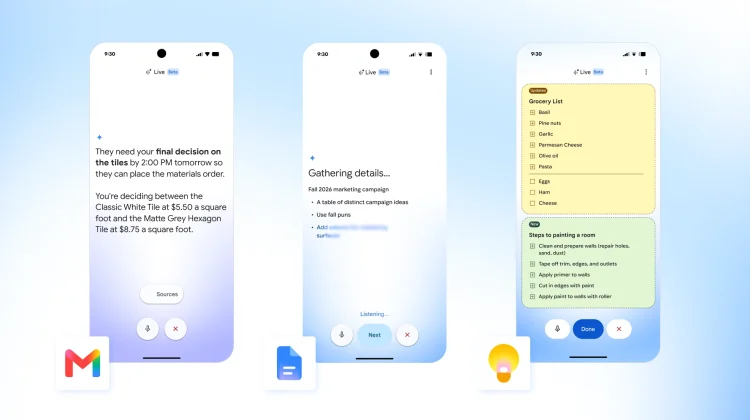
According to a new post over at News from Google, the company has officially announced the general availability of voice-driven conversational capabilities directly inside Gmail, Google Docs, and Google Keep. Branded as Gmail Live, Docs Live, and Keep Live, these tools are designed to turn your voice into structured writing, fast inbox triage, and background task execution while you’re on the move.
Gmail Live: conversational inbox search and triage
Digging through dozens of nested email threads to find a single detail while walking or driving has always been clunky. Gmail Live turns your inbox into a spoken conversational partner, letting you pull precise answers out of your email archive without reading through subject lines or typing search operators.
- Natural Querying: You can ask plain-language questions like “When is my kid’s next school event?” and Gmail will automatically cross-reference updates, dates, and senders to deliver a concise spoken answer.
- Contextual Follow-ups: Gmail Live maintains conversational context. If you ask, “Does he need to bring anything for the field trip?” it remembers the event you were just discussing and pulls the packing list from the relevant email attachment or thread.
- Fluid Interruptions: Just like standard Gemini Live, you don’t have to wait for the assistant to finish reading. You can interrupt mid-sentence, pivot the conversation, or switch topics entirely without starting over.
- On-Screen Source Verification: While you talk, the app displays a real-time transcript on your screen complete with clickable links to the source emails, making it easy to double-check details.
Docs Live: hands-free drafting and co-writing
Instead of staring at a blank mobile document, Docs Live acts as an interactive co-writer to help you get to a structured first draft using only your voice.
You can speak openly to brain-dump ideas, dictate proposals, or outline talking points. By being prescriptive about your deliverable – like asking for an executive summary, a client pitch, or meeting takeaways – Gemini organizes your spoken thoughts into a properly formatted document structure.
Even better, with your permission, Docs Live can synthesize context directly from your existing Gmail, Google Drive, and Google Chat history to ensure the draft includes relevant personal facts and project data.
Keep Live: intelligent audio brain dumps and auto-organized lists
For quick thoughts and daily chores, Keep Live tackles stream-of-consciousness audio. Rather than standard voice-to-text dictation that dumps raw transcripts onto a note, Keep Live listens to your unstructured thoughts and intelligently organizes them in the background into structured lists and clean notes.
It also understands intent and existing note context. If you say “ingredients for pesto pasta,” Gemini understands what you need and formats an itemized checklist. Furthermore, if you already have an active grocery list in Keep and mention that you need to grab bananas, Keep Live will automatically append the item to your existing checklist rather than creating a duplicate note.
Availability and rollout
Google is rolling these voice features out across mobile platforms, tiered by consumer Google AI subscription plans:
- Gmail Live: Available globally in English on iOS and Android for subscribers on Google AI Plus, Pro, and Ultra plans.
- Docs Live: Available globally in English on iOS and Android for Google AI Pro and Ultra subscribers.
- Keep Live: Launching initially on Android in English globally for Google AI Pro and Ultra subscribers.
For enterprise users, Google confirmed that all three Live capabilities are “coming soon” to Google Workspace business subscribers.
SUBSCRIBE TO UPSTREAM
Get Chrome Unboxed delivered straight to your inbox
Upstream is our flagship, curated newsletter with the top stories, most click-worthy deals, giveaways, and trending articles from Chrome Unboxed sent directly to your inbox a few times a week. Join 31,000+ subscribers.

