


Support our independent tech coverage. Chrome Unboxed is written by real people, for real people—not search algorithms. Join Chrome Unboxed Plus for just $2 a month to get an ad-free experience, access to our private Discord, and more. Learn more about membership here.
START FREE TRIAL (MONTHLY)START FREE TRIAL (ANNUAL)
In their latest APK Insights of the Google app v11.31 beta, 9to5Google has found evidence that the fitness and sleep data from your favorite apps may soon be integrated into Google Assistant to provide “proactive health and fitness results”. I love logging my sleep, weight and steps in Google Fit and MyFitness Pal, but it’s long since been a separate and manual process. As Google looks to complete their Fitbit acquisition, machine learning could potentially automate much of these processes, but we’ll see.
One such feature discovered in the APK is called ‘sleep account linking’. Assistant will use your app data to answer ‘sleep-related questions’. Fitbit is mentioned specifically in this string. In Google Fit, you can log how long you’ve slept, but not the quality, so it will be interesting to see if Google can determines this somehow. Taking a shot in the dark, I imagine you’ll be able to ask Assistant questions like ‘How long did I sleep last night?’ or ‘Did I sleep well?’ which would then be answered and followed up with suggestions for improving your sleep.
Your Assistant will get access to your <xliff:g id=provider example=Fitbit>%1$s</xliff:g> sleep data. Google Assistant will use this data to answer your sleep-related questions across your devices that have personal results turned on.
9to5Google
You should be able to make other queries in the future as well related to sleep and fitness as Google looks to provide “proactive health and fitness results” using “data, suggestions and related content”. Asking questions like “How many steps have I taken today” or “How many calories do I have left?” may become a reality. The former just opens Google Fit at this time and the latter does nothing. One area that the Assistant has fallen short up until now is personalizing health data because many people have grave concerns about this becoming a reality. Your queries will be deleted on device after they’re answered so that you remain in control of your privacy. You can also manage and delete all voice data you share with Google. Don’t forget that using health services with Google are optional and can be disabled in your Google app settings.
On devices where you have proactive health and fitness results turned on, the Assistant will show this data, suggestions, and related content without you having to ask. This data also helps troubleshoot and improve your health and fitness experience with the Assistant. Once your Assistant successfully fulfills your request to update, show, or answer questions about this data, Google will delete your audio query. The text from your request and other Assistant usage information is used to troubleshoot, develop, and improve Assistant services.
9to5Google
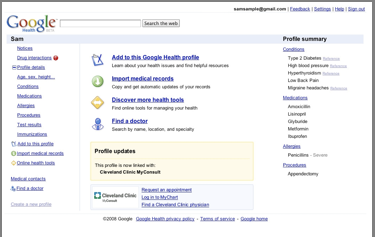
We recently talked about how Google is bringing the Assistant to the new Fitbit watches, so these insights line up perfectly with what we see Google unfolding before us. Google Health launched in 2008 and has long since shut down its user dashboard. Now, they’ve re-launched their efforts with a focus on AI and machine learning after the DeepMind team joined them last year. Google has invested a lot into making the Assistant more helpful for healthy living in the home and as they apply AI/ML technologies to many of the products they’ve sunset (Google Reader, anyone?), it’s even more evident to me that the Google Graveyard not really a graveyard at all, but rather a place where products go to be reincarnated.
SUBSCRIBE TO UPSTREAM
Get Chrome Unboxed delivered straight to your inbox
Upstream is our flagship, curated newsletter with the top stories, most click-worthy deals, giveaways, and trending articles from Chrome Unboxed sent directly to your inbox a few times a week. Join 31,000+ subscribers.

