


Support our independent tech coverage. Chrome Unboxed is written by real people, for real people—not search algorithms. Join Chrome Unboxed Plus for just $2 a month to get an ad-free experience, access to our private Discord, and more. Learn more about membership here.
START FREE TRIAL (MONTHLY)START FREE TRIAL (ANNUAL)
 Google Assistant – if you’ve somehow managed not to hear about it or encounter it in some way, shape or form until now – is Google’s virtual assistant that is already embedded in many devices and form factors across Google’s current purview.
From smartphones, tablets and Google Home, the Assistant is already in a lot of places. Add to that the clear and coming arrival on Chromebooks in the near future and you have a pretty pervasive digital assistant.
It seems Google isn’t ready to stop there, though.
Signs Of Assistant In The Browser
As we stated above, Google Assistant is not far from becoming a staple on Chromebooks. With a dedicated button on the keyboard and voice-enabled activation, Google clearly wants Chrome OS users to easily (and frequently) access Assistant.
But what about Chrome users on other platforms?
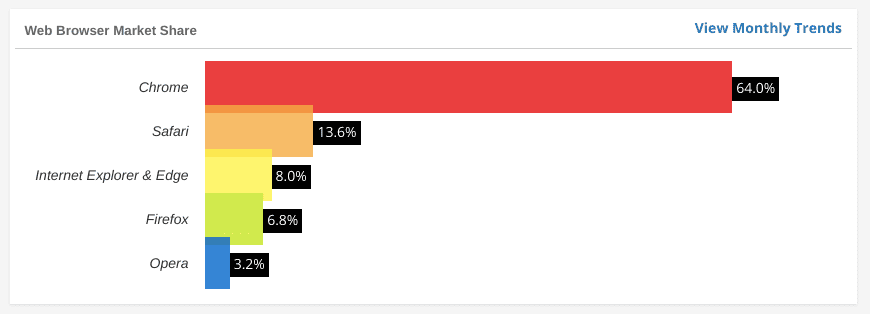
Chrome is the most popular browser in the world and Google’s way in for Mac, Windows and Linux users. By offering up Assistant to this large number of possibly unreached clientele, it would seem Google is invading one of the last major areas of its business.
You can see in this commit that there is very clear and concise language about tweaking the Assistant’s interface for the Web-based UI. As Assistant lives in a native application for Android and Chrome OS (soon), there would be little need for this work on those platforms. To an extent, iOS users would fall in this group as well since you can invoke Assistant via the Google App on iPads and iPhones.
Google’s remaining user base is in the browser arena. And in that arena, Google is king. By a long shot.
Forgone Conclusion
If Google’s ultimate goal is to get Assistant everywhere, this is a major step in that direction. I’ll be honest, I didn’t even consider this direction until seeing this commit, but I feel a little foolish for not considering it sooner.
Sure, Android is the most-used OS on the planet, so getting Assistant up and running there was priority #1. They also needed to get started in the smart speaker race to keep Amazon from simply running away with those spoils, so Google Home was priority #2. We’re even seeing third party hardware getting Google Assistant built in at this point.
Somehow, in all that, I failed to consider Google’s other monstrous audience. The Chrome Browser.
In some ways, that feels akin to talking about emerging tech in streaming TV and forgetting Chromecast. I’m unsure how I missed this, but it is absolutely a necessity for Google to make Assistant easily accessible to anyone running Chrome on any device. As Gabriel pointed out before, Assistant is a service that is a means to an end. Google is far less concerned with pimping its own hardware and far more concerned with getting its vast software reach onto as many devices as possible.
This is a logical and massive step in that direction. The more people use Assistant, the better it becomes. The better it becomes, the more people use it. Google needs to continue encouraging the adoption of Assistant as time goes by, and this move will be a massive boost to those numbers for sure.
When we’ll see it live and active, that’s anyone’s guess. If it hits Chromebooks soon, I’d assume that Chrome on other platforms won’t be far behind. Until then, know that the Assistant revolution is in full swing and Google’s overall vision, shared last October, looks to be coming into focus in a very real way.

