

Support our independent tech coverage. Chrome Unboxed is written by real people, for real people—not search algorithms. Join Chrome Unboxed Plus for just $2 a month to get an ad-free experience, access to our private Discord, and more. Learn more about membership here.
START FREE TRIAL (MONTHLY)START FREE TRIAL (ANNUAL)
If you’ve been utilizing Google’s new-ish Gemini in Chrome feature, you know the browser-bound side panel has quickly become one of the handiest ways to look up, summarize, and cross-reference information while you surf the web. But up until recently, that utility was strictly chained to the active Chrome window. If you minimized your browser or jumped into a progressive web app (PWA), your quick access to Gemini vanished with the minimized window.
That restriction is officially fading away for Chromebook Plus users, though. A small, incremental update rolling through ChromeOS M148 has quietly introduced a brand-new, persistent Gemini button directly to the system tray, sitting neatly right beside the Phone Hub and Tote sections that effectively makes the browser assistant a accessible system-wide.
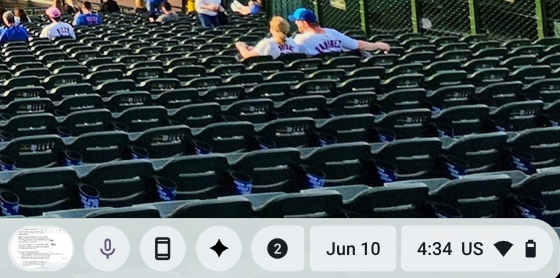
Floating outside the browser window
When you tap the new tray icon, it spins up the exact same Gemini in Chrome panel we’ve been using for months, but with a detached window UI that floats above other content.
If you are bouncing between different native applications, working out of a dedicated PWA, or organizing files in your system directory, the floating panel stays right where you need it. You can seamlessly copy data, drag bits of context into the chat box, and consult the AI without losing your primary workspace layout.
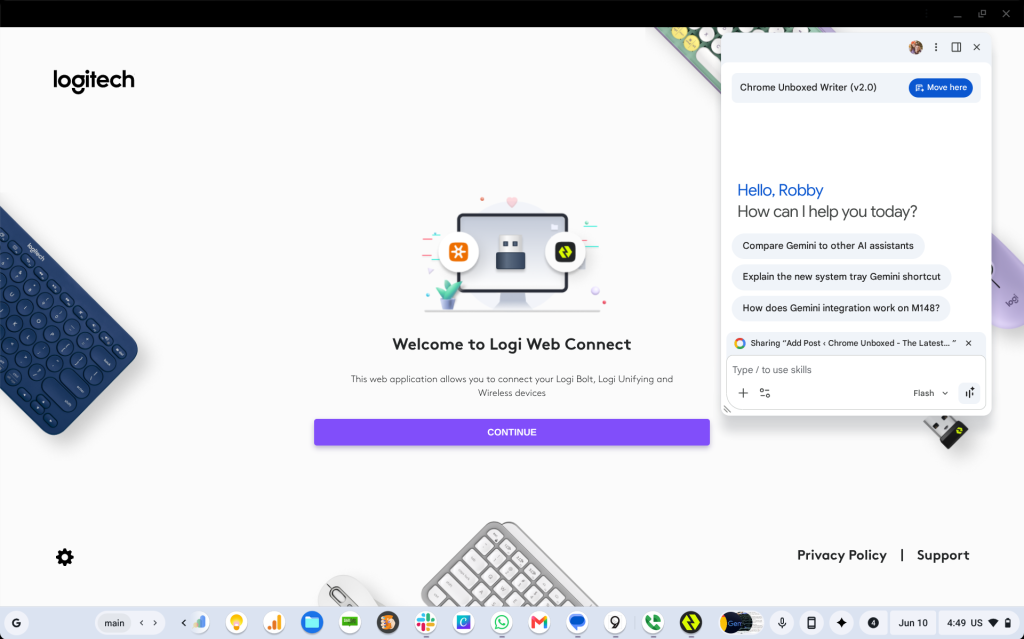
The integration gets even smarter when you jump back into your browser. If you navigate to a fresh tab and click the new tray button, the system recognizes your active browser context instantly. It functions exactly as if you had clicked the standard “Ask Gemini” button positioned at the top of the Chrome toolbar, automatically anchoring itself to the tab in front of you.
The update should be trickling out to eligible devices on M148 now, so keep an eye on your system shelf over the next few days to see when the new button pops into your tray. We don’t have anything that resembles an official announcement of this feature from Google just yet, but it wouldn’t be the first time a new thing just popped up on our Chromebooks.
SUBSCRIBE TO UPSTREAM
Get Chrome Unboxed delivered straight to your inbox
Upstream is our flagship, curated newsletter with the top stories, most click-worthy deals, giveaways, and trending articles from Chrome Unboxed sent directly to your inbox a few times a week. Join 31,000+ subscribers.

