


Support our independent tech coverage. Chrome Unboxed is written by real people, for real people—not search algorithms. Join Chrome Unboxed Plus for just $2 a month to get an ad-free experience, access to our private Discord, and more. Learn more about membership here.
START FREE TRIAL (MONTHLY)START FREE TRIAL (ANNUAL)
We’re coming up on one year post-launch of the new ‘Unified View’ for Gmail, and it’s hard to care about the previous ‘Original view’ of the service. Of course, that’s just my personal opinion, and I can see why some folks just want to keep their mail, Chat, Spaces, and Meet separate.
By combining everything in one place, Workspace can truly live up to its name. Quickly jumping between one or another of the provided tools without having to load another Chrome browser tab is extremely useful. If you don’t like one or several of the offerings, you can toggle them off in the Settings menu as seen below.
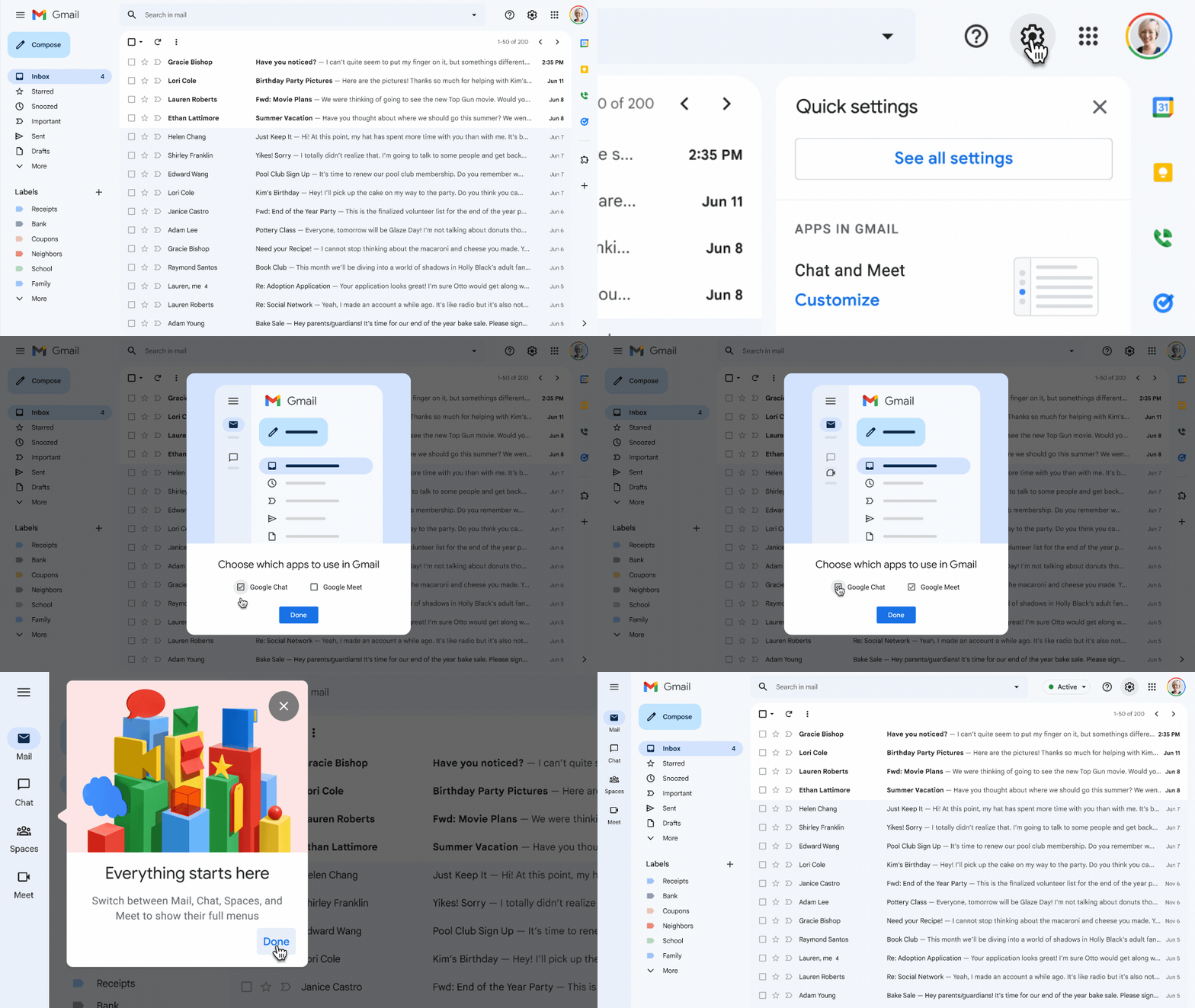
In a new Workspace Updates blog post, Google revealed that time is ticking for the good old Gmail view, and by the end of this month, it will no longer be available to revert to. Again, most folks probably won’t be bothered by this, but it certainly is worth mentioning. Up until now, you could jump to and from the traditional view with a few clicks.
This update will apply to all Workspace and G Suite legacy license holders, barring those with Workspace Essentials. Do you use the new integrated view for Gmail, or are you firmly planted in the camp that prefers things as they used to be? Let me know in the comments. It’s always interesting to see the community’s thoughts and reactions to big changes like this.
SUBSCRIBE TO UPSTREAM
Get Chrome Unboxed delivered straight to your inbox
Upstream is our flagship, curated newsletter with the top stories, most click-worthy deals, giveaways, and trending articles from Chrome Unboxed sent directly to your inbox a few times a week. Join 31,000+ subscribers.

