

Support our independent tech coverage. Chrome Unboxed is written by real people, for real people—not search algorithms. Join Chrome Unboxed Plus for just $2 a month to get an ad-free experience, access to our private Discord, and more. Learn more about membership here.
START FREE TRIAL (MONTHLY)START FREE TRIAL (ANNUAL)
We spent yesterday being a bit blown away by the absolute tidal wave of updates, developer tools, and agentic platforms flying out of Google I/O 2026. But as the dust begins to settle on the keynote stage, some of the actual features are already hitting our personal devices. I had the chance to sit down and test out one of the more futuristic, slightly unsettling, and entirely mind-blowing consumer features to come out of the event: the new AI avatar creation tool inside the Gemini app.
Driven by Google’s brand-new Gemini Omni model, this feature is officially rolling out to paid subscribers. Instead of just generating a generic video clip or animating a stock character, it allows you to clone your own face and voice to star in your own AI-generated videos. I just put the setup process through its paces, and the results are pretty wild.
The setup process is shockingly simple
Historically, creating a high-fidelity digital twin or training a custom voice model required specialized software, expensive hardware, and hours of processing time. Google has collapsed that entire barrier into a seamless mobile onboarding flow that takes about two minutes.
To get started, you tap the settings gear at the bottom of the Gemini web app and select “Avatar.” The app kicks you over to a dedicated secure onboarding screen that uses your phone’s front-facing camera. The training process consists of two quick phases:
- Camera training: You hold your phone at eye level in decent lighting and follow a few simple on-screen prompts to capture your face from a few angles.
- Voice training: You read a series of random phrases and numbers aloud into your microphone so the model can capture the specific cadence, tone, and regional dialect of your natural speaking voice.
Once you tap “Use Avatar,” Google securely binds your digital likeness to your account under the tag @[your username]. From that point on, you never have to upload a selfie or a voice clip again. Your avatar lives right inside your Gemini toolbox, ready to be called into action. And with this small setup, the results are scary good.
Testing out my digital twin
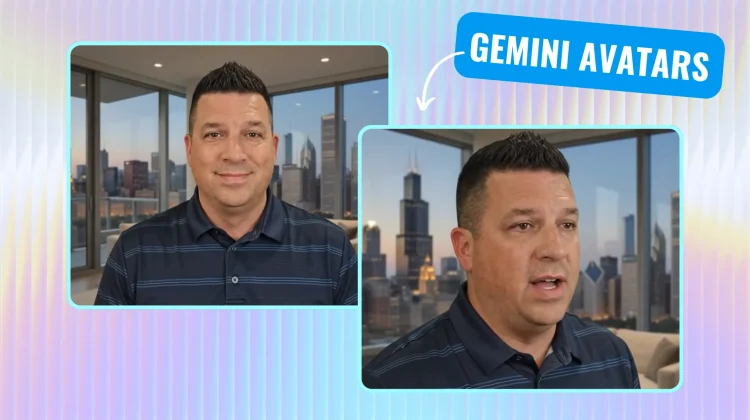
Once my avatar was fully cooked, I decided to test it with a simple prompt. I hopped into the Gemini chat box and typed out: “@robby.n.payne Tell me about how easy it is to make a Gemini Avatar. Also, make my background a penthouse view of the Chicago skyline.”
It takes a few minutes for the video to bake in the background, but watching the final 10-second output drop into the chat window is an absolute trip.
The facial tracking, micro-expressions, and lip-syncing are shockingly good for how little visual/audio training I gave it. The big upgrade here is hearing my own specific vocal inflections coming out of a fully synthesized video clip saying phrases I never actually uttered into a microphone. It’s not perfect, but again, the training source material was minimal and the output is impressive.
Privacy, guardrails, and what comes next
Because this technology opens up an obvious can of worms regarding deepfakes and identity theft, Google is being quite cautious with the deployment.
For starters, you must be 18 or older to access the tool, and the account owner has to be the one physically standing in front of the camera during setup. Furthermore, every single video file generated via the Omni model is permanently embedded with Google’s invisible SynthID digital watermark, meaning anyone can instantly right-click the video file in Chrome or run it through Search to verify its authenticity.
Safety guardrails aside, the sheer creative potential here is immense. Whether you are a content creator looking to scale your output, a business owner wanting to quickly draft custom training videos, or just a tech enthusiast wanting to mess around with the absolute cutting edge of generative media, this is a massive milestone. It is living right inside the Gemini app today, and I highly recommend firing it up and giving it a spin.
SUBSCRIBE TO UPSTREAM
Get Chrome Unboxed delivered straight to your inbox
Upstream is our flagship, curated newsletter with the top stories, most click-worthy deals, giveaways, and trending articles from Chrome Unboxed sent directly to your inbox a few times a week. Join 31,000+ subscribers.

