

Support our independent tech coverage. Chrome Unboxed is written by real people, for real people—not search algorithms. Join Chrome Unboxed Plus for just $2 a month to get an ad-free experience, access to our private Discord, and more. Learn more about membership here.
START FREE TRIAL (MONTHLY)START FREE TRIAL (ANNUAL)
After last week’s announcement for Gemini Advanced users, Google is now officially rolling out Gemini Live’s new camera and screen sharing features to Google Pixel 9 and Samsung Galaxy S25 series owners. This means if you’ve got one of these shiny new phones, or if you’re a Gemini Advanced subscriber, you’re about to get a much more intuitive way to interact with Google’s AI assistant.
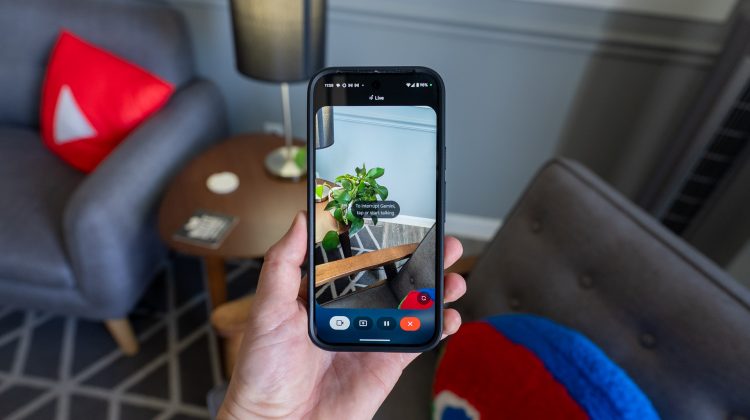
For those unfamiliar, Gemini Live allows users to have a more natural and free-flowing conversation with Gemini in over 45 languages. But now, this experience is being supercharged. With this update that’s rolling out, a new “share screen with Live” button will appear in the Gemini overlay, allowing the app to see your screen so you can ask Gemini questions about whatever you’re looking at. Similarly, a camcorder button in the Gemini Live interface will activate a live video mode, letting you point your camera at the world around you and ask questions in real-time.
To get these features to appear on your eligible device, you might need to Force Stop the Gemini app (or the main Google app, given its integration). To do this, navigate to Settings > Apps > Gemini (or Google) > Force stop, and confirm. This will stop the app’s background processes. After a few moments, relaunch Gemini Live, and those new sharing buttons should appear.
The magic behind this update is the integration of Project Astra’s multimodal AI into Gemini Live, enabling it to understand and respond to real-world objects and scenarios. If you recall, Project Astra was first officially teased by Google at I/O 2024, where they showcased a demo highlighting its real-time multimodal capabilities. While we still don’t know much about the glasses that were shown off as part of the demo, it’s nice to see the phone capabilities finally coming to fruition.
As for how you might use these new Gemini Live features, Google has already outlined 5 compelling use cases that you might want to try out for yourself. Imagine pointing your phone at a cluttered closet and getting suggestions on how to organize it, or using Gemini to troubleshoot a product issue simply by showing it the problem. It could even offer personal shopping advice based on what you point your camera at or help you brainstorm creative projects by analyzing your surroundings.
As this rollout continues for Gemini Advanced subscribers and these specific flagship devices, I’m genuinely excited to see how this transforms our interaction with AI on our phone. While screen sharing will undoubtedly be useful, the live video feature feels like a true game-changer. The ability to have a dynamic conversation with AI as you explore your environment in real-time is a massive leap beyond simply taking photos and uploading them.
This feels like the future of mobile AI interaction and will only get better when we have Android XR glasses with Gemini Live built in. But what are your thoughts? Have you tried out these new Gemini Live features? Let me know in the comments!
SUBSCRIBE TO UPSTREAM
Get Chrome Unboxed delivered straight to your inbox
Upstream is our flagship, curated newsletter with the top stories, most click-worthy deals, giveaways, and trending articles from Chrome Unboxed sent directly to your inbox a few times a week. Join 31,000+ subscribers.

