
• Skip to main content
  • Skip to primary sidebar
  • Deals
  • Features
  • Guides
  • Chromebooks
  • Videos
  • Podcast
  • More +
    • Reviews
    • Unboxing
    • Upcoming Devices
    • Chromebook Plus
    • Chrome
    • ChromeOS
    • Chrome OS Flex
  • Search
  • Sign Up
  • Log In
Chrome Unboxed – The Latest Chrome OS News

Chrome Unboxed - The Latest Chrome OS News

A Space for All Things Chrome, Google, and More!

  • Deals
  • Features
  • Guides
  • Chromebooks
  • Videos
  • Podcast
  • More +
    • Reviews
    • Unboxing
    • Upcoming Devices
    • Chromebook Plus
    • Chrome
    • ChromeOS
    • Chrome OS Flex
  • Search
  • Sign Up
  • Log In

First Look: Google Calendar Chromebook productivity experiment officially appears

October 16, 2021 By Michael Perrigo View Comments

Support our independent tech coverage. Chrome Unboxed is written by real people, for real people—not search algorithms. Join Chrome Unboxed Plus for just $2 a month to get an ad-free experience, access to our private Discord, and more. Learn more about membership here.
START FREE TRIAL (MONTHLY)START FREE TRIAL (ANNUAL)

Chromebooks are receiving native Google Calendar integration with the upcoming Calendar Productivity Experiment. As we previously discussed, this will allow you to quickly access a monthly view to glance at what date falls on what day of the month, and so on in order to make you more productive. In the past, I’ve personally had to launch the Google Calendar web app in order to do such a simple task, and since Windows has had this for years, it made me very excited to finally be receiving it on Chrome OS.

Last night, I was toying with my device in Canary mode, and I happened upon the experiment as it finally went live! I’ve checked each day for this and it’s finally here, but accessing it was definitely done in a way I hadn’t expected. As you can see in the video below, by enabling the aforementioned Productivity Experiment: Monthly Calendar View developer flag, you’re ready to begin using it.

Xremove ads

Productivity experiment: Monthly Calendar View

Show Monthly Calendar View with Google Calendar events to increase productivity by helping users view their schedules more quickly. – Chrome OS

#calendar-view

By clicking on the clock at the bottom-right of the shelf, your quick settings will appear, along with any notifications you may have from apps and web apps. However, if you have the Show Date in Tray flag enabled as well, you can access the new Calendar widget by clicking on that date! At this time, I had to try twice in order to trigger it, but that’s because it’s still in early development.

If you hover over it and scroll, you can get all the way to 2023 before it stops, and I’ve even gone back as far as the 1800s before I got tired of testing. For now, clicking on any date does not link you out to Google Calendar or show you upcoming events, but I imagine this is probably in the works. There’s a “Today” button that jumps you back to the current date, an up and down arrow to quickly jump between months, and a gear icon which will take you directly to your time and date settings for the system.

Featured Videos

Xremove ads

It’s funny how the Chrome OS Mock-Up that I did a while back is coming to life a bit more each week. Google seems to be right on track with my predictions for the integrations and features and even the visual style of the new Chrome OS. I’m not sure how much I predicted this or influenced it, but I’m proud to see it happen nonetheless. Granted, the official Calendar widget is a lot nicer than mine, but it’s pretty much spot on with what I created!
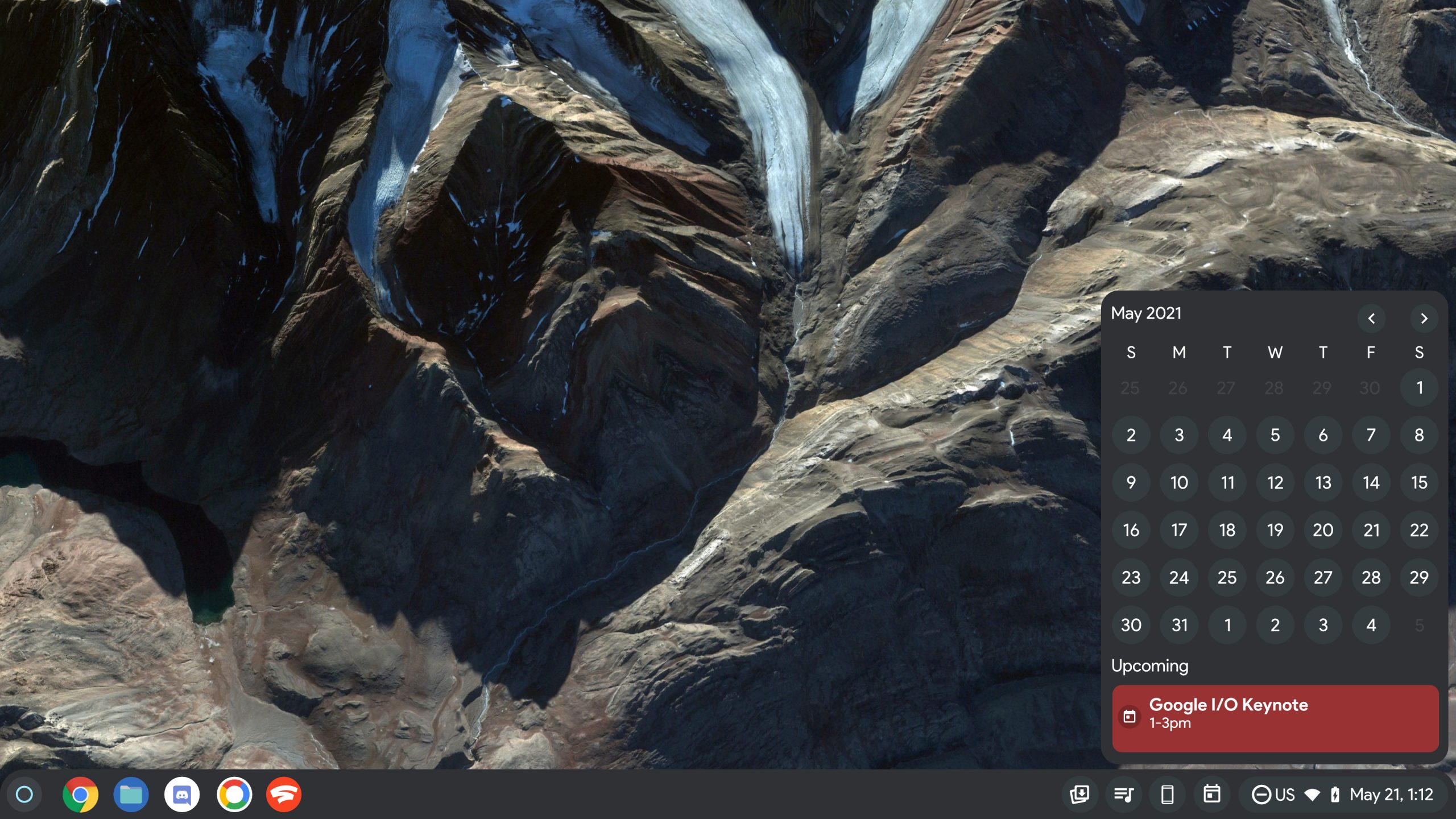
Here’s my Calendar Mock-Up prediction!

Now, all we’ll need is the “Upcoming” section I predicted for the tool, an Assistant Snapshot section, and a Material You rework of everything. Let me know in the comments how useful this will be to you when it officially rolls out and whether or not you’ll use it at all. I’m hoping that double-clicking each date bubble will take you directly to Calendar on the web in time, but we’ll have to wait to see what the company does.

SUBSCRIBE TO UPSTREAM

Get Chrome Unboxed delivered straight to your inbox

Upstream is our flagship, curated newsletter with the top stories, most click-worthy deals, giveaways, and trending articles from Chrome Unboxed sent directly to your inbox a few times a week. Join 31,000+ subscribers.

Xremove ads
SUBSCRIBE HERE!

Filed Under: ChromeOS, New & Upcoming Features, News Tagged With: videos

About Michael Perrigo

Known as "Google Mike" to his customers, Michael worked at Best Buy as a Chromebook Expert who dedicated his time to understanding the user experience from a regular Chromebook owner's perspective. Having spent nearly 20 years meeting you face-to-face, he strives to help you understand your technology through carefully crafted guides and coverage, relentlessly seeking out the spark in what's new and exciting about ChromeOS.

Primary Sidebar

Googlebook

Googlebook OS is getting keyboard shortcuts for play/pause and previous/next in media

By Robby Payne
November 28, 2026

Flagships, tablets, or budget laptops: why the Googlebook launch was always going to be a gamble

By Robby Payne
November 25, 2026

Googlebook ‘Pelion’ borrows its battery from one of my favorite Acer Chromebooks

By Robby Payne
November 25, 2026

Entry-level Googlebooks might finally be coming with Snapdragon C silicon

By Robby Payne
November 24, 2026

When I need to get technical work done, I still reach for a Chromebook over a Googlebook

By Robby Payne
November 24, 2026

More Googlebook

Xremove ads

Deals

The best Black Friday Googlebook and Chromebook deals

By Robby Payne
November 27, 2026

The first Googlebook deals are here, slashing up to $300 off two 3K OLED models

By Robby Payne
November 20, 2026

My favorite convertible Chromebook is $150 off right now and primed for Googlebook OS

By Robby Payne
September 29, 2026

Google Pixel Buds 2a in Hazel bundled with a new Googlebook laptop at Best Buy

Score a free $129 pair of Pixel Buds 2a with any Googlebook pre-order at Best Buy

By Robby Payne
September 28, 2026

The best Chromebook ever made is $350 off at Best Buy right now

By Robby Payne
August 21, 2026

More Deals

Xremove ads

Reviews

My brutally honest thoughts on Googlebook after one month [VIDEO]

By Robby Payne
November 2, 2026

Acer Chromebook Plus Spin 514 Review: the best convertible you can buy [VIDEO]

By Robby Payne
July 1, 2026

Lenovo Chromebook Plus 2-in-1 Review: pretty great in a vacuum

By Robby Payne
April 23, 2026

My review after 6 weeks with the Lenovo Chromebook Plus 14 [VIDEO]

By Robby Payne
August 11, 2025

One week with the best small Android tablet you can buy, and I’m sold

By Robby Payne
May 9, 2025

More Reviews

Xremove ads

TWITTER · FACEBOOK · INSTAGRAM · YOUTUBE · EMAIL · ABOUT

Copyright © 2026 · Chrome Unboxed · Chrome is a registered trademark of Google Inc.
We are participants in various affiliate advertising programs designed to provide a means for us to earn fees by linking to affiliated sites.

PRIVACY POLICY