


Support our independent tech coverage. Chrome Unboxed is written by real people, for real people—not search algorithms. Join Chrome Unboxed Plus for just $2 a month to get an ad-free experience, access to our private Discord, and more. Learn more about membership here.
START FREE TRIAL (MONTHLY)START FREE TRIAL (ANNUAL)
I’m not saying I’m Nostradamus (He was actually wrong about plenty), but my vision for Material You on Chromebooks is coming to life more and more each day. From the Quick Settings to the Notifications revamp, and other small tweaks as well – I know it’s not for everyone, but I’m getting excited!
It’s more than that though. If you recall, the image below shows my mock-up for Material You on ChromeOS. While we’re already more than halfway through the “MY” redesign, one of the features I thought to toss in that we’ve yet to see become a real thing for laptops is the “History” button for notifications.
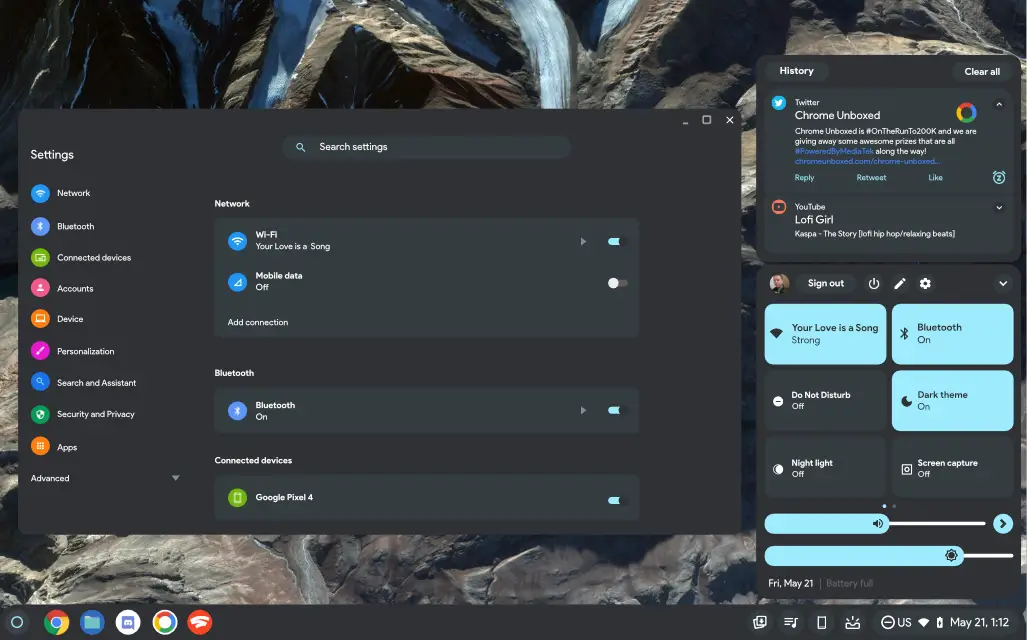
Android 12 already has this, and it allows you to recall older notifications that you swiped away on accident. I don’t use it often on my phone, but it is truly useful when you find yourself in a situation where you wish you didn’t dismiss something.
This very thing may be in the works if a recent ChromeOS Canary developer flag is to be believed. To be fair, it doesn’t say anything about the implementation of this button, but rather the recording of your notif count and interactions with them.
Notification History Interaction
#enable-notification-history-interaction
Enable recording of notification count and interaction. – Mac, Windows, Linux, ChromeOS, Fuchsia, Lacros.
There could be a good reason for recording these that have nothing to do with my hopes for a way to revisit them, and the fact that the flag is also available for Desktop Chrome for various operating systems other than ChromeOS where there isn’t exactly a notification center also paints a picture of something different possibly going on here.
However, I can’t think of a good reason to have a flag for logging this type of data. It’s true that developer flags aren’t always added leading up to a consumer-facing feature release, but they often are. We could just be seeing a tool for developers, but my hope remains that the “History” button will grace our Quick Settings notification tray before long. Let me know in the comments if you’d like a way to see this information or if you’re fine without it.
SUBSCRIBE TO UPSTREAM
Get Chrome Unboxed delivered straight to your inbox
Upstream is our flagship, curated newsletter with the top stories, most click-worthy deals, giveaways, and trending articles from Chrome Unboxed sent directly to your inbox a few times a week. Join 31,000+ subscribers.

