


Support our independent tech coverage. Chrome Unboxed is written by real people, for real people—not search algorithms. Join Chrome Unboxed Plus for just $2 a month to get an ad-free experience, access to our private Discord, and more. Learn more about membership here.
START FREE TRIAL (MONTHLY)START FREE TRIAL (ANNUAL)
You’ve heard the term ‘Workspace’ thrown around an overwhelming amount over the past year, and now that we’re all done mispronouncing it as ‘Workplace’, we’ve become pretty familiar with Google’s rebranded offerings. From Meet to Chat, to Gmail, Drive, and everything in between, the company has done a great deal during the pandemic to offer premium tools and resources for the evolving hybrid workforce.
With that being said, it does have a slight problem with its nomenclature often tripping over its own feet – Google Tasks is now a standalone app and a new module inside of Chat, Google Chat is now Google Chat – not even kidding. Hangouts was relaunched several times before it was killed off recently, and now there are ‘Collections’ and ‘Spaces’ – two things we’ve seen before back when the search giant tried its hand at social media (no, not that time…or that time…or even that time).
See what I mean? Anyways, did you know that Google Drive has something called ‘Workspaces’ – not to be confused with Google Workspace, the umbrella term for the company’s new G Suite rebrand? I didn’t either until recently. When I discovered them, I kind of fell in love with them though. If you navigate to the Priority tab or home screen on Drive for the web, you’ll have the ability to create ‘Workspaces’ if you’re on a Workspace account. That’s fitting, right?
When you do, you can toss a handful of files into it and give it a name. Up to eight Workspaces can be open or active at a time, and you can even hide the ones you’re not currently using. So far as I’ve seen, these are basically collaborative or solo ‘tables’, akin to spreading out a stack of papers to brainstorm. Sure, you could ‘star’ documents, but these are more focused and based on a topic or project you’re working on.
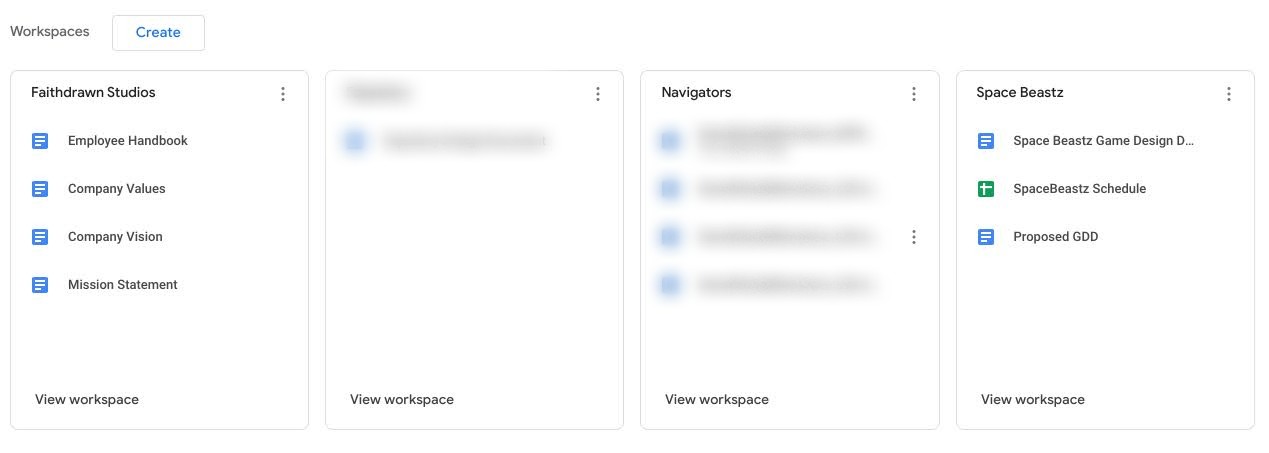
I often do this very thing with real paper, so it’s nice to see there’s a digital equivalent to it – something I never realized I wanted or needed until I encountered it! Today, I’m drawing attention to something pretty odd, but not unexpected – Workspaces are pretty much the only thing that the Chromebook Files app is missing.
Now you shouldn’t expect to see them on a device running a personal Google Account, but what about those with Workspace Accounts for business or school? Having already created several ‘Workspaces’ to hold documents, I can verify that they simply don’t make an appearance in the Files app, and I think that’s odd.
Not only does this put a wrench in my workflow now that I’ve adopted them, but it’s also inconsistent with the filesystem found on Drive for the web. If Google wants to eventually have feature parity, I would hope that these would become available locally before long. Though this immediately caught my attention, there’s probably a good reason for it.
Maybe it needs a rebrand so it no longer clashes with the overall ‘Workspace’ naming. Maybe it’s still just in the cards for a future update and is on its way. I mean, the Files app has gone through something of a metamorphosis over the past few years – ‘Shared Drives’, ‘Shared with me’, and more never used to even exist there, so it’s seen exponential growth in such a short amount of time.
If this is something that got omitted for some reason, I hope that this decision is walked back. Taking that a step further, I hope that in addition to bringing Workspaces to the Chromebook Files app, I hope that users with personal Google Accounts will also gain access to them. They seem invaluable to specific workflows, and it would be a shame to lose them or have them in one place and not the other.
In the end, if Google hopes to phase out the Drive PWA and Files app in favor of its new Files system web application (SWA) that’s in the works, it should make sure the experience mirrors that of its counterparts. I don’t know about you, but I’m kind of tired of needing to have both pinned to my shelf for use. I’m curious to see in the comments section if any of you are using ‘Workspaces’ or if they’re a feature that’s fallen by the wayside since their launch.
SUBSCRIBE TO UPSTREAM
Get Chrome Unboxed delivered straight to your inbox
Upstream is our flagship, curated newsletter with the top stories, most click-worthy deals, giveaways, and trending articles from Chrome Unboxed sent directly to your inbox a few times a week. Join 31,000+ subscribers.


