

• Skip to main content
  • Skip to primary sidebar
  • Deals
  • Features
  • Guides
  • Chromebooks
  • Videos
  • Podcast
  • More +
    • Reviews
    • Unboxing
    • Upcoming Devices
    • Chromebook Plus
    • Chrome
    • ChromeOS
    • Chrome OS Flex
  • Search
  • Sign Up
  • Log In
Chrome Unboxed – The Latest Chrome OS News

Chrome Unboxed - The Latest Chrome OS News

A Space for All Things Chrome, Google, and More!

  • Deals
  • Features
  • Guides
  • Chromebooks
  • Videos
  • Podcast
  • More +
    • Reviews
    • Unboxing
    • Upcoming Devices
    • Chromebook Plus
    • Chrome
    • ChromeOS
    • Chrome OS Flex
  • Search
  • Sign Up
  • Log In

Chrome Web Store to issue two new badges for extensions that are trustworthy

April 12, 2022 By Michael Perrigo View Comments

Support our independent tech coverage. Chrome Unboxed is written by real people, for real people—not search algorithms. Join Chrome Unboxed Plus for just $2 a month to get an ad-free experience, access to our private Discord, and more. Learn more about membership here.
START FREE TRIAL (MONTHLY)START FREE TRIAL (ANNUAL)

Bad actor extensions on the Chrome Web Store have run rampant for far too long, promising to utilize user data only for the intended purpose, and then breaking that promise and misusing it for personal gain or malicious intent. Now that Manifest V3 has become the standard though, Google has limited its ability to do this, and anyone who doesn’t follow the company’s guidelines for respecting user privacy will not get their new “seal of approval”.
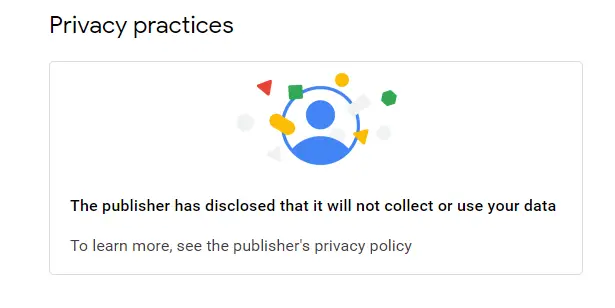
Instead, it will inform the user on what data the developer and its extension are utilizing and how so that anyone who installs it can make an informed decision regarding all that it entails. Now, an email went out to developers just yesterday (Credit: XDA Developers) stating that Google will be pushing ahead further with its efforts to clean up the reputation of the Web Store for extensions.

Xremove ads

First, the “Featured badge” will go out automatically to devs and publisher accounts that have been verified and who have a positive track record with Google’s services and compliance with the Developer Program Policy. This means that anyone with that seal of approval and a clean track record will get the Featured badge, making it easier for users to put their trust in said developer or extension.

Second, the “Established publisher” badge will go out to extensions that follow the company’s technical best practices and that meet a high standard of user experience and design. This one will be dished out manually based on who Google deems worthy of it after a personal inspection.

Featured Videos

Xremove ads

It’s been made clear that anyone who earns either badge (they can’t be bought!) may receive higher rankings in search and filtering, and may even have their extension appear in special promos on the Web Store and elsewhere.

Do you check for the seal of approval on an extension’s “Privacy practices” page before installing it? Would you be more likely to install something that had either the Featured badge or the Established publisher badge? Let me know in the comments, and if you’re a developer, you will soon be able to request consideration for these badges, but Google isn’t opening the doors for that until April 20, 2022.

SUBSCRIBE TO UPSTREAM

Get Chrome Unboxed delivered straight to your inbox

Upstream is our flagship, curated newsletter with the top stories, most click-worthy deals, giveaways, and trending articles from Chrome Unboxed sent directly to your inbox a few times a week. Join 31,000+ subscribers.

Xremove ads
SUBSCRIBE HERE!

Filed Under: Extensions, New & Upcoming Features, News, Privacy and Security, Updates

About Michael Perrigo

Known as "Google Mike" to his customers, Michael worked at Best Buy as a Chromebook Expert who dedicated his time to understanding the user experience from a regular Chromebook owner's perspective. Having spent nearly 20 years meeting you face-to-face, he strives to help you understand your technology through carefully crafted guides and coverage, relentlessly seeking out the spark in what's new and exciting about ChromeOS.

Primary Sidebar

Xremove ads

Deals

The Google TV Streamer hits $80 again, bringing Gemini and smart home control to your living room

By Joseph Humphrey
June 5, 2026

The best Chromebook deals today

By Robby Payne
May 25, 2026

Save $300 as Acer’s Chromebook Plus Spin 714 returns to its all-time low price

By Robby Payne
May 21, 2026

Save $40 on the Google Pixel Watch 4 before the Spring Sale ends

By Joseph Humphrey
April 24, 2026

Deal Alert: the excellent Lenovo Chromebook Plus 2-in-1 returns to $429

By Robby Payne
April 20, 2026

More Deals

Xremove ads

Reviews

Lenovo Chromebook Plus 2-in-1 Review: pretty great in a vacuum

By Robby Payne
April 23, 2026

Acer Chromebook Plus Spin 514 Review: Kompanio Ultra power in a convertible

By Robby Payne
December 24, 2025

My review after 6 weeks with the Lenovo Chromebook Plus 14 [VIDEO]

By Robby Payne
August 11, 2025

One week with the best small Android tablet you can buy, and I’m sold

By Robby Payne
May 9, 2025

Best Chromebooks of 2024 [VIDEO]

By Robby Payne
November 28, 2024

More Reviews

Xremove ads

Guides

This Chromebook trackpad shortcut is definitely not new, but is blowing my mind

By Robby Payne
March 11, 2024

How to reduce broadcast delay on YouTube TV to stop live spoilers

By Robby Payne
December 8, 2023

Windows PC keyboard and Chromebook

How to use a Windows keyboard with a Chromebook

By Joseph Humphrey
December 8, 2023

How reset and revert your Chromebook to the previous version of Chrome OS

By Robby Payne
November 29, 2023

My Chromebook Plus features disappeared: here’s how I fixed it

By Robby Payne
November 24, 2023

More Guides

TWITTER · FACEBOOK · INSTAGRAM · YOUTUBE · EMAIL · ABOUT

Copyright © 2026 · Chrome Unboxed · Chrome is a registered trademark of Google Inc.
We are participants in various affiliate advertising programs designed to provide a means for us to earn fees by linking to affiliated sites.

PRIVACY POLICY