

Support our independent tech coverage. Chrome Unboxed is written by real people, for real people—not search algorithms. Join Chrome Unboxed Plus for just $2 a month to get an ad-free experience, access to our private Discord, and more. Learn more about membership here.
START FREE TRIAL (MONTHLY)START FREE TRIAL (ANNUAL)
A few months ago, Google revealed that it was going to add a personal ‘Notes’ section to its now famous (or infamous, depending on who you ask) Side Panel, which has come to house many useful features for quick access. Microsoft Edge has had this for quite some time and was honestly one of my favorite features back when I tested it as a Chromebook user attempting to use Windows for a week.
Now, according to Leopeva 64-2 on Reddit, Chrome will also let you add notes directly to a web page – similar to how one would tag comments on a Google Doc or PDFs and images in Google Drive. Check it out below – highlighting and right-clicking some text and choosing the ‘Add comment’ button in Edge currently produces this result, and the Redditor has discovered Chromium commits that indicate Google is going the same route.
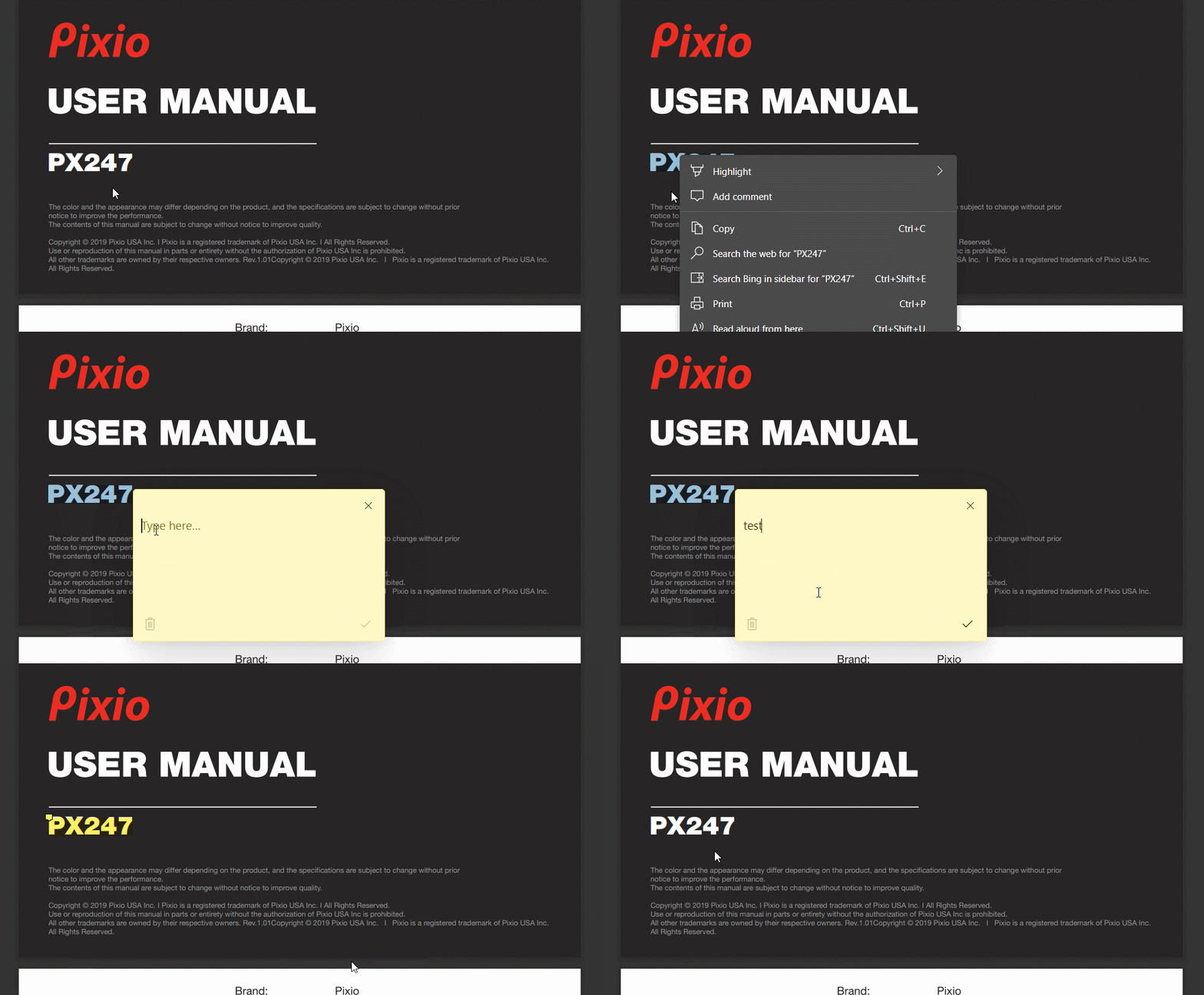
Called when the note creation UX should be shown in the UI layer. |bounds| corresponds to the location in the webpage where the associated highlight is, and should be compared with existing notes in the UI to determine where the new note should be inserted.
This could be extremely useful for those who don’t necessarily feel the need to bookmark an entire web page in order to recall or save a bit of the page’s information. I personally love this idea of having a notes section, but I will say that I wish it integrated directly with Google Keep instead of just being stored on the browser’s layer.
These notes can not only be called up on the page where they were highlighted and created, but also via the Side Panel on the right side. There’s even an option to hide all page annotations, which is what these comments or notes are being called, at least in Edge. Once this feature rolls out to Chrome, I’m sure it will closely reflect what Microsoft is doing since it’s all based on Chromium, but there’s always a possibility it’s quite different since both teams are taking drastically different approaches to similar features.
SUBSCRIBE TO UPSTREAM
Get Chrome Unboxed delivered straight to your inbox
Upstream is our flagship, curated newsletter with the top stories, most click-worthy deals, giveaways, and trending articles from Chrome Unboxed sent directly to your inbox a few times a week. Join 31,000+ subscribers.

