
• Skip to main content
  • Skip to primary sidebar
  • Deals
  • Features
  • Guides
  • Chromebooks
  • Videos
  • Podcast
  • More +
    • Reviews
    • Unboxing
    • Upcoming Devices
    • Chromebook Plus
    • Chrome
    • ChromeOS
    • Chrome OS Flex
  • Search
  • Sign Up
  • Log In
Chrome Unboxed – The Latest Chrome OS News

Chrome Unboxed - The Latest Chrome OS News

A Space for All Things Chrome, Google, and More!

  • Deals
  • Features
  • Guides
  • Chromebooks
  • Videos
  • Podcast
  • More +
    • Reviews
    • Unboxing
    • Upcoming Devices
    • Chromebook Plus
    • Chrome
    • ChromeOS
    • Chrome OS Flex
  • Search
  • Sign Up
  • Log In

You may soon be able to open multiple tabs in standalone web apps on your Chromebook

June 2, 2022 By Michael Perrigo View Comments

Support our independent tech coverage. Chrome Unboxed is written by real people, for real people—not search algorithms. Join Chrome Unboxed Plus for just $2 a month to get an ad-free experience, access to our private Discord, and more. Learn more about membership here.
START FREE TRIAL (MONTHLY)START FREE TRIAL (ANNUAL)

Tabbed PWAs are a feature that I’ve been enjoying on and off for a year or two on my Chromebook, and I personally think that it should be the default. But before I get into the nitty-gritty, let me first explain what the heck I’m talking about.

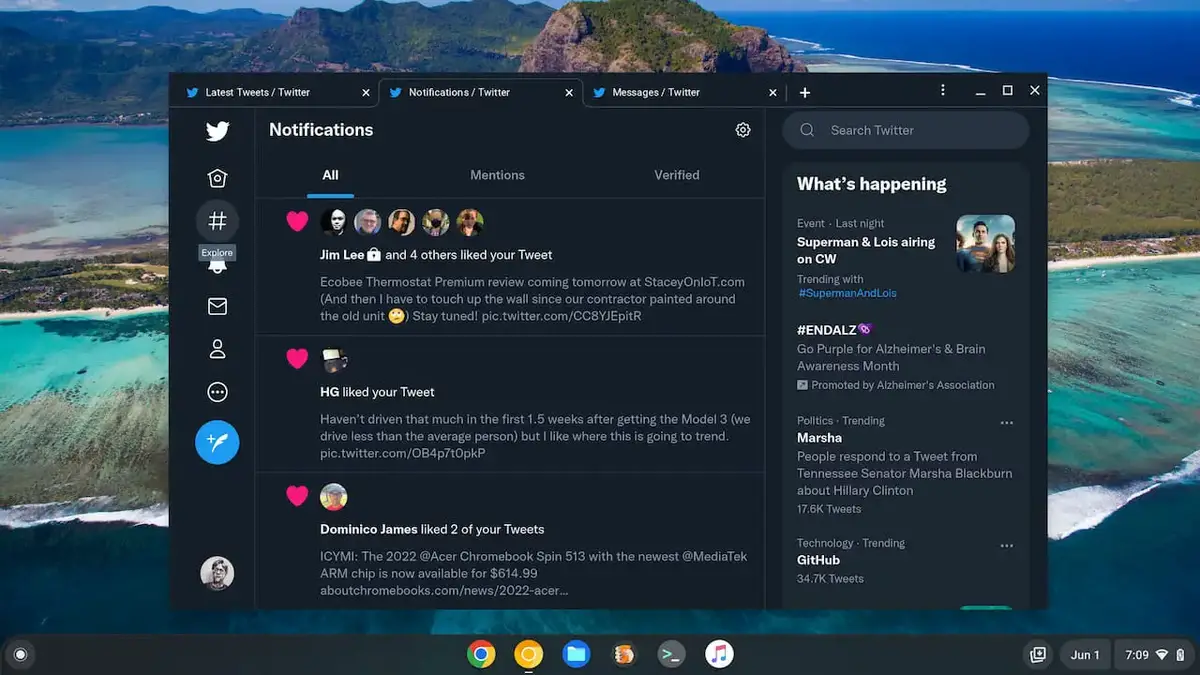
In ChromeOS Canary right now, you can enable a developer flag that takes your web app shortcuts that you’ve created and gives them a tabbed strip at the top as you see in the image below from About Chromebooks.
Xremove ads
Source: About Chromebooks

So, instead of having one instance of Twitter, for example, you can have several open simultaneously without the need for multiple separate app windows floating around your desktop. It’s a fantastic concept that comes in handy more with Gmail or Google Keep where you’d need to access multiple Google Accounts at the same time, but it can really be used for whatever you want.

chrome://flags#enable-desktop-pwas-tab-strip
chrome://flags:#enable-desktop-pwas-tab-strip-settings

Enable these Chrome flags to get the feature working!

Sadly, this feature still hasn’t rolled out to users en masse, and despite it being created all the way back in 2018, it seems it’s just not ready for prime time for some reason. For this reason, it’s been stuck in ChromeOS Canary for a long, long time.

Featured Videos

Xremove ads

According to XDA Developers, however, the feature may be progressing once more toward release (though that may not be any time soon) as a Chrome Platform Status update says the following as well as showing off a video of tabbed PWAs in action:

Currently PWAs in a standalone window can only have one page open at a time. Some apps expect users to have many pages open at once. Tabbed mode adds a tab strip to standalone web apps that allows multiple tabs to be open at once.

XDA Developers

Developers will apparently have to add support to their web app manifest file for tabs manually, but when I tested it out I noticed two things. First, most web apps that I cared about already had it built in somehow, second, the experience was pretty inconsistent. I constantly had to change windows back to “New tabbed window” by right-clicking them and hovering over the arrow to the right of “New window”. It was a very convenient feature, but very annoying to daily drive, and I’m wondering what’s taking so very long for this essential tool to come to everyone.

From what I gather, just having an official description update to the Chrome Platform Status shows that the feature isn’t dead or stuck, but rather in motion once more. Do you see yourself using tabbed web apps, or do you prefer to open everything in Chrome as tabs? Doing it this way can lead to lots of disorganization, and tabbed PWAs can clean that up quite a bit.

Xremove ads

SUBSCRIBE TO UPSTREAM

Get Chrome Unboxed delivered straight to your inbox

Upstream is our flagship, curated newsletter with the top stories, most click-worthy deals, giveaways, and trending articles from Chrome Unboxed sent directly to your inbox a few times a week. Join 31,000+ subscribers.

SUBSCRIBE HERE!

Filed Under: ChromeOS, New & Upcoming Features, News, Updates

About Michael Perrigo

Known as "Google Mike" to his customers, Michael worked at Best Buy as a Chromebook Expert who dedicated his time to understanding the user experience from a regular Chromebook owner's perspective. Having spent nearly 20 years meeting you face-to-face, he strives to help you understand your technology through carefully crafted guides and coverage, relentlessly seeking out the spark in what's new and exciting about ChromeOS.

Primary Sidebar

Xremove ads

Deals

Massive Deal Alert: The Acer Chromebook Plus Spin 714 just hit an all-time low $499

By Robby Payne
April 1, 2026

The best Chromebook deals today

By Robby Payne
March 30, 2026

The Acer Chromebook Plus Spin 714 hits a new all-time low at $270 off

By Robby Payne
March 25, 2026

You can score $40 off Google’s battery-powered Nest Doorbell right now

By Joseph Humphrey
March 20, 2026

The touchscreen Lenovo Chromebook Slim 3 is a steal at under $200

By Robby Payne
March 16, 2026

More Deals

Xremove ads

Reviews

Acer Chromebook Plus Spin 514 Review: Kompanio Ultra power in a convertible

By Robby Payne
December 24, 2025

My review after 6 weeks with the Lenovo Chromebook Plus 14 [VIDEO]

By Robby Payne
August 11, 2025

One week with the best small Android tablet you can buy, and I’m sold

By Robby Payne
May 9, 2025

Best Chromebooks of 2024 [VIDEO]

By Robby Payne
November 28, 2024

Samsung Galaxy Chromebook Plus Review: Samsung is back! [VIDEO]

By Robby Payne
October 28, 2024

More Reviews

Xremove ads

Guides

This Chromebook trackpad shortcut is definitely not new, but is blowing my mind

By Robby Payne
March 11, 2024

How to reduce broadcast delay on YouTube TV to stop live spoilers

By Robby Payne
December 8, 2023

Windows PC keyboard and Chromebook

How to use a Windows keyboard with a Chromebook

By Joseph Humphrey
December 8, 2023

How reset and revert your Chromebook to the previous version of Chrome OS

By Robby Payne
November 29, 2023

My Chromebook Plus features disappeared: here’s how I fixed it

By Robby Payne
November 24, 2023

More Guides

TWITTER · FACEBOOK · INSTAGRAM · YOUTUBE · EMAIL · ABOUT

Copyright © 2026 · Chrome Unboxed · Chrome is a registered trademark of Google Inc.
We are participants in various affiliate advertising programs designed to provide a means for us to earn fees by linking to affiliated sites.

PRIVACY POLICY