
• Skip to main content
  • Skip to primary sidebar
  • Deals
  • Features
  • Guides
  • Chromebooks
  • Videos
  • Podcast
  • More +
    • Reviews
    • Unboxing
    • Upcoming Devices
    • Chromebook Plus
    • Chrome
    • ChromeOS
    • Chrome OS Flex
  • Search
  • Sign Up
  • Log In
Chrome Unboxed – The Latest Chrome OS News

Chrome Unboxed - The Latest Chrome OS News

A Space for All Things Chrome, Google, and More!

  • Deals
  • Features
  • Guides
  • Chromebooks
  • Videos
  • Podcast
  • More +
    • Reviews
    • Unboxing
    • Upcoming Devices
    • Chromebook Plus
    • Chrome
    • ChromeOS
    • Chrome OS Flex
  • Search
  • Sign Up
  • Log In

‘Eche’ will let you ‘Push’ things from your Pixel phone to your Chromebook

September 13, 2021 By Michael Perrigo View Comments

Support our independent tech coverage. Chrome Unboxed is written by real people, for real people—not search algorithms. Join Chrome Unboxed Plus for just $2 a month to get an ad-free experience, access to our private Discord, and more. Learn more about membership here.
START FREE TRIAL (MONTHLY)START FREE TRIAL (ANNUAL)

Phone Hub is Google’s initiative to help bring your Chromebook and phone closer together. It lets you check your notifications, and battery, and even ring your handheld device, see recently accessed apps and Chrome tabs, and more.

We’ve been following ‘Eche’ for some time, and while it’s always seemed to us to be a more direct way to ‘mirror’ your phone beyond the Hub’s capabilities, or even in conjunction with it, it hasn’t shown much public progress for some time. You can visit chrome://eche/app in order to launch it within its own app window after enabling its flag, but then you’ll only be met with a message stating that you need to open a specific notification in order to continue.

Xremove ads

Today, 9to5Google has uncovered a new ‘Push’ feature for Pixel phones in their APK Insights report of the recent Android 12 Beta 5. Found on the ‘Recents’ screen via com.google.pixel.exo, the option as seen below could work much in the same way as services like Push Bullet. Swipe up on your pill navigation to call up a list of open apps and apps running in the background, tap ‘Push’, and said app or selected text snippet will appear in the Phone Hub on your Chromebook’s shelf.
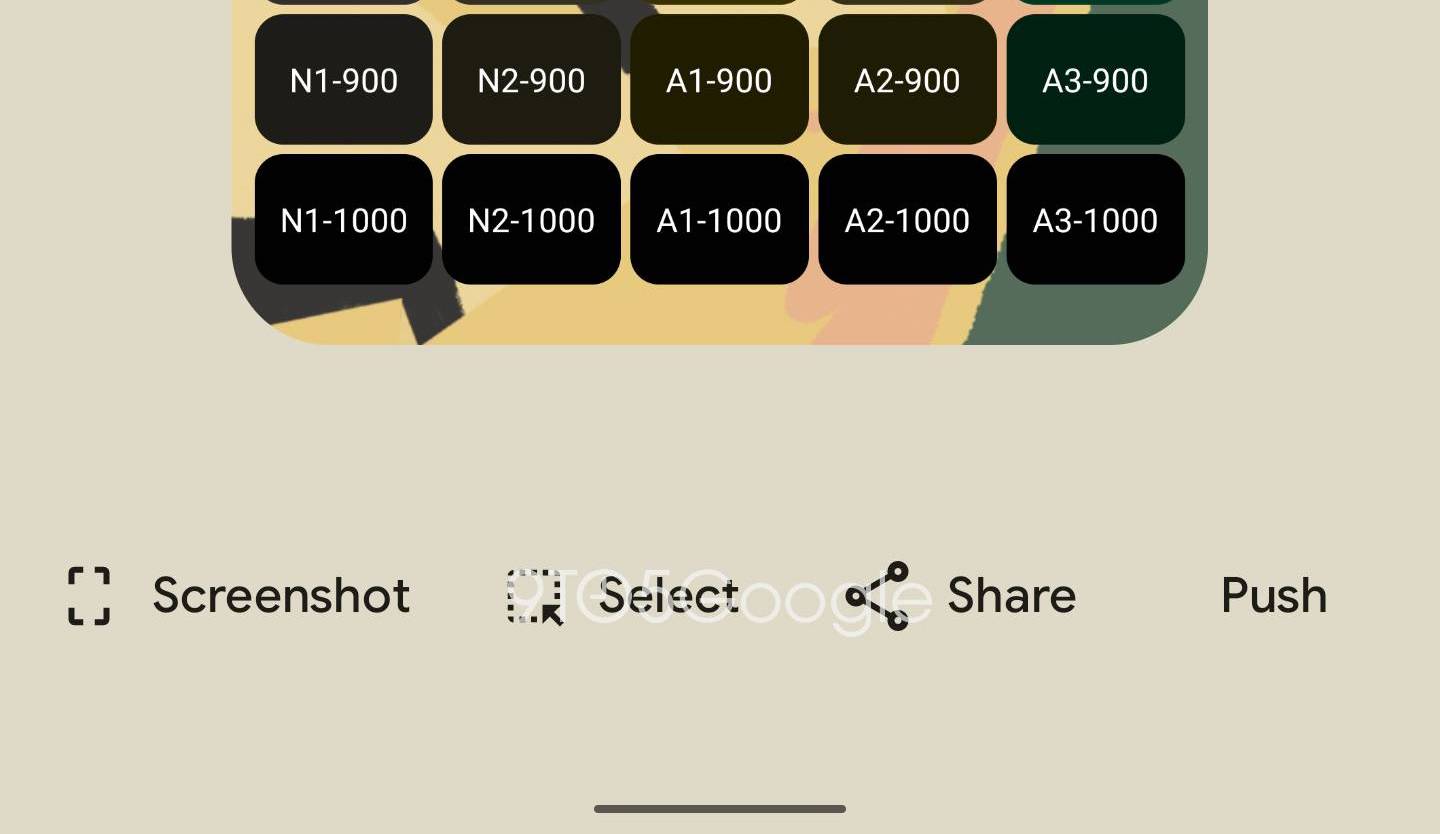
Source: 9to5Google

9to5Google believes that both devices will have to be on the same network for this to work, which makes sense. They’ve come across code snippets that reference ‘Fast Pair’ and the ability to link to a device named “%1$s” which is likely a placeholder for your Chromebook’s model number or hostname.

Featured Videos

Xremove ads

<string name=”fast_pair_exo_customized_title”>Link to %1$s</string>

<string name=”fast_pair_exo_customized_description”>Use your phone’s apps directly on %1$s when you’re at home</string>

9to5Google

At this time, it’s unclear exactly how Eche will go about doing what it sets out to do – be it pushing over app data from your phone to your laptop or mirroring entire applications from one screen to the other. If it does perform the latter operation, it could be akin to ‘casting’ your screen the same way a Chromecast does, so that you don’t have to pull your phone out of your pocket whatsoever if you’re sitting down to work.

Whatever the case, we’re excited to see this finally making progress and can’t wait to test it out when it makes its debut. It would be great if Google announced the feature for Chrome OS with Android 12, which is rumored to release officially on October 4th. With ‘Push’ seemingly being a Pixel-exclusive feature, this would make the most sense, but we’ll have to wait and see.

SUBSCRIBE TO UPSTREAM

Get Chrome Unboxed delivered straight to your inbox

Upstream is our flagship, curated newsletter with the top stories, most click-worthy deals, giveaways, and trending articles from Chrome Unboxed sent directly to your inbox a few times a week. Join 31,000+ subscribers.

Xremove ads
SUBSCRIBE HERE!

Filed Under: Apps, ChromeOS, New & Upcoming Features, News, Updates

About Michael Perrigo

Known as "Google Mike" to his customers, Michael worked at Best Buy as a Chromebook Expert who dedicated his time to understanding the user experience from a regular Chromebook owner's perspective. Having spent nearly 20 years meeting you face-to-face, he strives to help you understand your technology through carefully crafted guides and coverage, relentlessly seeking out the spark in what's new and exciting about ChromeOS.

Primary Sidebar

Xremove ads

Deals

Save $40 on the Google Pixel Watch 4 before the Spring Sale ends

By Joseph Humphrey
April 24, 2026

The best Chromebook deals today

By Robby Payne
April 20, 2026

Deal Alert: the excellent Lenovo Chromebook Plus 2-in-1 returns to $429

By Robby Payne
April 20, 2026

Lenovo Legion Tab Gen 3 drops to $399, ahead of the much pricier Gen 5 release

By Joseph Humphrey
April 18, 2026

How to get 50% off YouTube Premium for a full year with Google One

By Robby Payne
April 16, 2026

More Deals

Xremove ads

Reviews

Lenovo Chromebook Plus 2-in-1 Review: pretty great in a vacuum

By Robby Payne
April 23, 2026

Acer Chromebook Plus Spin 514 Review: Kompanio Ultra power in a convertible

By Robby Payne
December 24, 2025

My review after 6 weeks with the Lenovo Chromebook Plus 14 [VIDEO]

By Robby Payne
August 11, 2025

One week with the best small Android tablet you can buy, and I’m sold

By Robby Payne
May 9, 2025

Best Chromebooks of 2024 [VIDEO]

By Robby Payne
November 28, 2024

More Reviews

Xremove ads

Guides

This Chromebook trackpad shortcut is definitely not new, but is blowing my mind

By Robby Payne
March 11, 2024

How to reduce broadcast delay on YouTube TV to stop live spoilers

By Robby Payne
December 8, 2023

Windows PC keyboard and Chromebook

How to use a Windows keyboard with a Chromebook

By Joseph Humphrey
December 8, 2023

How reset and revert your Chromebook to the previous version of Chrome OS

By Robby Payne
November 29, 2023

My Chromebook Plus features disappeared: here’s how I fixed it

By Robby Payne
November 24, 2023

More Guides

TWITTER · FACEBOOK · INSTAGRAM · YOUTUBE · EMAIL · ABOUT

Copyright © 2026 · Chrome Unboxed · Chrome is a registered trademark of Google Inc.
We are participants in various affiliate advertising programs designed to provide a means for us to earn fees by linking to affiliated sites.

PRIVACY POLICY