

Support our independent tech coverage. Chrome Unboxed is written by real people, for real people—not search algorithms. Join Chrome Unboxed Plus for just $2 a month to get an ad-free experience, access to our private Discord, and more. Learn more about membership here.
START FREE TRIAL (MONTHLY)START FREE TRIAL (ANNUAL)
The release of Chrome OS 57 may be old news but we have been fielding a lot of inquiries about some of the updates. A large number of users have frequented the Chromebook Central forum with questions about new features that weren’t very clearly outlined in the latest release. So, we are going to attempt to keep an up-to-date synopsis of Chrome OS versions to help you get the most out of your Chromebook and avoid confusion when things change on your device.
Convertible Sleep Mode
This new feature is pretty straight forward and at the moment will only pertain to a small percentage of users. A large number of these users have frequented forums asking about the proper behavior of the power button on the side of their convertible Chromebooks. As of Chrome OS 57 the power button two functions and they both are accessible regardless of which “mode” your device is in.
Just like your mobile phone, the power button will put your device to sleep whether in clamshell, tablet, tent or display mode. A simple, quick press will lock and power off the display. Another click and you’re back in business but you will have to sign in. Alternatively, just like your phone, holding the power button for more than 3 seconds will power down your Chromebook.
Pin Unlock
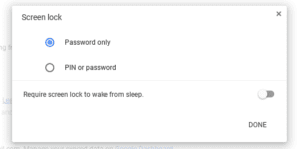 This property has been floating around Chrome OS 54 but it required some tinkering to enable it. With the latest version, Quick Pin Unlock is now available in your screen lock settings with no additional steps needed. Simply navigate to Settings>People>manage screen lock and you will be prompted to type in your account password. From there you can enable and set a PIN number with which you can access your Chromebook from its locked state.
Note: PIN unlock will only work from a locked screen. At power up you will need to use your account password.
Android Media Files
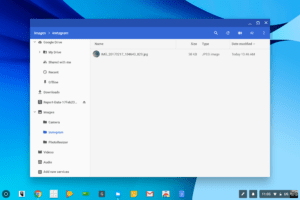 If you’re lucky enough to have a Chromebook with access to the Google Play Store you can now view and manage media files created by and saved via Android Apps. In your files app you will find a folder labeled “Media.” Opening that folder will present you with sub-folders of Android Apps that have accessible media on your device.

New Default Wallpapers
A few new wallpapers have been added to the background selection for Chrome OS devices. As always, you can create your own wallpaper or even let your Chromebook chose one for you. There have been some recent commits in the repository that hint at specific models have unique defaults when available. We have seen different manufacturers use a particular background for their devices but this might serve as a larger collection of images specific to each device. We shall see.
Chrome OS 58 will be rolling out very soon. Along with the hopes of finally seeing Android Apps across the board, we look forward to any and all enhancements in the next version and will report as soon as it drops.
There you have it. Have you seen something new in Chrome OS 57? Drop us a line or comment below and we’ll get it on the list.

