
• Skip to main content
  • Skip to primary sidebar
  • Deals
  • Features
  • Guides
  • Chromebooks
  • Videos
  • Podcast
  • More +
    • Reviews
    • Unboxing
    • Upcoming Devices
    • Chromebook Plus
    • Chrome
    • ChromeOS
    • Chrome OS Flex
  • Search
  • Sign Up
  • Log In
Chrome Unboxed – The Latest Chrome OS News

Chrome Unboxed - The Latest Chrome OS News

A Space for All Things Chrome, Google, and More!

  • Deals
  • Features
  • Guides
  • Chromebooks
  • Videos
  • Podcast
  • More +
    • Reviews
    • Unboxing
    • Upcoming Devices
    • Chromebook Plus
    • Chrome
    • ChromeOS
    • Chrome OS Flex
  • Search
  • Sign Up
  • Log In

Chrome continues its war on bad extensions by giving you direct control over what data they can access

December 9, 2020 By Michael Perrigo View Comments

Support our independent tech coverage. Chrome Unboxed is written by real people, for real people—not search algorithms. Join Chrome Unboxed Plus for just $2 a month to get an ad-free experience, access to our private Discord, and more. Learn more about membership here.
START FREE TRIAL (MONTHLY)START FREE TRIAL (ANNUAL)

With 4 million Chrome extensions downloaded by users daily, it’s clear that we love expanding the functionality of our browser in new ways. What isn’t so great is when we see in the news that a Chrome extension or two has stolen the data of millions and seemingly gotten away with it. Extensions are a hot mess right now, to put it lightly, but with great power comes great responsibility – or so a highly specific pop culture icon’s uncle once said – so, if we’re going to continue to use and trust Chrome extensions, they’re going to need to be subject to better “supervision”, so to speak.

That’s why Google has been on a warpath against bad actor extensions as of late. Just last month, they revealed their roadmap for limiting how much data a developer can collect on your browsing habits and they also outlined their plans for policing how it can be used. Additionally, they revealed their plans to offer a ‘seal of approval’ of sorts for extensions that follow a strict set of guidelines and respect users’ privacy.

Xremove ads

During this upcoming year (presumably early on), Chrome will change how extensions access data and how permissions work when an extension is installed. You will be in charge of determining which websites the extension can access while you’re browsing. The extension itself has historically been able to make a determination on this, thus allowing the developer to use your browsing data for anything they want without even informing you!

Gif showing that you will be able to manage the extension’s permissions, so you control which websites it can access as you browse the web.

Once you grant an extension permission to access a website’s data, that preference can be saved for that domain. You can also still decide to grant an extension access to all the websites you visit, but that is no longer the default.

The Keyword

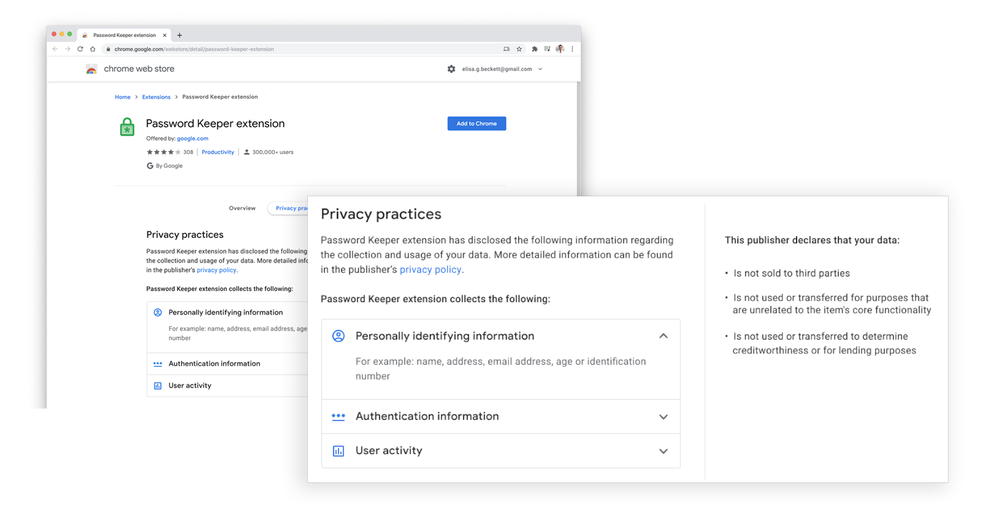
Another way in which Google is holding extension developers accountable is by requiring them to list exactly what data they’re using and how. Come 2021, the details page and the Chrome Web Store listing for each of your extensions will reveal, in plain sight, what was previously hidden. By clicking the ‘Privacy practices’ tab, you’ll be able to read through exactly what that developer has agreed to in regards to data collection and usage. Any deviation from this should get them removed from the Web Store. Going forward, we’re hoping that Google comes in stronger and faster with this and lays the smack down before bad actor extensions have time to do any damage.
Featured Videos

Xremove ads
Image showing user interface for Chrome extension "privacy practices" feature

Lastly, Chrome will start offering more proactive measures against these types of extensions in 2021 through Enhanced Safe Browsing. Last year, they updated their safety check tool in the browser’s settings to help you identify potentially harmful extensions and remove them. At this time, we aren’t sure what they will reveal, but we’re excited to find out as we continue to watch Google transform the Chrome Web Store from the wild west into a properly managed marketplace for extensible functionality. Now if they could just redesign it or move everything into the Play Store as they’re starting to do with PWAs, we’d be ecstatic!
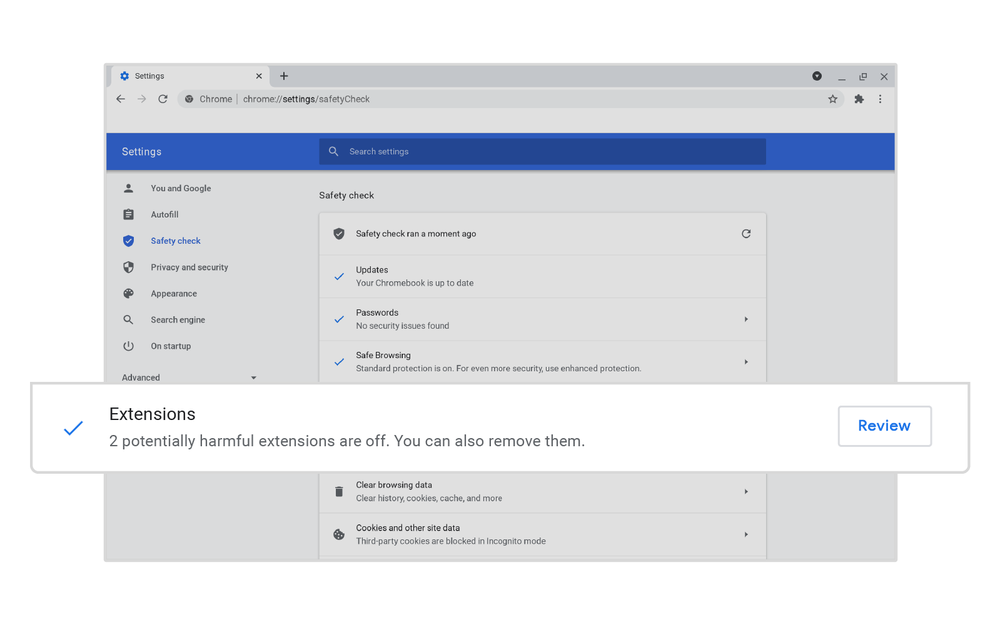
Image showing user interface for Chrome’s Safety check. Image dialogue box reading "2 potentially harmful extensions are off. You can also remove them."

SUBSCRIBE TO UPSTREAM

Get Chrome Unboxed delivered straight to your inbox

Upstream is our flagship, curated newsletter with the top stories, most click-worthy deals, giveaways, and trending articles from Chrome Unboxed sent directly to your inbox a few times a week. Join 31,000+ subscribers.

SUBSCRIBE HERE!

Filed Under: Chrome, Extensions, New & Upcoming Features, News

About Michael Perrigo

Known as "Google Mike" to his customers, Michael worked at Best Buy as a Chromebook Expert who dedicated his time to understanding the user experience from a regular Chromebook owner's perspective. Having spent nearly 20 years meeting you face-to-face, he strives to help you understand your technology through carefully crafted guides and coverage, relentlessly seeking out the spark in what's new and exciting about ChromeOS.

Primary Sidebar

Xremove ads

Deals

How to get 50% off YouTube Premium for a full year with Google One

By Robby Payne
April 16, 2026

The Pixel 10a just dropped to $449, but here’s why you should buy the Pixel 10 instead

By Joseph Humphrey
April 13, 2026

Save up to $200 on the two best Chromebooks on the market

By Robby Payne
April 13, 2026

The best Chromebook deals today

By Robby Payne
April 13, 2026

You can grab the battery-powered Nest Doorbell for just $129.99 right now

By Joseph Humphrey
April 11, 2026

More Deals

Xremove ads

Reviews

Acer Chromebook Plus Spin 514 Review: Kompanio Ultra power in a convertible

By Robby Payne
December 24, 2025

My review after 6 weeks with the Lenovo Chromebook Plus 14 [VIDEO]

By Robby Payne
August 11, 2025

One week with the best small Android tablet you can buy, and I’m sold

By Robby Payne
May 9, 2025

Best Chromebooks of 2024 [VIDEO]

By Robby Payne
November 28, 2024

Samsung Galaxy Chromebook Plus Review: Samsung is back! [VIDEO]

By Robby Payne
October 28, 2024

More Reviews

Xremove ads

Guides

This Chromebook trackpad shortcut is definitely not new, but is blowing my mind

By Robby Payne
March 11, 2024

How to reduce broadcast delay on YouTube TV to stop live spoilers

By Robby Payne
December 8, 2023

Windows PC keyboard and Chromebook

How to use a Windows keyboard with a Chromebook

By Joseph Humphrey
December 8, 2023

How reset and revert your Chromebook to the previous version of Chrome OS

By Robby Payne
November 29, 2023

My Chromebook Plus features disappeared: here’s how I fixed it

By Robby Payne
November 24, 2023

More Guides

TWITTER · FACEBOOK · INSTAGRAM · YOUTUBE · EMAIL · ABOUT

Copyright © 2026 · Chrome Unboxed · Chrome is a registered trademark of Google Inc.
We are participants in various affiliate advertising programs designed to provide a means for us to earn fees by linking to affiliated sites.

PRIVACY POLICY