


Support our independent tech coverage. Chrome Unboxed is written by real people, for real people—not search algorithms. Join Chrome Unboxed Plus for just $2 a month to get an ad-free experience, access to our private Discord, and more. Learn more about membership here.
START FREE TRIAL (MONTHLY)START FREE TRIAL (ANNUAL)
Google has many experiments in the pipeline that it toys with before releasing them to the public. A recent one was its attempt to hide extended URLs from the browser’s Omnibox in an effort to decrease social engineering schemes (Not its first attempt). Apparently, always showing the full web address can help shoulder surfers more accurately track your interactions or something. The company also claims that in websites like Gmail where many same document navigations occur, the URL can flash too often. To be honest, I’m not really sure what the point of this was, to begin with – perhaps to simplify the web browser or make it more attractive and less distracting.
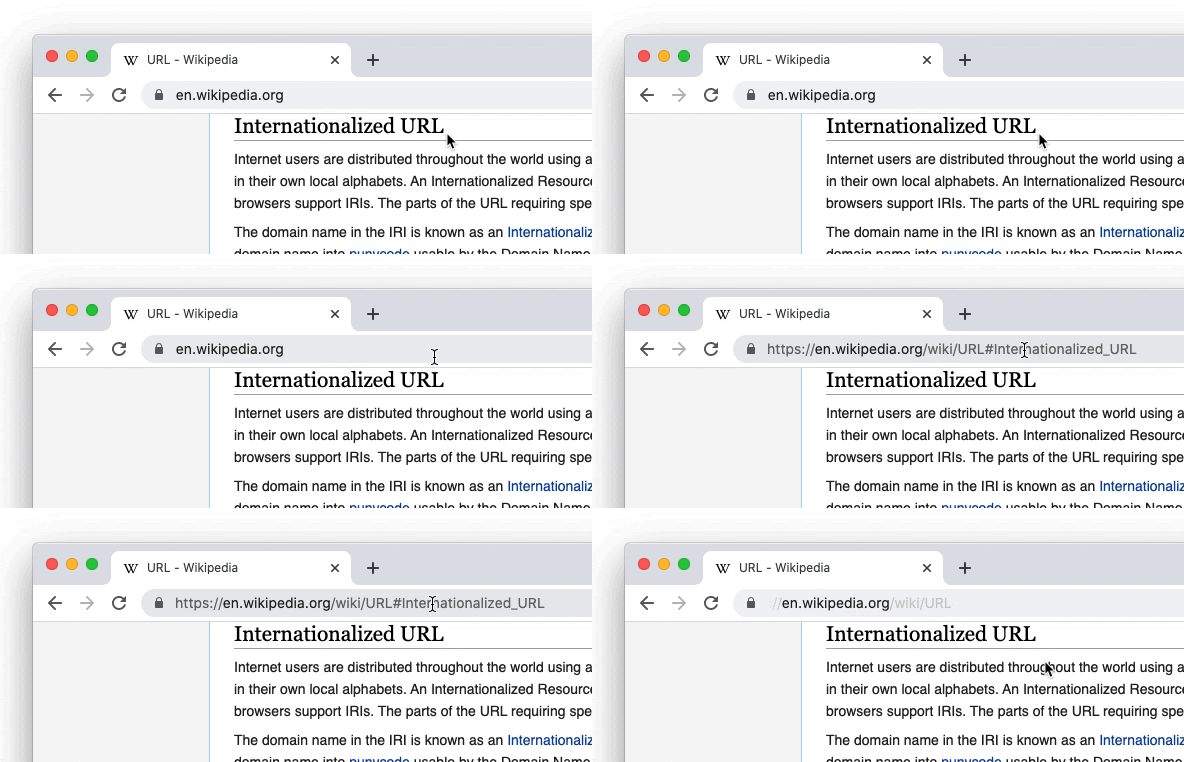
Re #14: We think this is an important problem area to explore because phishing and other forms of social engineering are still rampant on the web, and much research shows that browsers’ current URL display patterns aren’t effective defenses.
We’re implementing this simplified domain display experiment so that we can conduct qualitative and quantitative research to understand if it helps users identify malicious websites more accurately. This means we’ll have study participants exploring the prototype in lab/survey studies, and we will also roll it out to a small % of real Chrome users to understand if it helps protect them from phishing. If the results show that this simplified domain display does help protect users from attacks, then we’ll make a decision about whether to ship it to all users, balancing user feedback with the security considerations. As noted above, users will have an option available to individually opt out of it if they feel that it isn’t a security or usability improvement for them.
Chromium Bugs
The bug comment above shows that the experiment was always meant to be temporary unless research proved it effective. Well, it didn’t, and we’re not surprised. This past week, Google has decided to shut this down. Now, those in Chrome Canary will begin seeing the full web address in their Omnibox without the need to hover or expand it. No flag reversion will be necessary either.
Delete simplified domain experiment
This experiment didn’t move relevant security metrics, so we’re not going to launch it. 🙁
Chromium Bugs
Users have been quick to point out that since its inception, this approach to web URLs actually benefit Google more than they. By giving less importance to specific addresses, AMP (Accelerated Mobile Pages) can flourish – and by extension, its creator, Google. Basically, this keeps those browsing the web on Google-hosted content more often than not. Some would argue that deprioritizing or modifying desktop web URLs could harm the beloved decentralization of the internet as a whole, but that’s a much larger conversation to be had and has many nuances.
SUBSCRIBE TO UPSTREAM
Get Chrome Unboxed delivered straight to your inbox
Upstream is our flagship, curated newsletter with the top stories, most click-worthy deals, giveaways, and trending articles from Chrome Unboxed sent directly to your inbox a few times a week. Join 31,000+ subscribers.


