
• Skip to main content
  • Skip to primary sidebar
  • Deals
  • Features
  • Guides
  • Chromebooks
  • Videos
  • Podcast
  • More +
    • Reviews
    • Unboxing
    • Upcoming Devices
    • Chromebook Plus
    • Chrome
    • ChromeOS
    • Chrome OS Flex
  • Search
  • Sign Up
  • Log In
Chrome Unboxed – The Latest Chrome OS News

Chrome Unboxed - The Latest Chrome OS News

A Space for All Things Chrome, Google, and More!

  • Deals
  • Features
  • Guides
  • Chromebooks
  • Videos
  • Podcast
  • More +
    • Reviews
    • Unboxing
    • Upcoming Devices
    • Chromebook Plus
    • Chrome
    • ChromeOS
    • Chrome OS Flex
  • Search
  • Sign Up
  • Log In

Saving your Chrome Tab Groups to the Bookmark bar is finally working in Chrome Canary

November 14, 2022 By Michael Perrigo View Comments

Support our independent tech coverage. Chrome Unboxed is written by real people, for real people—not search algorithms. Join Chrome Unboxed Plus for just $2 a month to get an ad-free experience, access to our private Discord, and more. Learn more about membership here.
START FREE TRIAL (MONTHLY)START FREE TRIAL (ANNUAL)

One of my all-time favorite upcoming Chrome features is finally up and running properly! For what seems like forever, I’ve been tracking and reporting on something called ‘Tab Groups Save‘. The ability to save your Tab Groups for later, close the browser, re-open it and re-launch said groups has been completely absent since the tool first launched.

Source: Reddit

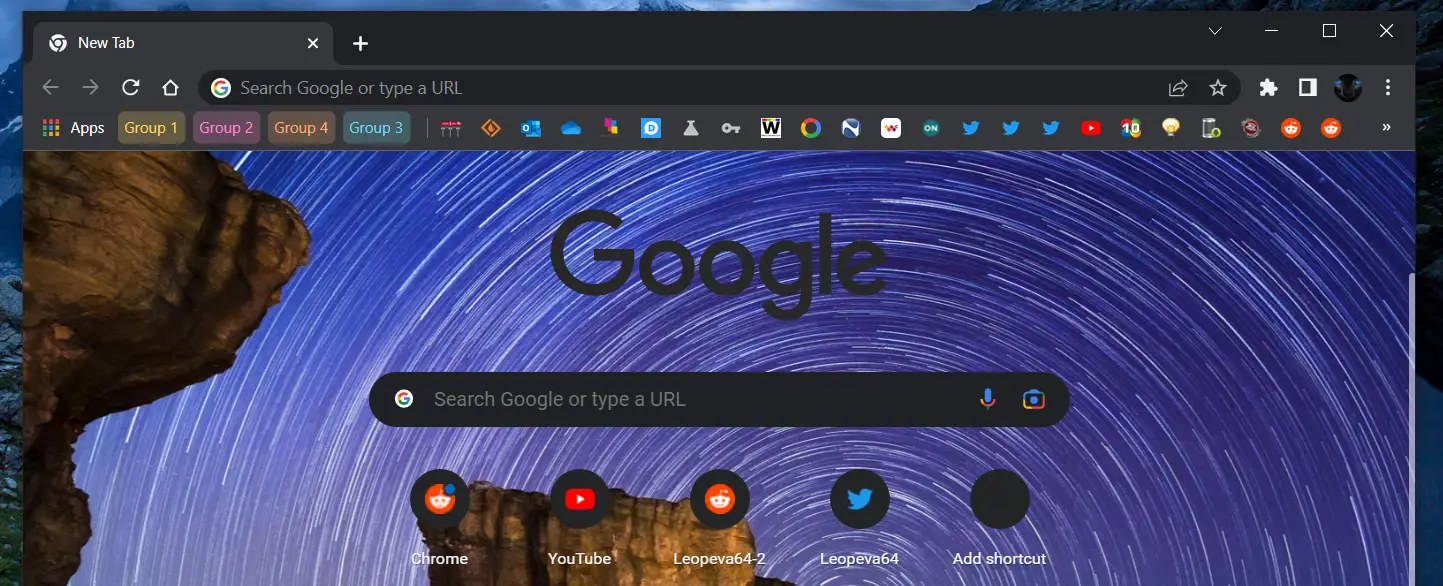
Not long ago, these groups actually jumped down to the Bookmark bar after the user clicked ‘Save group’, but unfortunately, coming back later revealed that these colorful chips full of delicious, personalized content were completely gone.

Xremove ads

Now, thanks to our friend Leopeva64-2 over on Reddit, it looks like Google has finally found a way to make these stick. In Chrome Canary 110, your saved Tab Groups will now be accessible to you after booting your browser up from scratch, though at this time, they are in the wrong order.
Source: Reddit

[ SavedTabGroup ] Sync Bridge Implementation

The SavedTabGroupSyncBridge allows us to send and receive updates from sync in order to maintain an ordering of saved tab groups across devices. Additionally, the sync bridge adds the ability to store saved tab groups into local storage (to the disk) which can be recovered / recalled across sessions (browser crashes, closing the browser, updating the browser, etc).

Chromium Gerrit

There’s no need to worry though, as this issue is already being prioritized, which gives me the sense that saving things for later without having to store them directly as static bookmarks that rot and are forgotten is probably right around the corner!

Featured Videos

Xremove ads

Once it’s available to everyone, the company may make it available to older versions of Chrome, including versions 108 and 109, according to Leopeva64-2. I’ve accidentally fallen in love with Tab Groups, and can’t wait to actually be able to collect and save sessions for later without using extensions like Toby.

SUBSCRIBE TO UPSTREAM

Get Chrome Unboxed delivered straight to your inbox

Upstream is our flagship, curated newsletter with the top stories, most click-worthy deals, giveaways, and trending articles from Chrome Unboxed sent directly to your inbox a few times a week. Join 31,000+ subscribers.

SUBSCRIBE HERE!

Filed Under: Chrome, New & Upcoming Features Tagged With: videos

About Michael Perrigo

Known as "Google Mike" to his customers, Michael worked at Best Buy as a Chromebook Expert who dedicated his time to understanding the user experience from a regular Chromebook owner's perspective. Having spent nearly 20 years meeting you face-to-face, he strives to help you understand your technology through carefully crafted guides and coverage, relentlessly seeking out the spark in what's new and exciting about ChromeOS.

Primary Sidebar

Xremove ads

Deals

Save $40 on the Google Pixel Watch 4 before the Spring Sale ends

By Joseph Humphrey
April 24, 2026

The best Chromebook deals today

By Robby Payne
April 20, 2026

Deal Alert: the excellent Lenovo Chromebook Plus 2-in-1 returns to $429

By Robby Payne
April 20, 2026

Lenovo Legion Tab Gen 3 drops to $399, ahead of the much pricier Gen 5 release

By Joseph Humphrey
April 18, 2026

How to get 50% off YouTube Premium for a full year with Google One

By Robby Payne
April 16, 2026

More Deals

Xremove ads

Reviews

Lenovo Chromebook Plus 2-in-1 Review: pretty great in a vacuum

By Robby Payne
April 23, 2026

Acer Chromebook Plus Spin 514 Review: Kompanio Ultra power in a convertible

By Robby Payne
December 24, 2025

My review after 6 weeks with the Lenovo Chromebook Plus 14 [VIDEO]

By Robby Payne
August 11, 2025

One week with the best small Android tablet you can buy, and I’m sold

By Robby Payne
May 9, 2025

Best Chromebooks of 2024 [VIDEO]

By Robby Payne
November 28, 2024

More Reviews

Xremove ads

Guides

This Chromebook trackpad shortcut is definitely not new, but is blowing my mind

By Robby Payne
March 11, 2024

How to reduce broadcast delay on YouTube TV to stop live spoilers

By Robby Payne
December 8, 2023

Windows PC keyboard and Chromebook

How to use a Windows keyboard with a Chromebook

By Joseph Humphrey
December 8, 2023

How reset and revert your Chromebook to the previous version of Chrome OS

By Robby Payne
November 29, 2023

My Chromebook Plus features disappeared: here’s how I fixed it

By Robby Payne
November 24, 2023

More Guides

TWITTER · FACEBOOK · INSTAGRAM · YOUTUBE · EMAIL · ABOUT

Copyright © 2026 · Chrome Unboxed · Chrome is a registered trademark of Google Inc.
We are participants in various affiliate advertising programs designed to provide a means for us to earn fees by linking to affiliated sites.

PRIVACY POLICY