

We’ve all been there. You’re on your phone, you come across a long, interesting-looking article, but you just don’t have the time to read the whole thing. For a while now, you’ve been able to get a summary by manually copying the URL, switching over to the Gemini app, and pasting the link. It works, but it’s a clunky, multi-step process.
Additionally, on Chromebooks, we’ve had the availability of Gemini summaries built right in for over a year at this point. A simple right-click and selection of “Summarize this with Help Me Read” gives you a condensed, to-the-point version of the content on your screen with ChromeOS devices. However, on mobile devices, this simply isn’t an option.
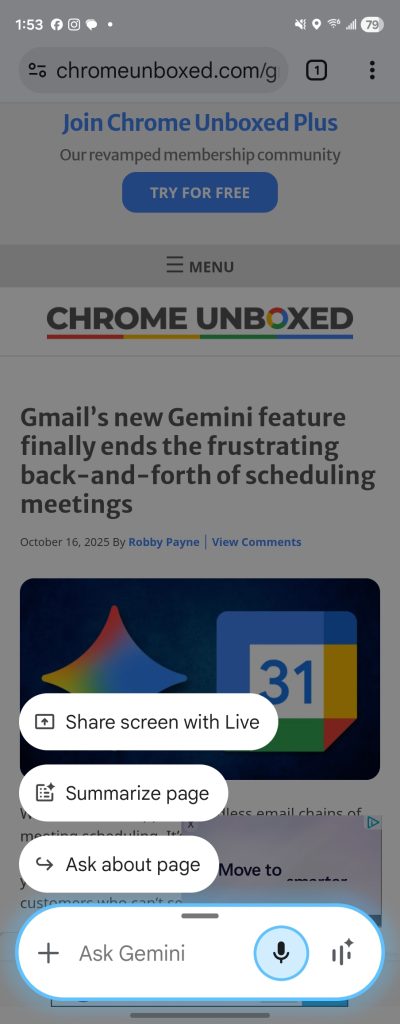
However, a fantastic and much-needed new feature is now rolling out to Chrome for Android that adds a one-tap “Summarize page” shortcut directly to the Gemini overlay just like we see on desktop, and it could make consuming written content on the go a must quicker process.
A smarter, simpler way to get the gist
The new feature, first spotted by the team at 9to5Google, is incredibly intuitive. Here’s how it works:
- When you’re on a webpage in Chrome, simply activate the Gemini overlay (usually by holding the power button or swiping from a corner).
- Alongside the existing options, you’ll see a new “Summarize page” chip.
- Tap it, and after a delightful little animation, a handy floating window will appear with a concise, AI-generated summary of the page’s content.
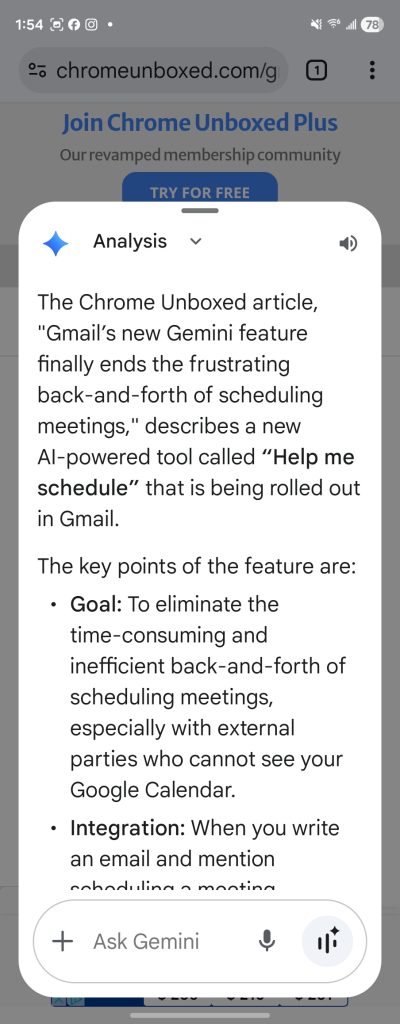
From that summary window, you can expand it to read more or even ask follow-up questions to dive deeper. It’s a seamless, in-context way to get the information you need without ever leaving the page you’re on.
More than just a Chrome feature
This isn’t just limited to the main Chrome browser, either. The new “Summarize page” shortcut also appears when you’re viewing a Chrome Custom Tab, which includes articles you open from the Discover feed, Google Search results, and the Google News app, making it a truly system-wide tool for content consumption.
This is a fantastic quality-of-life update and a feature we’ve been waiting for since the big “Gemini in Chrome” announcements for desktop earlier this month. It’s great to see this powerful capability now making its way to mobile, and it’s another great example of Google making Gemini a more context-aware and genuinely helpful assistant. The feature is rolling out now with both the stable and beta versions of the Google app.
Join Chrome Unboxed Plus
Introducing Chrome Unboxed Plus – our revamped membership community. Join today at just $2 / month to get access to our private Discord, exclusive giveaways, AMAs, an ad-free website, ad-free podcast experience and more.
Plus Monthly
$2/mo. after 7-day free trial
Pay monthly to support our independent coverage and get access to exclusive benefits.
Plus Annual
$20/yr. after 7-day free trial
Pay yearly to support our independent coverage and get access to exclusive benefits.
Our newsletters are also a great way to get connected. Subscribe here!
Click here to learn more and for membership FAQ

