


Support our independent tech coverage. Chrome Unboxed is written by real people, for real people—not search algorithms. Join Chrome Unboxed Plus for just $2 a month to get an ad-free experience, access to our private Discord, and more. Learn more about membership here.
START FREE TRIAL (MONTHLY)START FREE TRIAL (ANNUAL)
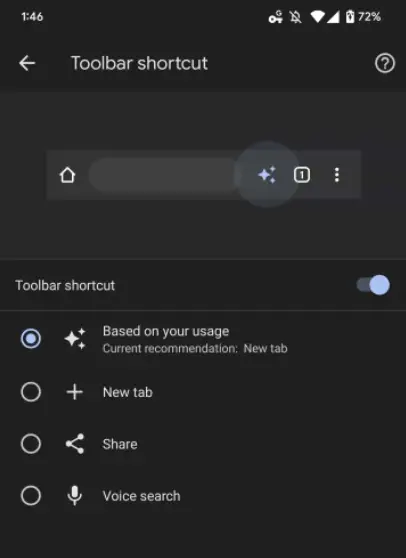
A brand new developer flag has appeared in Chrome for Android, and as discovered by 9to5Google, it seeks to make your browser’s toolbar adapt to your needs in real-time. As you can see below, a “toolbar shortcut” will appear between the Omnibox and the tab counter once the feature rolls out (Currently rolling out, just not to everyone).
chrome://flags/#adaptive-button-in-top-toolbar-customization
In the meantime, it can be enabled manually by visiting chrome://flags and toggling the “Adaptive Button in Top Toolbar Customization” flag. After a quick restart, you can head to Chrome’s settings page, and then to “Advanced”. Choose “Toolbar shortcut” and then you’ll be able to select whether the shortcut shows you a new tab icon, a share icon, or a voice search microphone.
Additionally, a sparkle icon can be chosen, and that will automagically change the toolbar shortcut to one of these three choices dynamically and based on your usage. I’m not sure how often this will change though. For example, will you need to open a new tab, share or activate voice search manually from the vertical three dots “more” menu before it understands that it may benefit you to have a quick shortcut to that specific command?
If so, what if you change over to needing one of the other three and you never consistently do one of them. Does that mean that the shortcut will be dynamic, but always be a step behind you with no way to predict what your next action may be? Regardless, this is a neat little update, so let me know in the comments if you think you’ll find this useful once it rolls out!
SUBSCRIBE TO UPSTREAM
Get Chrome Unboxed delivered straight to your inbox
Upstream is our flagship, curated newsletter with the top stories, most click-worthy deals, giveaways, and trending articles from Chrome Unboxed sent directly to your inbox a few times a week. Join 31,000+ subscribers.

