
• Skip to main content
  • Skip to primary sidebar
  • Deals
  • Features
  • Guides
  • Chromebooks
  • Videos
  • Podcast
  • More +
    • Reviews
    • Unboxing
    • Upcoming Devices
    • Chromebook Plus
    • Chrome
    • ChromeOS
    • Chrome OS Flex
  • Search
  • Sign Up
  • Log In
Chrome Unboxed – The Latest Chrome OS News

Chrome Unboxed - The Latest Chrome OS News

A Space for All Things Chrome, Google, and More!

  • Deals
  • Features
  • Guides
  • Chromebooks
  • Videos
  • Podcast
  • More +
    • Reviews
    • Unboxing
    • Upcoming Devices
    • Chromebook Plus
    • Chrome
    • ChromeOS
    • Chrome OS Flex
  • Search
  • Sign Up
  • Log In

Brave Browser removes Google as the default search engine in favor of its own

October 28, 2021 By Michael Perrigo View Comments

Brave – the Chromium-based privacy and openness-focused web browser company acquired “Tailcat” last year. This was a European open-source search engine, and now that it’s been rebranded as Brave Search, the team behind it is attempting to take on Google Search to provide a more user-centric experience than the tech giant.

The idea was to build a service from the ground up that would return search results for individuals without the targeted advertising or malicious algorithms often offered by corporations. You can read all about the team’s ambitions in their academic paper.

Xremove ads

Now, Brave Browser itself has made the decision to nix Google Search as the default for finding information in place of Brave Search, and well, that’s a brave move. The CEO states that the default search engine being set to its own will dramatically increase adoption rates for those who use its browser. Additionally, the Web Discovery Project was also introduced, which lets users share specific data with the company without compromising their privacy. Essentially, this data would be anonymous and would lack any clear identifiers. It’s also completely optional.
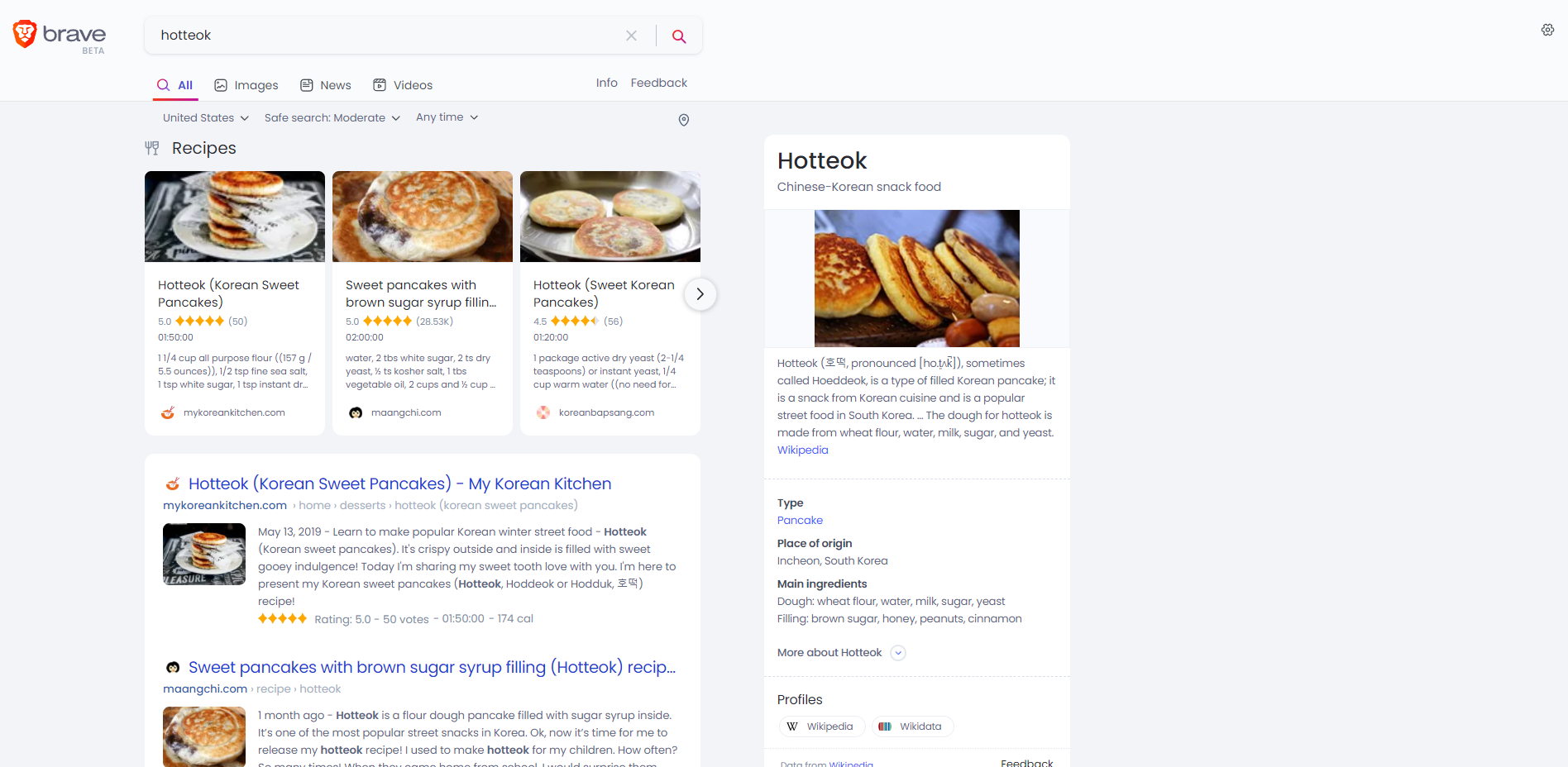
Brave Search is clean, but not as intelligent

I’ve tried Brave Search, and its proposition comes at a cost. I found it to be much less useful at autocomplete, correcting searches, and finding relevant information than Google. I suppose it will take time for the company to sort through these issues. For example, I’ve been wanting to try some delicious Korean hotteok, which is a pancake that’s often filled with nuts, brown sugar, and or syrup, but I forgot how to spell it because I’m an uncultured swine. Google would have caught that and fixed it for me, but with Brave, I had to know the exact spelling, and anything less brought up anything but food.

Featured Videos

Xremove ads

As Google continues to face scrutiny in the court over its advertising practices, more competitors like Brave are sure to crop up in an attempt to service users. Apple itself has allegedly been working on its own search engine to rival Google’s, but whether or not any of these will have staying power remains to be seen.

Google has been on the forefront of information technology for decades now, even going far beyond returning links and implementing artificial intelligence and machine learning to better understand the relationship between humans and computers. I need to do more research on Brave, but if any rival hopes to take on Google, they will have to do a lot better than to only return little blue links like Google did a decade ago.

Join Chrome Unboxed Plus

Introducing Chrome Unboxed Plus – our revamped membership community. Join today at just $2 / month to get access to our private Discord, exclusive giveaways, AMAs, an ad-free website, ad-free podcast experience and more.

Xremove ads

Plus Monthly

$2/mo. after 7-day free trial

Pay monthly to support our independent coverage and get access to exclusive benefits.

Start free trial

Plus Annual

$20/yr. after 7-day free trial

Xremove ads

Pay yearly to support our independent coverage and get access to exclusive benefits.

Start free trial

Our newsletters are also a great way to get connected. Subscribe here!

Click here to learn more and for membership FAQ

Filed Under: Chrome, News, Updates

About Michael Perrigo

Known as "Google Mike" to his customers, Michael worked at Best Buy as a Chromebook Expert who dedicated his time to understanding the user experience from a regular Chromebook owner's perspective. Having spent nearly 20 years meeting you face-to-face, he strives to help you understand your technology through carefully crafted guides and coverage, relentlessly seeking out the spark in what's new and exciting about ChromeOS.

Primary Sidebar

Xremove ads

Deals

The best Chromebook deals today

By Robby Payne
December 26, 2025

The Acer Chromebook Plus Spin 514 hits an all-time low price of $499

By Robby Payne
December 23, 2025

Save $220 on the powerful, versatile Acer Chromebook Plus Spin 714

By Robby Payne
December 10, 2025

The Google Pixel 9a just hit its lowest price ever at $150 off

By Joseph Humphrey
December 8, 2025

At $349, this Lenovo Chromebook Plus is one of the best value laptops you can buy

By Joseph Humphrey
December 3, 2025

More Deals

Xremove ads

Reviews

Acer Chromebook Plus Spin 514 Review: Kompanio Ultra power in a convertible

By Robby Payne
December 24, 2025

My review after 6 weeks with the Lenovo Chromebook Plus 14 [VIDEO]

By Robby Payne
August 11, 2025

One week with the best small Android tablet you can buy, and I’m sold

By Robby Payne
May 9, 2025

Best Chromebooks of 2024 [VIDEO]

By Robby Payne
November 28, 2024

Samsung Galaxy Chromebook Plus Review: Samsung is back! [VIDEO]

By Robby Payne
October 28, 2024

More Reviews

Xremove ads

Guides

This Chromebook trackpad shortcut is definitely not new, but is blowing my mind

By Robby Payne
March 11, 2024

How to reduce broadcast delay on YouTube TV to stop live spoilers

By Robby Payne
December 8, 2023

Windows PC keyboard and Chromebook

How to use a Windows keyboard with a Chromebook

By Joseph Humphrey
December 8, 2023

How reset and revert your Chromebook to the previous version of Chrome OS

By Robby Payne
November 29, 2023

My Chromebook Plus features disappeared: here’s how I fixed it

By Robby Payne
November 24, 2023

More Guides

TWITTER · FACEBOOK · INSTAGRAM · YOUTUBE · EMAIL · ABOUT

Copyright © 2025 · Chrome Unboxed · Chrome is a registered trademark of Google Inc.
We are participants in various affiliate advertising programs designed to provide a means for us to earn fees by linking to affiliated sites.

PRIVACY POLICY