
• Skip to main content
  • Skip to primary sidebar
  • Deals
  • Features
  • Guides
  • Chromebooks
  • Videos
  • Podcast
  • More +
    • Reviews
    • Unboxing
    • Upcoming Devices
    • Chromebook Plus
    • Chrome
    • ChromeOS
    • Chrome OS Flex
  • Search
  • Sign Up
  • Log In
Chrome Unboxed – The Latest Chrome OS News

Chrome Unboxed - The Latest Chrome OS News

A Space for All Things Chrome, Google, and More!

  • Deals
  • Features
  • Guides
  • Chromebooks
  • Videos
  • Podcast
  • More +
    • Reviews
    • Unboxing
    • Upcoming Devices
    • Chromebook Plus
    • Chrome
    • ChromeOS
    • Chrome OS Flex
  • Search
  • Sign Up
  • Log In

ASUS USB-C Docks Work Flawlessly With Chromebooks

January 6, 2017 By Robby Payne View Comments

Support our independent tech coverage. Chrome Unboxed is written by real people, for real people—not search algorithms. Join Chrome Unboxed Plus for just $2 a month to get an ad-free experience, access to our private Discord, and more. Learn more about membership here.
START FREE TRIAL (MONTHLY)START FREE TRIAL (ANNUAL)
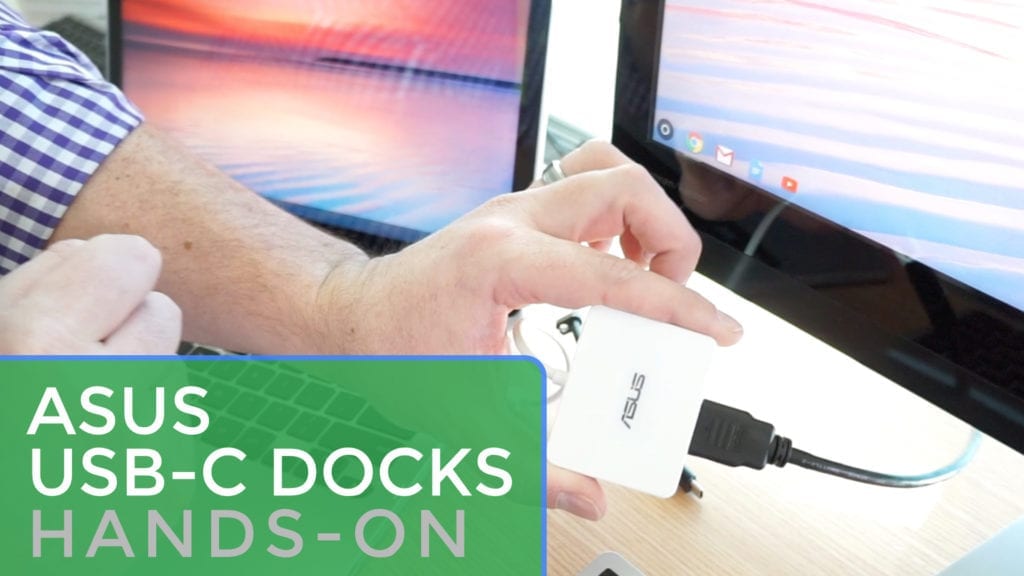
Today, in ASUS’s booth at CES, we took a look at the Chromebook Flip C302 with the m3 processor. While we were there, we managed to get our hands on a couple very interesting USB-C docks.


Xremove ads

For those who’ve never considered a desktop docking solution, they are what USB-C was made for. Well, that is a bit hyperbolic, but docking solutions are one of the many bright spots of this new, universal connection.

How It Works

Docking is a simple concept. You have a laptop that has all the processing power you need from your desktop, so instead of having both, you want only one device. When you sit at your main desk, you have a monitor, keyboard and mouse (and other peripherals, possibly) you’d like to leverage along with that laptop.

Featured Videos

Xremove ads

When you sit down at the desk, instead of plugging in your display cable, power cable, and USB dongle (for keyboards and such) each time, a dock gives you a single connection to be up and running immediately.

Through the USB-C port, display, power, and accessory connections can all be served easily.


Enter The ASUS Docks

What we are looking at today are two docks from ASUS that give you this simplistic interface and very attractive design. The Mini Dock and Universal Dock both server the same purpose, but one is bent on simplistic hook up while the other gives you a port for almost any type of external device.

Xremove ads

Both work exactly as expected, passing your charger’s power on to the docked device while extending your monitor flawlessly. External ports also behave themselves, letting you access an additional USB 3.0 port or a slew of input methods on the Universal Dock.

Check out the video for a look at these in use and, if you are interested (I’m grabbing one of these for my desk), we’ve dropped a couple links below.

BUY THE ASUS MINI DOCK NOW FROM AMAZON

Xremove ads

BUY THE ASUS UNIVERSAL DOCK NOW FROM ASUS

Filed Under: Accessories, All Stories, News

About Robby Payne

As the founder of Chrome Unboxed, Robby has been reviewing Chromebooks for over a decade. His passion for ChromeOS and the devices it runs on drives his relentless pursuit to find the best Chromebooks, best services, and best tips for those looking to adopt ChromeOS and those who've already made the switch.

Primary Sidebar

Xremove ads

Deals

Massive Deal Alert: The Acer Chromebook Plus Spin 714 just hit an all-time low $499

By Robby Payne
April 1, 2026

The best Chromebook deals today

By Robby Payne
March 30, 2026

The Acer Chromebook Plus Spin 714 hits a new all-time low at $270 off

By Robby Payne
March 25, 2026

You can score $40 off Google’s battery-powered Nest Doorbell right now

By Joseph Humphrey
March 20, 2026

The touchscreen Lenovo Chromebook Slim 3 is a steal at under $200

By Robby Payne
March 16, 2026

More Deals

Xremove ads

Reviews

Acer Chromebook Plus Spin 514 Review: Kompanio Ultra power in a convertible

By Robby Payne
December 24, 2025

My review after 6 weeks with the Lenovo Chromebook Plus 14 [VIDEO]

By Robby Payne
August 11, 2025

One week with the best small Android tablet you can buy, and I’m sold

By Robby Payne
May 9, 2025

Best Chromebooks of 2024 [VIDEO]

By Robby Payne
November 28, 2024

Samsung Galaxy Chromebook Plus Review: Samsung is back! [VIDEO]

By Robby Payne
October 28, 2024

More Reviews

Xremove ads

Guides

This Chromebook trackpad shortcut is definitely not new, but is blowing my mind

By Robby Payne
March 11, 2024

How to reduce broadcast delay on YouTube TV to stop live spoilers

By Robby Payne
December 8, 2023

Windows PC keyboard and Chromebook

How to use a Windows keyboard with a Chromebook

By Joseph Humphrey
December 8, 2023

How reset and revert your Chromebook to the previous version of Chrome OS

By Robby Payne
November 29, 2023

My Chromebook Plus features disappeared: here’s how I fixed it

By Robby Payne
November 24, 2023

More Guides

TWITTER · FACEBOOK · INSTAGRAM · YOUTUBE · EMAIL · ABOUT

Copyright © 2026 · Chrome Unboxed · Chrome is a registered trademark of Google Inc.
We are participants in various affiliate advertising programs designed to provide a means for us to earn fees by linking to affiliated sites.

PRIVACY POLICY