

Support our independent tech coverage. Chrome Unboxed is written by real people, for real people—not search algorithms. Join Chrome Unboxed Plus for just $2 a month to get an ad-free experience, access to our private Discord, and more. Learn more about membership here.
START FREE TRIAL (MONTHLY)START FREE TRIAL (ANNUAL)
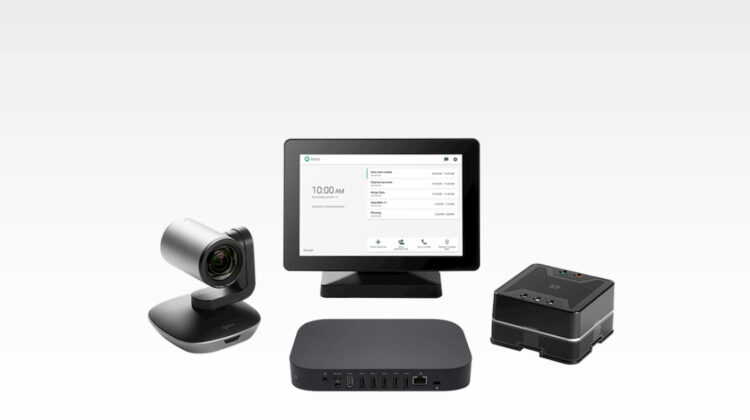
We’ve been tracking the development of Comet Lake Chromeboxes for a few months now. So, when this news came across the wire, I thought ASUS had beat everyone else out of the gate. Much to my disappointment, that was not the case at all. Still, new Chrome OS hardware is exciting and these are no exception. Google took to the GSuite Blog this week to announce new hardware kits from ASUS that are designed specifically for videoconferencing. The Google Meet Kit from ASUS reskins the 8th Gen Core i7 Chromebox 3 with a sleek, magnetic chassis and adds some robust new hardware options to take your video meetings to an entirely new level.

ASUS will offer three different kits depending on your specific needs, room size and of course, budget. I say budget because the large room features the Logitech PTZ Pro 2 webcam that must be purchased separately and costs $849 by itself. Oddly enough, the lesser kits for small to medium rooms will come with a 4K static webcam. Of course, it lacks the professional quality of the PTX Pro 2 and doesn’t feature pan, tilt or the 10x zoom. Still, it should be ample enough for most settings.
Along with the new kits, Google is rolling out a Beta program for users who want to test out new voice control features for Meet hardware. The program will give users access to touch-free controls that enable hotword options for joining meetings as well as testing new features. To join the Beta program, administrators can sign up here. The Meet Compute system (Chromebox) is equipped with an upgraded 128GB hard drive but ASUS opted to keep the RAM at 4GB. The chassis is magnetized which allows it to mount to the included verticle stand without the need for screws or extra hardware.

All three kits will come with the ASUS Compute system and Google Meet speaker mic. The medium and large room kits also include a 10.1″ touch display while the small room kit includes a remote control with embedded keyboard for interacting with your compute system and meetings. No official pricing has been announced but 9to5Google reports that the starter kit will come in around $2090 with the medium bundle moving up to nearly $2500. The large room kit is reported to cost around $2150 but that does not include the $849 for the PTZ Pro 2 by Logitech.
Google also notes that they have partnered with CLT to bring more options to the newly rebranded Google Meet platform. CTL, in partnership with Logitech, will be launching its own Google Meet kit in the near future and will likely offer the bundle directly from the company’s site where they offer white-glove deployment as well as all of the management tools needed for Chrome Enterprise devices. We’ll keep an eye out for the new products but for now, you will need to contact your Google reseller to get information on the availability of the ASUS kits. You can find more details at ASUS.
SUBSCRIBE TO UPSTREAM
Get Chrome Unboxed delivered straight to your inbox
Upstream is our flagship, curated newsletter with the top stories, most click-worthy deals, giveaways, and trending articles from Chrome Unboxed sent directly to your inbox a few times a week. Join 31,000+ subscribers.
Source: GSuite Blog

