

Support our independent tech coverage. Chrome Unboxed is written by real people, for real people—not search algorithms. Join Chrome Unboxed Plus for just $2 a month to get an ad-free experience, access to our private Discord, and more. Learn more about membership here.
START FREE TRIAL (MONTHLY)START FREE TRIAL (ANNUAL)
In an effort to make driving safer this holiday season, Google is adding a few updates to Android Auto, and as usual, these are most features you would have expected it to have all along. Whether you’re traveling across the country or just going down the road to pick a few things up, these should prove useful to the overall experience of making your use of the service more seamless.
First, you can now toggle a setting in Android Auto to make it launch automatically once your phone connects to your car. Previously, you’d hop in your car and your device would connect to the vehicle’s Bluetooth, and then you’d need to manually open Auto or ask Assistant Driving Mode to take you somewhere.
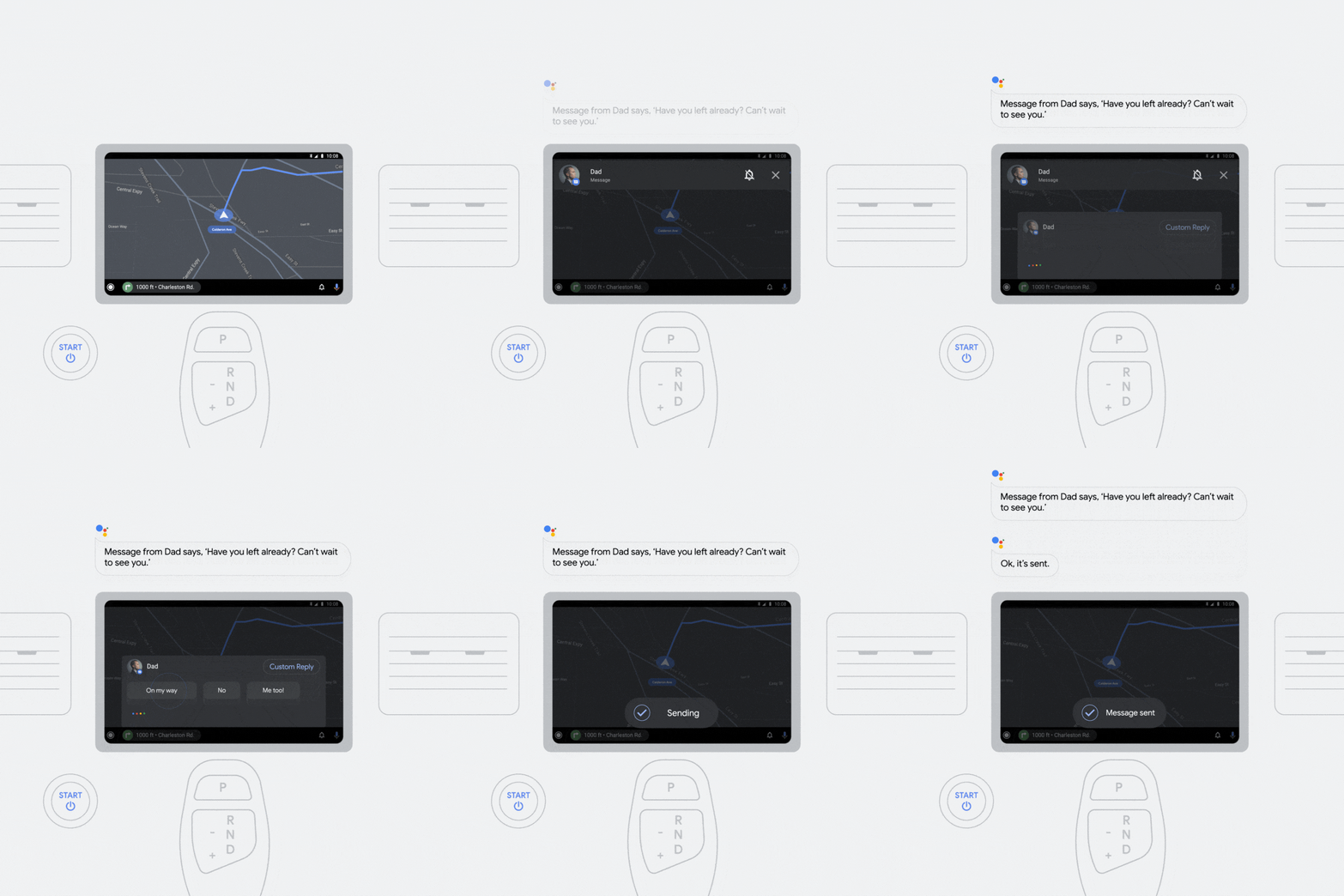
Coming soon, Google’s famous “Smart reply” feature, which has been seen across Google Messages, Gmail, Chat, and more, will be implemented in your car so that you can reply to your friends and family’s text messages with one simple tap at a red light. Check out the example below – a message comes in, Assistant reads it out loud to you, and a few preset contextual responses appear for you to choose from. Ultimately, this will keep you safer on the road as these are glanceable. Of course, there’s always the possibility that these aren’t perfectly relevant, so having the voice input automatically up and listening for your answer is a great backup.
An “Always-on play button” will also appear on your device’s home screen so you can play music with a single tap. Not only that, but in the near future, being able to search for your favorite music by voice across all installed media apps will be coming to your home screen as well.
Lastly, “Digital car key” is a new feature that will let you lock, unlock, or start your compatible vehicle right from your phone! First of all, how crazy is it that we’ve entered into a generation where these types of things are not only possible, but widely accessible? If you have a Pixel 6, Pixel 6 Pro or Samsung Galaxy S21 in select countries, and happen to have, oh, I don’t know, bought a BMW in the last two years, for instance, you can take advantage of this feature as early as today! In case you’re wondering how this is even possible, it’s due to the ultra-wideband (UWB) chip in these phones – pretty cool, right?
Even though I most certainly don’t have a BMW, I’m still excited for these advancements. Many of us spend so much time focusing on the smart tech in our own homes as we’ve been quarantined for so long, but it’s awesome to see Google continuing to invest in on-the-go technologies like Android Auto and Maps. As families consider traveling this holiday season to be with loved ones, there’s nothing more important than safety, and even though some of these updates are just plain cool, there’s clearly a focus on getting people there and back without concerns.
SUBSCRIBE TO UPSTREAM
Get Chrome Unboxed delivered straight to your inbox
Upstream is our flagship, curated newsletter with the top stories, most click-worthy deals, giveaways, and trending articles from Chrome Unboxed sent directly to your inbox a few times a week. Join 31,000+ subscribers.

