


Support our independent tech coverage. Chrome Unboxed is written by real people, for real people—not search algorithms. Join Chrome Unboxed Plus for just $2 a month to get an ad-free experience, access to our private Discord, and more. Learn more about membership here.
START FREE TRIAL (MONTHLY)START FREE TRIAL (ANNUAL)
Unbeknownst to many, the Pixel 7 Series was released as the first ever 64-bit only Android phone. This is a milestone many years in the making and has been warned about since 2014 when Google told Developers to start getting their apps ready for the change. Alas, the time came, and the Pixel 7 and 7 Pro shipped with a 64-bit only build of Android 13, which means that 32-bit apps cannot be installed on these devices.
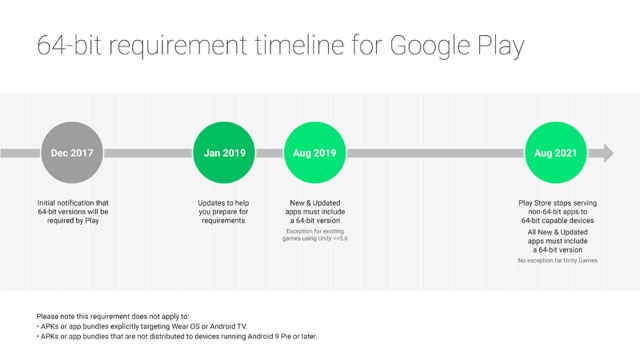
At this point in the transition, since App Developers have been required for a while now to support 64-bit architecture in their apps in order to publish them on the Google Play Store, installing apps from the Play Store is not something users have to worry about. The only issue, in this case, would be manually sideloading APKs with 32-bit apps like Flappy Bird and the like, which is not what the day-to-day Android user would be doing anyway.
This leaves Pixel devices, such as the Pixel 6 Pro and older, still running a 32-bit build which unfortunately leaves them out of 64-bit only benefits. One of the more notable ones is the up to 150MB of RAM that the OS saves, which results in fewer out-of-memory conditions, meaning less jank and fewer background app kills.
However, as Android Police reports, Google now lets you flash a 64-bit beta build on any Pixel phone, from the Pixel 4a to the Pixel 6 series, if you want to. This is, of course, not meant for the inexperienced as these new 64-bit images are only available via the Android Developers website, along with the other betas for the Android 13 Quarterly Platform Releases. In fact, you can’t even install these builds over the air. Instead, you would need to flash them yourself. Google also makes it clear that the images are meant for developers only by stating that “images provide a strict 64-bit-only environment for testing 64-bit app compatibility.”
So, if you are not an App Developer, how does this help or affect you on an older Pixel device? In my opinion, this opens up more opportunities for Devs that may only have an older Pixel device to work with, to develop, fix, and test their apps that are not yet on the Play Store. The Play Store could definitely benefit from more app diversity and a richer ecosystem, and that can only happen if we have more developers that are able to test their 64-bit apps properly. Now, with the availability of 64-bit builds for older devices, a Dev with a Pixel 4a could potentially build the next popular app.
SUBSCRIBE TO UPSTREAM
Get Chrome Unboxed delivered straight to your inbox
Upstream is our flagship, curated newsletter with the top stories, most click-worthy deals, giveaways, and trending articles from Chrome Unboxed sent directly to your inbox a few times a week. Join 31,000+ subscribers.
