
• Skip to main content
  • Skip to primary sidebar
  • Deals
  • Features
  • Guides
  • Chromebooks
  • Videos
  • Podcast
  • More +
    • Reviews
    • Unboxing
    • Upcoming Devices
    • Chromebook Plus
    • Chrome
    • ChromeOS
    • Chrome OS Flex
  • Search
  • Sign Up
  • Log In
Chrome Unboxed – The Latest Chrome OS News

Chrome Unboxed - The Latest Chrome OS News

A Space for All Things Chrome, Google, and More!

  • Deals
  • Features
  • Guides
  • Chromebooks
  • Videos
  • Podcast
  • More +
    • Reviews
    • Unboxing
    • Upcoming Devices
    • Chromebook Plus
    • Chrome
    • ChromeOS
    • Chrome OS Flex
  • Search
  • Sign Up
  • Log In

YouTube introduces game-changing new feature for live streams

November 11, 2022 By Johanna Romero View Comments

YouTube Live Stream QA Feature

Support our independent tech coverage. Chrome Unboxed is written by real people, for real people—not search algorithms. Join Chrome Unboxed Plus for just $2 a month to get an ad-free experience, access to our private Discord, and more. Learn more about membership here.
START FREE TRIAL (MONTHLY)START FREE TRIAL (ANNUAL)

YouTube has announced that creators will soon be able to deploy a question-and-answer session in chat during a live broadcast or YouTube Premieres thanks to a new tool called “Live Q&A” session. The question-and-answer session can be moderated, and the restrictions that apply to your live chat settings will also apply to the session itself. This means that if you have specific terms that are forbidden, they will also be forbidden in the Q&A section of the website. Additionally, content creators will have the ability to submit questions for moderation, and users will be able to flag questions that they feel violate YouTube’s community guidelines.
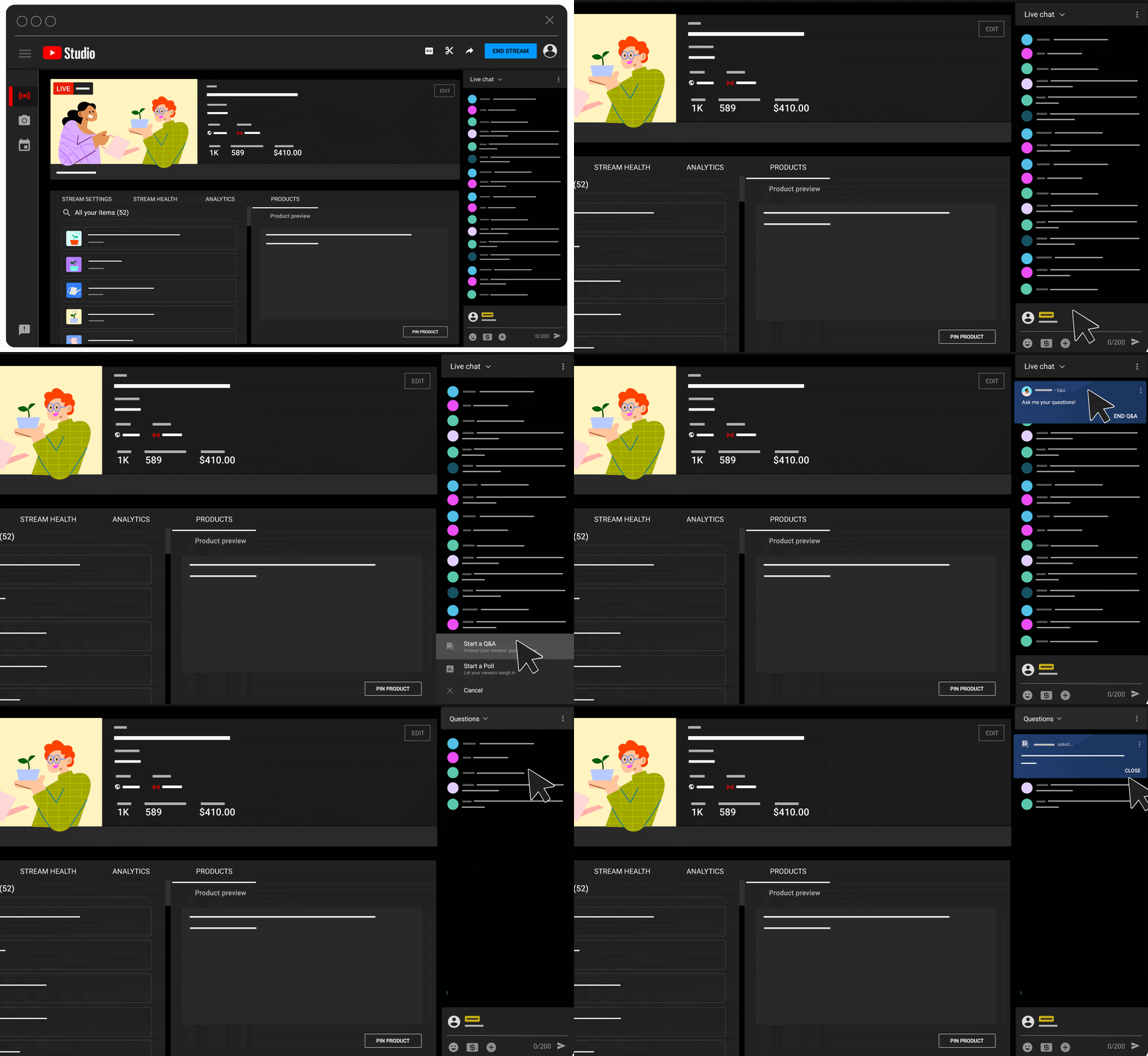
This new feature has been launched in hopes that it is going to make live streams even more interactive and will appear alongside Live Polls. Third party software solutions have offered similar functionality, but most of them require a paid membership for these features or for higher definition (4K) broadcasts. Luckily, this is one more feature creators can now use without having to pay a premium to have more successful live streams.

Xremove ads

According to the feature notes, the questions on the Q&A will be arranged in chronological order, with the most recent ones appearing first. There is no limit to the number of questions participants may ask, but after you have answered 200 of them, the oldest questions on your list will be removed. Live Q&A questions are managed by the same systems that allow monitoring of live chats, such as blocking words, holding messages for review, and reporting inappropriate content.

Additionally, only users that have Manager or Editor channel access will be able to modify the Q&A list, which may present a problem for channels that make use of the “moderator” role instead. This includes looking at the Questions List, choosing which questions to answer, eliminating questions from the Questions List, and doing other similar tasks. Hopefully this changes in the future and moderators are given more access within Q&As, since that seems like the entire point of having that role in the first place.

Featured Videos

Xremove ads

SUBSCRIBE TO UPSTREAM

Get Chrome Unboxed delivered straight to your inbox

Upstream is our flagship, curated newsletter with the top stories, most click-worthy deals, giveaways, and trending articles from Chrome Unboxed sent directly to your inbox a few times a week. Join 31,000+ subscribers.

SUBSCRIBE HERE!

Filed Under: YouTube Tagged With: live streams, q&a, videos, youtube

Primary Sidebar

Xremove ads

Deals

The Lenovo Chromebook Slim 3 is the one to get, starting at just $139 right now

By Robby Payne
March 6, 2026

The best Chromebook deals today

By Robby Payne
March 6, 2026

The fantastic $599 deal on the Samsung Galaxy Chromebook Plus has returned

By Robby Payne
February 25, 2026

There are some great Pixel 10a pre-order offers right now: Here are my 2 favorite deals

By Joseph Humphrey
February 25, 2026

Save up to 25% off the Gemini-powered Nest Cam Indoor

By Joseph Humphrey
February 19, 2026

More Deals

Xremove ads

Reviews

Acer Chromebook Plus Spin 514 Review: Kompanio Ultra power in a convertible

By Robby Payne
December 24, 2025

My review after 6 weeks with the Lenovo Chromebook Plus 14 [VIDEO]

By Robby Payne
August 11, 2025

One week with the best small Android tablet you can buy, and I’m sold

By Robby Payne
May 9, 2025

Best Chromebooks of 2024 [VIDEO]

By Robby Payne
November 28, 2024

Samsung Galaxy Chromebook Plus Review: Samsung is back! [VIDEO]

By Robby Payne
October 28, 2024

More Reviews

Xremove ads

Guides

This Chromebook trackpad shortcut is definitely not new, but is blowing my mind

By Robby Payne
March 11, 2024

How to reduce broadcast delay on YouTube TV to stop live spoilers

By Robby Payne
December 8, 2023

Windows PC keyboard and Chromebook

How to use a Windows keyboard with a Chromebook

By Joseph Humphrey
December 8, 2023

How reset and revert your Chromebook to the previous version of Chrome OS

By Robby Payne
November 29, 2023

My Chromebook Plus features disappeared: here’s how I fixed it

By Robby Payne
November 24, 2023

More Guides

TWITTER · FACEBOOK · INSTAGRAM · YOUTUBE · EMAIL · ABOUT

Copyright © 2026 · Chrome Unboxed · Chrome is a registered trademark of Google Inc.
We are participants in various affiliate advertising programs designed to provide a means for us to earn fees by linking to affiliated sites.

PRIVACY POLICY