


Support our independent tech coverage. Chrome Unboxed is written by real people, for real people—not search algorithms. Join Chrome Unboxed Plus for just $2 a month to get an ad-free experience, access to our private Discord, and more. Learn more about membership here.
START FREE TRIAL (MONTHLY)START FREE TRIAL (ANNUAL)
Many of us watch YouTube daily on devices other than our phones and computers. For me, and many others, that device is a television. Google states that as of January 2022, viewers are watching over 700 million hours daily of YouTube content on a TV. That’s a lot of hours and a very clear sign that one cannot ignore the user experience on the YouTube app made for televisions.
Earlier this year, YouTube’s Chief Product Officer, Neal Mohan, shared a look ahead at what was expected to be improved with the YouTube experience this year. One of the areas mentioned was the TV experience since it was YouTube’s fastest-growing screen in 2021. We are now seeing this come to fruition with a new feature that allows you to connect your TV to your iOS or Android phone and use that phone to interact with the content you are seeing on the TV.
According to Brynn Evans, Head of Design for YouTube on TV, the eureka moment came when they figured out that over 80% of YouTube users were using another device while watching a video on their TV and were using this device to simultaneously open the same video and engage with it by liking, subscribing, or commenting. This realization prompted the design team to shift their focus on improving the big-screen experience, which had been a challenge up to that point, to use this newfound knowledge. The result was turning your mobile device into an extension of that experience by having it synchronized to your TV for the purposes of interacting while leaving your video playing full screen and without interruptions.
This feature started rolling out yesterday, and to work, your phone and your TV must be signed in to the same YouTube account. When you open the YouTube app on your TV and then your phone, you should see a popup on the phone prompting you to connect to the TV to access video details and comments easily. It is unclear if the feature will be an account-based rollout or if it comes as an update to the mobile YouTube app.
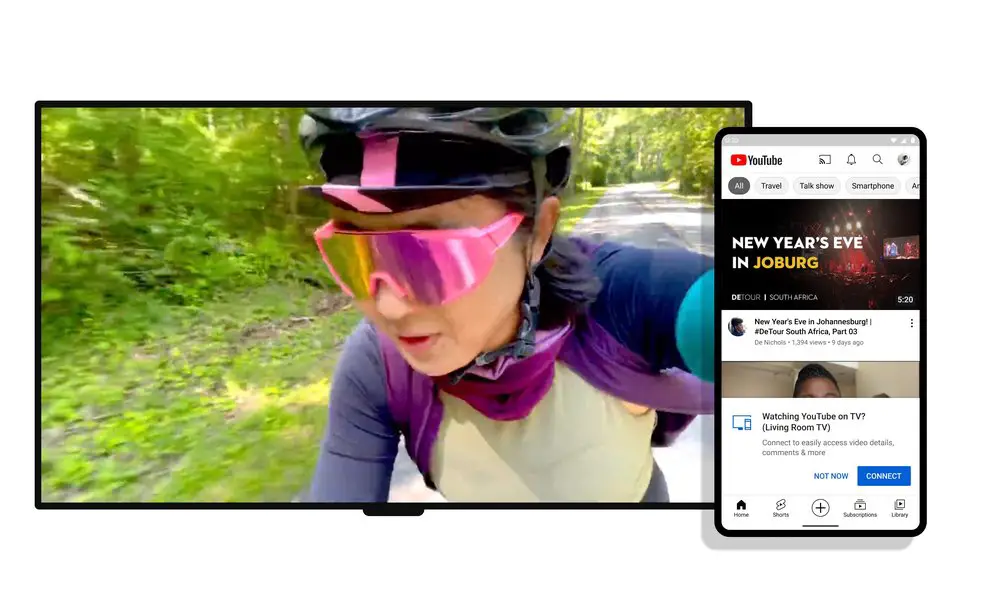
This feature is not to be confused with casting a video from your phone to watch on your TV, which already has the capabilities that this feature is promising to do. Instead, where this feature shines is when watching videos directly from the YouTube app on your TV and then realizing you want to add a comment or subscribe to that channel.
YouTube is also working on ways to redesign the watch page to call attention to using this new feature, plus other ones they are testing at the moment, such as browsing and shopping for products featured in videos. I, for one, am very excited about these new features and how proactive the YouTube team has been at improving the product. I can’t wait to see what’s next.
SUBSCRIBE TO UPSTREAM
Get Chrome Unboxed delivered straight to your inbox
Upstream is our flagship, curated newsletter with the top stories, most click-worthy deals, giveaways, and trending articles from Chrome Unboxed sent directly to your inbox a few times a week. Join 31,000+ subscribers.
