

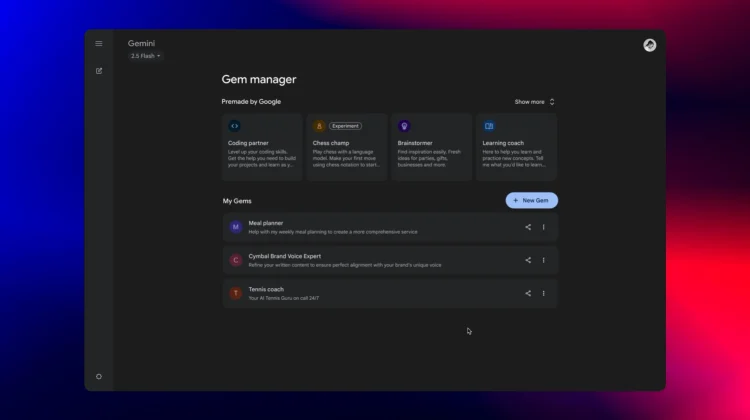
Gemini’s “Gems” feature is a fantastic way to personalize your AI experience, allowing you to create custom-tailored assistants that save you from repetitive prompting. You can have one Gem that’s your creative writing partner, another that’s a meal planner, and a third that’s a travel agent.
But up until now, that personalization has been just for you. Starting today, that’s changing. Google is now rolling out the ability to share the custom Gems you create with your friends, family, and coworkers, turning them into powerful, collaborative resources.
Sharing is as easy as Google Drive
The new sharing feature is designed to be simple and familiar. When you open your Gem manager on the web version of Gemini, you’ll now see a “Share” button next to any Gem you’ve created.
The sharing model works just like it does for files in Google Drive, giving you granular control over who you share with and what they can do. You can choose to let others simply view your Gem, or you can give them editing permissions to collaborate on its instructions.
This is a fantastic update that makes Gems even more useful. You can now craft a detailed vacation guide Gem for your family, a specialized story-writing partner for your creative team, or a personalized meal planner for a friend and share it with a simple link. It’s a simple but powerful update that makes one of Gemini’s best features even better.
Join Chrome Unboxed Plus
Introducing Chrome Unboxed Plus – our revamped membership community. Join today at just $2 / month to get access to our private Discord, exclusive giveaways, AMAs, an ad-free website, ad-free podcast experience and more.
Plus Monthly
$2/mo. after 7-day free trial
Pay monthly to support our independent coverage and get access to exclusive benefits.
Plus Annual
$20/yr. after 7-day free trial
Pay yearly to support our independent coverage and get access to exclusive benefits.
Our newsletters are also a great way to get connected. Subscribe here!
Click here to learn more and for membership FAQ

