

Support our independent tech coverage. Chrome Unboxed is written by real people, for real people—not search algorithms. Join Chrome Unboxed Plus for just $2 a month to get an ad-free experience, access to our private Discord, and more. Learn more about membership here.
START FREE TRIAL (MONTHLY)START FREE TRIAL (ANNUAL)
I have to be honest, I haven’t had a “home PC” in years. I used to tinker and build my own custom Windows towers just to have a decent, customizable solution for home use but Chromebooks have become so versatile that most days, it just isn’t necessary. Don’t get me wrong, there are plenty of users that want and absolutely need the latest and greatest PC rig that features a top-end GPU, tons of RAM/storage, and the latest processor but that’s not me and I’d argue that it isn’t the average household, in general. That said, I’ve been sitting here mulling over the idea of a home Chrome OS device and the more I think about it, the more it makes sense.
Chromebooks are awesome. More and more users are learning that Chrome OS offers everything they need in the way of productivity as well as entertainment. No matter where I go, I know that my Chromebook can tag along and I can get some work done, watch a movie or even play some Stadia. Those features are what led me to rethink my opinion about having a stationary Chrome OS device around the house. Yes, you can hook your Chromebook up to a monitor or even your television and use it to stream your favorite shows or do some remote work but if you’re like me, you don’t really have a convenient place to prop up your device when you want to dock it to your television. I also don’t have a home office anymore so the days of having a desk and monitor to sit down to are gone -for now, anyway.
True, many homes have smart TVs and devices like Chromecasts to stream content but what about an all-in-one device that can serve all of your needs and doesn’t cost an arm and a leg. That’s exactly where Chromeboxes step in to shine. The Chrome OS mini PC has made a massive comeback over the past couple of years and enterprises are deploying these things in droves. The latest Comet Lake devices will get updates for nearly eight more years, they offer the same robust security as other Chrome OS devices and companies can get entry-level models for as little as $250. All you need is a monitor or TV, an HDMI cable, and an internet connection and you’re off to the races.
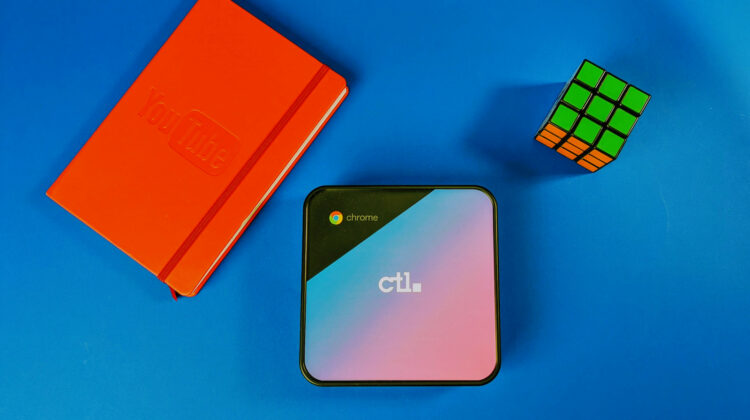
The very things that make Chromeboxes great for enterprises also make them the perfect fit for the average home that simply needs a reliable, cost-effective PC that doesn’t suck. A Chromebox like the CTL CBX2 features a 10th Gen Celeron U-series processor that is capable of running the modern web apps and tools used by many remote workers and students alike. Most of these Chrome OS mini PCs measure under 6″ x 6″ and can be easily fitted to the back of a monitor or television and you’ll never even know it’s there. You get a wide array of ports including dual HDMI outputs, USB-C, and a ton of USB-A ports that are perfect to plug in a dongle for pairing a mouse and keyboard. These peripherals can be hidden away in your TV stand or cabinet until you need to use them. Flip your TV to the HDMI input for the Chromebox and boom, you’ve got yourself a large screen Chrome OS desktop that can be used for meetings, work, streaming, or gaming. Yes, the Celeron 5205U with 8GB of RAM has more than enough horsepower to run any of the big-name titles you’ll find on Stadia.
Another advantage of an affordable Chromebox is the ability to upgrade should you find yourself in need of more RAM or storage. Some models are trickier than others but as you can see in the video below, adding some RAM or a new hard drive to a Chromebox is quite simple and it can save you some serious cash in the long run. You can pick up a Celeron Chromebox with 8GB of RAM and 64GB of storage for around $290 and you probably won’t need anything else. Even if you find you need more storage, you can pick up a 250GB M.2 PCIe card from somewhere like Crucial for as little as $55.
As I mentioned, a Chromebook is my go-to device for everything but there is a lot of merit to having a device in your home that is made to live there. You never know when one of life’s mishaps could see you spilling a cup of coffee on your brand new Galaxy Chromebook 2 or may your little one knocks your laptop off the table and the screen shatters just minutes before you need to be watching that big presentation. With a Chromebox, you can have a dedicated and affordable PC solution for your home. If you’re starting from scratch, you can pick up a new Chromebox, monitor, mouse/keyboard, and even a webcam and spend less than $500 if you’re really thrifty. Now that I think about it, I can’t really think of a reason NOT to have a Chromebox around the house.
If you’re in the market for a Chrome OS mini PC, there are options aplenty from Acer, ASUS, HP, and more but we do recommend checking out CTL. You get the same 10th Gen internals, port selection, and features as any other Comet Lake Chromebox only at a lesser price. CTL offers customizable options on its Chromebox line that ranges from Celeron to Core i7 and you can even get a custom paint job. You can find all of CTL’s Chrome OS lineup here.
SUBSCRIBE TO UPSTREAM
Get Chrome Unboxed delivered straight to your inbox
Upstream is our flagship, curated newsletter with the top stories, most click-worthy deals, giveaways, and trending articles from Chrome Unboxed sent directly to your inbox a few times a week. Join 31,000+ subscribers.

