

• Skip to main content
  • Skip to primary sidebar
  • Deals
  • Features
  • Guides
  • Chromebooks
  • Videos
  • Podcast
  • More +
    • Reviews
    • Unboxing
    • Upcoming Devices
    • Chromebook Plus
    • Chrome
    • ChromeOS
    • Chrome OS Flex
  • Search
  • Sign Up
  • Log In
Chrome Unboxed – The Latest Chrome OS News

Chrome Unboxed - The Latest Chrome OS News

A Space for All Things Chrome, Google, and More!

  • Deals
  • Features
  • Guides
  • Chromebooks
  • Videos
  • Podcast
  • More +
    • Reviews
    • Unboxing
    • Upcoming Devices
    • Chromebook Plus
    • Chrome
    • ChromeOS
    • Chrome OS Flex
  • Search
  • Sign Up
  • Log In

Why the Pixel Weather app got rid of the Froggy mascot

November 1, 2024 By Robby Payne View Comments

Support our independent tech coverage. Chrome Unboxed is written by real people, for real people—not search algorithms. Join Chrome Unboxed Plus for just $2 a month to get an ad-free experience, access to our private Discord, and more. Learn more about membership here.
START FREE TRIAL (MONTHLY)START FREE TRIAL (ANNUAL)

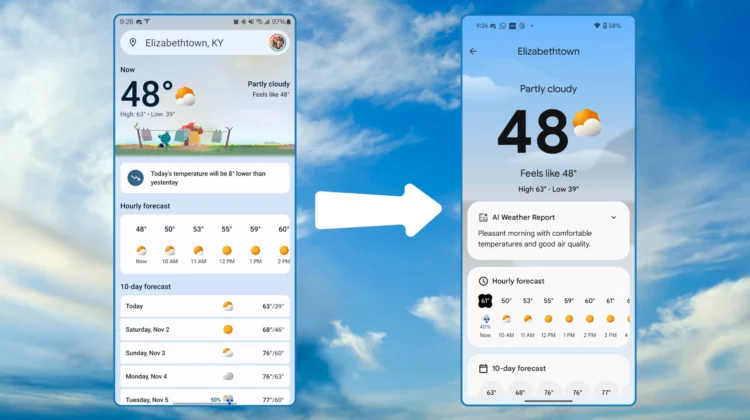
Earlier this week, we shared news that Google’s Pixel Weather app finally made its way to older Pixel devices! Specifically, Pixel 6 and newer got in on the update, but in the midst of the roll-out, I’m sure many of you that don’t have the latest Pixel devices from Google recognized a staple of the Pixel Weather app is now missing; Froggy, the beloved Google Weather mascot, didn’t make the jump (pun totally intended).

This week’s Made by Google Podcast shed some light on the design choices behind Pixel Weather, and why Froggy got left out of the mix. It seems Google was aiming for a more sophisticated, minimalist aesthetic for Pixel Weather. Instead of Froggy indicating the overall feel of the current weather, you’ll find subtle AI-generated cityscapes for over 300 major cities worldwide. The idea is to keep the focus squarely on the weather data instead of cute characters.

Xremove ads

The Pixel Weather team acknowledged that for some, this would be a sad omission. But apparently Froggy is a bit of a love-or-hate sort of character. I suppose I can see both sides when I think about it, and ultimately they decided to play it safe and go for a more universally-appealing, grown-up design.

And given the fact that Google clearly put a lot of thought into this updated app, I don’t blame them. Recognizing that weather is one of the most-used apps on our phones, Google wanted to deliver a premium, out-of-the-box experience that users will enjoy checking multiple times a day.

Featured Videos

Xremove ads
Check out Today’s Best Chomebook Deals

New features inbound

The podcast also touched on a couple of cool features that haven’t quite rolled out yet. “Animation haptics” will soon let you feel the rain through vibrations that match the intensity of the downpour. And for a truly immersive experience, there will be an Easter egg that unlocks a “beautiful soundscape” when you tap on the current condition icon during precipitation. Again, those features haven’t arrived on our devices just yet, but be on the lookout for them.

While Froggy’s absence might sting for some, Pixel Weather brings a fresh, modern take on the classic weather app and it’s been a very nice addition to the overall Pixel experience. I’d wager at the end of the day, if Froggy isn’t a part of that mix any longer, it’s not really that big of a deal as long as the app continues to be beautiful, functional, and as accurate as possible.

VIA: 9to5 Google

Xremove ads

SUBSCRIBE TO UPSTREAM

Get Chrome Unboxed delivered straight to your inbox

Upstream is our flagship, curated newsletter with the top stories, most click-worthy deals, giveaways, and trending articles from Chrome Unboxed sent directly to your inbox a few times a week. Join 31,000+ subscribers.

SUBSCRIBE HERE!

Filed Under: Apps, News, Pixel

About Robby Payne

As the founder of Chrome Unboxed, Robby has been reviewing Chromebooks for over a decade. His passion for ChromeOS and the devices it runs on drives his relentless pursuit to find the best Chromebooks, best services, and best tips for those looking to adopt ChromeOS and those who've already made the switch.

Primary Sidebar

Xremove ads

Deals

The Pixel 10a just dropped to $449, but here’s why you should buy the Pixel 10 instead

By Joseph Humphrey
April 13, 2026

Save up to $200 on the two best Chromebooks on the market

By Robby Payne
April 13, 2026

The best Chromebook deals today

By Robby Payne
April 13, 2026

You can grab the battery-powered Nest Doorbell for just $129.99 right now

By Joseph Humphrey
April 11, 2026

Deal Alert: the excellent Lenovo Chromebook Plus 2-in-1 drops to $429

By Robby Payne
April 10, 2026

More Deals

Xremove ads

Reviews

Acer Chromebook Plus Spin 514 Review: Kompanio Ultra power in a convertible

By Robby Payne
December 24, 2025

My review after 6 weeks with the Lenovo Chromebook Plus 14 [VIDEO]

By Robby Payne
August 11, 2025

One week with the best small Android tablet you can buy, and I’m sold

By Robby Payne
May 9, 2025

Best Chromebooks of 2024 [VIDEO]

By Robby Payne
November 28, 2024

Samsung Galaxy Chromebook Plus Review: Samsung is back! [VIDEO]

By Robby Payne
October 28, 2024

More Reviews

Xremove ads

Guides

This Chromebook trackpad shortcut is definitely not new, but is blowing my mind

By Robby Payne
March 11, 2024

How to reduce broadcast delay on YouTube TV to stop live spoilers

By Robby Payne
December 8, 2023

Windows PC keyboard and Chromebook

How to use a Windows keyboard with a Chromebook

By Joseph Humphrey
December 8, 2023

How reset and revert your Chromebook to the previous version of Chrome OS

By Robby Payne
November 29, 2023

My Chromebook Plus features disappeared: here’s how I fixed it

By Robby Payne
November 24, 2023

More Guides

TWITTER · FACEBOOK · INSTAGRAM · YOUTUBE · EMAIL · ABOUT

Copyright © 2026 · Chrome Unboxed · Chrome is a registered trademark of Google Inc.
We are participants in various affiliate advertising programs designed to provide a means for us to earn fees by linking to affiliated sites.

PRIVACY POLICY