

Support our independent tech coverage. Chrome Unboxed is written by real people, for real people—not search algorithms. Join Chrome Unboxed Plus for just $2 a month to get an ad-free experience, access to our private Discord, and more. Learn more about membership here.
START FREE TRIAL (MONTHLY)START FREE TRIAL (ANNUAL)
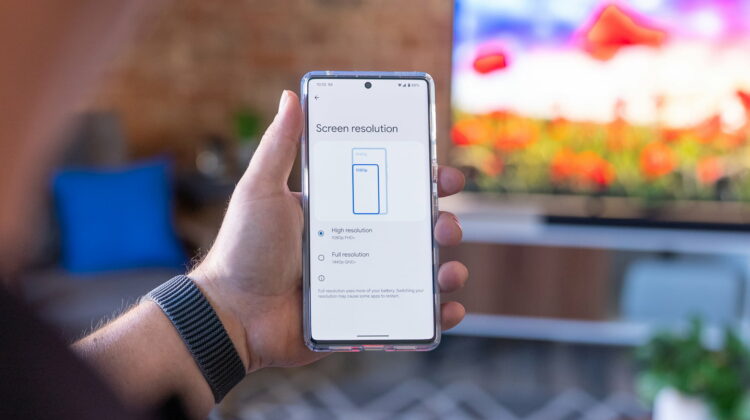
Right out of the box, if you dig under the hood just a bit on your new Pixel 7 Pro, you’ll find a setting in the Display section that now allows for a couple different display resolutions: FHD+ (roughly 1080p) and QHD+ (roughly 1440p). Clicking back and forth between the two, you’d be forgiven for not completely being able to tell the difference, and if I’m being perfectly honest, as I prepared to write this post I fully thought my phone was set to QHD+. As I went to swap it, I found that wasn’t the case, and I became even more inclined to just leave it at FHD+.
I was fully set to write a quick post about why you should flip this setting over to QHD+ right out of the box (it is set to FHD+ by default) as it seems there’s not a huge downgrade in battery performance for the most part when pushing the extra pixels. But as I flipped back and forth between the two, I realized that the difference isn’t just subtle: it is totally unrecognizable to my eyes.
In essence, Google is following in Samsung’s footsteps in offering a lower effective resolution for the Pixel 7 Pro, allowing them to advertise a higher resolution in the spec layout while only forcing the phone to actually manipulate 1080p’s worth of pixels on the screen. This isn’t display scaling and changing between FHD+ and QHD+ won’t really change the size of anything on the screen, but reducing the resolution should make things run smoother and all be less taxing on the Tensor SoC.
So far, I can’t tell much difference at all between the two, so I’m leaving things set on the FHD+ setting for now. I figure if I can’t tell the difference, a bit better battery life and smoother performance is worth the trade-off. Some of you are likely asking why I wouldn’t want to use all the resolution available to me and I totally understand why anyone with the Pixel 7 Pro would want to push all the pixels possible, but it only makes sense to take advantage of the extra battery life available with FHD+ if I literally cannot tell the difference when looking at the screen.
Don’t get me wrong: the Pixel 7 Pro has no issue whatsoever pushing the full resolution of its screen. This has nothing to do with making the phone usable or getting the battery to last through the day. The Pixel 7 Pro has been fantastic to use in either mode so far, so this isn’t about quality of life improvements with Google’s latest flagship.
Instead, it’s more about making a shift in a setting to maximize a few aspects that we all want more of (performance and battery life) while not really paying a visual penalty to do so. If you want to crank it up to QHD+ and feel like you are getting a better image on your screen, by all means do so. For my eyes, there’s simply no upside to doing this, so I’m keeping it put at FHD+ for now. I assume my battery and my gaming will thank me for it, and I think yours will too if you choose to go this route.
SUBSCRIBE TO UPSTREAM
Get Chrome Unboxed delivered straight to your inbox
Upstream is our flagship, curated newsletter with the top stories, most click-worthy deals, giveaways, and trending articles from Chrome Unboxed sent directly to your inbox a few times a week. Join 31,000+ subscribers.

