

Support our independent tech coverage. Chrome Unboxed is written by real people, for real people—not search algorithms. Join Chrome Unboxed Plus for just $2 a month to get an ad-free experience, access to our private Discord, and more. Learn more about membership here.
START FREE TRIAL (MONTHLY)START FREE TRIAL (ANNUAL)
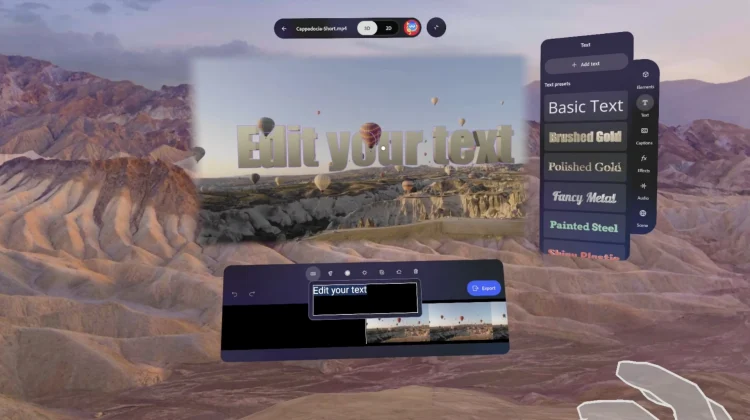
The Samsung Galaxy XR launch was packed with exciting demos, but one that truly stood out to me as the platform’s first potential killer app: Project Pulsar from Adobe. While running 2D apps in floating windows is fine, Android XR needs new, platform-specific experiences, and I think Pulsar is the best example of this.
On the surface, it’s an immersive video editing app exclusive to Android XR, but its “wow” feature is its ability to understand a video’s depth. During the launch presentation, we saw Max Spear, Product Lead of XR at Google, editing a video of a hot air balloon festival. Max was able to ask Gemini for creative caption ideas (“Floating Fantasies” was the suggestion) and then place that text into the scene.
And here’s where it gets interesting. When Max placed the 3D text and a 3D heart icon into the video, the app didn’t just crudely overlay them on top of the footage. The app understood the video’s depth and the other objects in the scene. The text and the 3D heart realistically floated in the scene, passing behind the foreground balloons and in front of the background balloons as the camera moved.
Why Project Pulsar is so impressive
As someone who has edited video for 15 years, I can tell you confidently that this type of editing is difficult and time-consuming to do in standard software like Final Cut Pro or After Effects. It normally requires meticulous, frame-by-frame work. Project Pulsar, by leveraging the spatial nature of XR and its “depth map,” makes this complex task as simple as physically placing an object in the scene. As Adobe puts it, you can create advanced looks like “text behind subject” without needing any VFX skills.
And I think this is the entire promise of spatial computing realized in a single app. It takes a complex, expert-level task and makes it intuitive, visual, and even fun, all because you’re working within a 3D environment. You can even export the final product as a standard 2D video or as a stereoscopic 3D “spatial video” to be viewed on other XR devices.
Also, the importance of having Adobe (a powerhouse of creative software) on board as a launch partner with an exclusive app cannot be overstated. It gives the Galaxy XR and the Android XR platform immediate creative legitimacy. It shows that this isn’t just a content consumption device; it’s a serious content creation tool.
Project Pulsar is included in the “Explorer Pack” for everyone who buys a Galaxy XR, so all early adopters will get to try it. While we’ll have to wait to get our hands on it to see if it’s as good as it looks, it’s this type of application that truly excites me about the future of this platform!
SUBSCRIBE TO UPSTREAM
Get Chrome Unboxed delivered straight to your inbox
Upstream is our flagship, curated newsletter with the top stories, most click-worthy deals, giveaways, and trending articles from Chrome Unboxed sent directly to your inbox a few times a week. Join 31,000+ subscribers.

