


Support our independent tech coverage. Chrome Unboxed is written by real people, for real people—not search algorithms. Join Chrome Unboxed Plus for just $2 a month to get an ad-free experience, access to our private Discord, and more. Learn more about membership here.
START FREE TRIAL (MONTHLY)START FREE TRIAL (ANNUAL)
Just a couple of days behind schedule, the latest version of ChromeOS is now rolling out to users around the globe. Like its browser counterpart, ChromeOS 110 comes bearing a hat full of bug fixes and security patches which you can read about here. Along with these security updates, the fresh version of ChromeOS arrived with more updates than we expected. Some focus on user experience while others hone in on diagnostic tools. Here’s a look at what’s new in ChromeOS 110.
Autocomplete Redesign
The ChromeOS launcher is a powerful tool that helps users unearth applications, documents, search queries and more. ChromeOS 110 refines the launcher’s search capabilities with better autocompletion, more defined search results and improved keyboard selection. Check out what’s new and improved with the ChromeOS launcher.
- Robust autocompletion for mistyped and misspelled queries
- Clearer search result categories for selected result
- More intuitive result selection experience with keyboard navigation
Keyboard Diagnostics
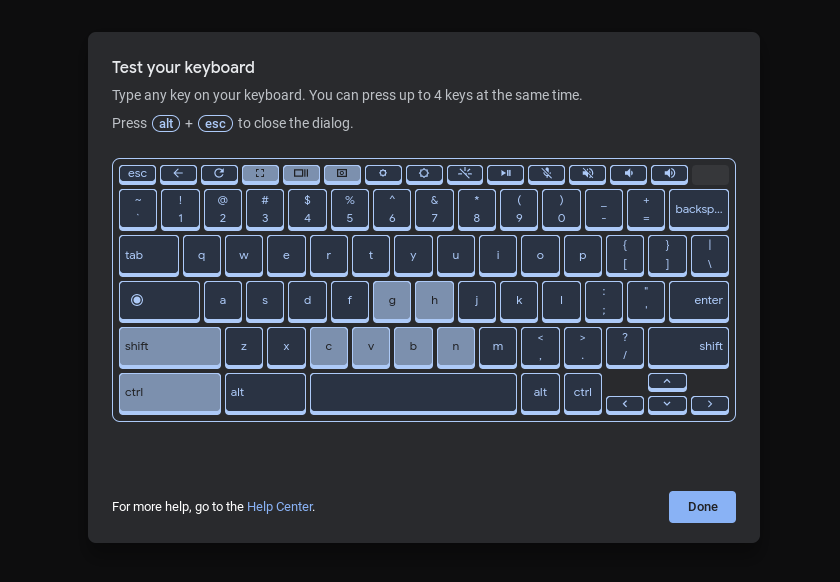
Building on the ChromeOS diagnostic System Web App, the diagnostic tool that comes preinstalled on ChromeOS now gives users the ability to manually test connected keyboards. In the diagnostic app, you will now find a “keyboard” tab. When launched, you can test each and every key on your keyboard to make sure the device is registering keystrokes. Currently, this tool does not appear to work with keyboards connected via Bluetooth.
Channel Icons
If you find yourself in the Beta, Dev, or Canary channels of ChromeOS, you will now see an icon in the system tray at the bottom right of your shelf. The icon denotes which channel you are in. For me, I have a little yellow canary icon to the right of the battery symbol.
Feedback Tool Refresh
The feedback tool for ChromeOS is a quick and easy to use option if you need to report an issue with your device or wish to suggest a feature update. In ChromeOS 110, the feedback tool gets a little more intuitive by auto suggesting help articles that may be related to your query or complaint.
Super Resolution Audio
For users that frequently use Bluetooth headsets, ChromeOS 110 has added super resolution audio. The feature uses machine learning to reconstruct high-frequency segments of audio that are often lost on low bandwidth Bluetooth connections. This will result in better quality audio for video conferencing.

Better Print and Scan diagnostics
Currently, if you’re printing from your Chromebook and something goes awry, you’ll receive a relatively generic error in the form of a notification popup. ChromeOS 110 adds a new crosh command that gives you more details about print and scan errors by outputting a detailed log file that can be used when submitting feedback. You can access the tool by opening a crosh window by pressing CTRL+ALT+T and using the printscan_debug command.
Enhanced Select to Speak
Select to speak is a powerful accessibility tool in ChromeOS that allows users to scrape a section of text and then, have the system read the text back and the speed of their liking. When enabled, Select to Speak will now show up in the right-click menu for easier access. Also, Select-to-speak can now automatically change language to match the content selected by the user, so that words will be pronounced correctly in that language, without the user having to manually change the voice settings.
Acer Chromebook Spin 714 catches up
The 12th Gen Acer Chromebook Spin 714, for reasons unknown, has been stuck on version 109 of ChromeOS for quite some time. While we still don’t know what caused the delay, it appears that the premium convertible has finally made its way to the latest version with ChromeOS 110. If you’ve been waiting, it’s time to smash that update button.
That’s about it for ChromeOS 110. A lot of great features in this update and by now, it should have made its way to your device if it is eligible. You can check for any updates by heading to the settings menu and selecting About ChromeOS. Click the updates button and watch the magic happen.

