


Support our independent tech coverage. Chrome Unboxed is written by real people, for real people—not search algorithms. Join Chrome Unboxed Plus for just $2 a month to get an ad-free experience, access to our private Discord, and more. Learn more about membership here.
START FREE TRIAL (MONTHLY)START FREE TRIAL (ANNUAL)
Over the course of 2021, I’ve come to realize how addicted I am to Youtube. This may be a controversial statement, but I’ll stick to it – Youtube is Google’s most successful and best social network, and with how quickly video is becoming the standard media type for consumption, it’s clearly on track to win as the dominant social network. Here are just some quick stats that enforce this according to Hootsuite’s blog:
- YouTube has more than 2 billion logged-in monthly users
- YouTube is the world’s second-most visited website
- It’s also the world’s second-most used social platform
- People watch more than a billion hours of video on YouTube every day
On top of all of this, it’s recently opened up the Community tab for all content creators with at least 500 subscribers, so we’re seeing way more text-based posts on the platform. If you really think about it, the mix of text and video now makes Youtube more like a traditional social network with video at its core. When you consider how many views any particular video gets in addition to how many comments they rack up, it’s kind of nuts to realize how active Youtube is as a social network!
With all of that said, I’ve been taking advantage of a few great Chrome extensions throughout this year that I wanted to share with you all. These will enhance your viewing experience, and honestly, I’m not sure why they aren’t already a part of the service! There are obviously many more great extensions that you can find on the Chrome web store, but these are the ones that I’ve found to be the most useful and gratifying thus far. So, without any further ado, let’s take a look at my top five!
Rounded Tube
Here’s my latest addition to the list, and honestly, it’s quickly becoming my favorite. Rounded Tube does to Youtube what Google should have done long ago – it adds rounded corners to all of your video thumbnails, and even to the main video player while you’re watching a video. If you look at what the company is doing to Google News, Discover, Play Books, and pretty much every other aspect of its ecosystem, you’ll see rounded corners.
However, Youtube itself feels stuck in the 2010s (I know, first-world problems, right?) Sharp, squared-off corners make for a less pleasant experience while browsing and watching, and while many probably wouldn’t notice or care too much, I’ve found it’s disconnected me from the cohesive look and feel of Google’s other services. Install this and refresh your page to see the magic happen before your very eyes!
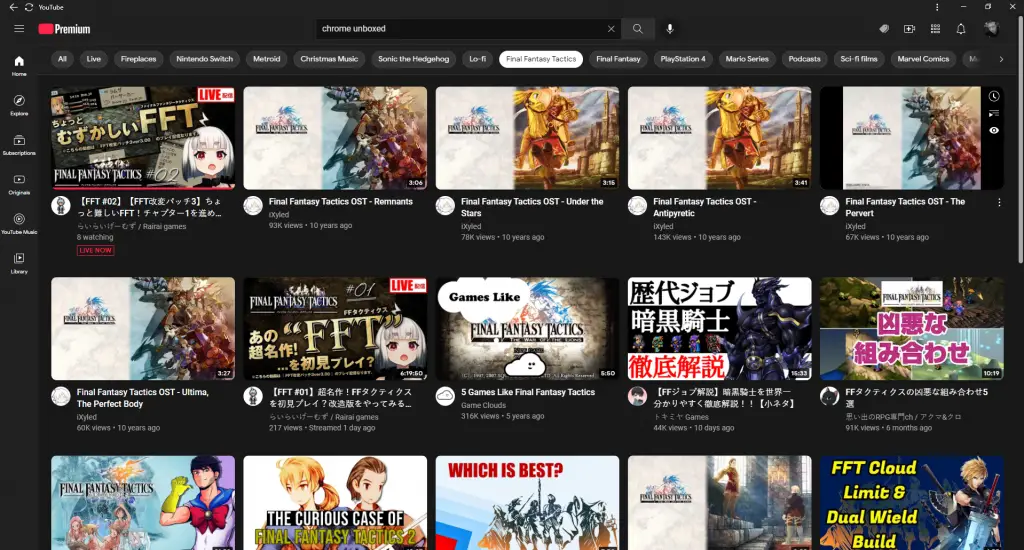
One thing to note, though, is that if the content creator uploaded the Youtube video with a thumbnail that’s got a border, you’ll see that the illusion of the rounded corners is broken by the squared-off edges of the border within the image, so your mileage may vary. Still, it’s a fantastic addition to your Extensions, and now that I have it, I simply can’t live without it. Here’s to hoping that Google rounds off the corners on Youtube sooner rather than later since it is about to be 2022.
PocketTube: Youtube Subscription Manager
By far my most used and useful extension is PocketTube. Back in the day, Google allowed you to organize your subscriptions into categories for easier segregation of topics, and while its new smart chips at the top of the homepage and of searches are super useful and welcome, nothing beats a clear-cut grouping system.
After installing PocketTube, you just scroll down below your subscriptions on the left sidebar of the website and begin grouping things. You can also add channels to a group from the channel’s homepage too, which is great. Choosing an icon allows you to quickly identify them while browsing. You can see an example of this below.
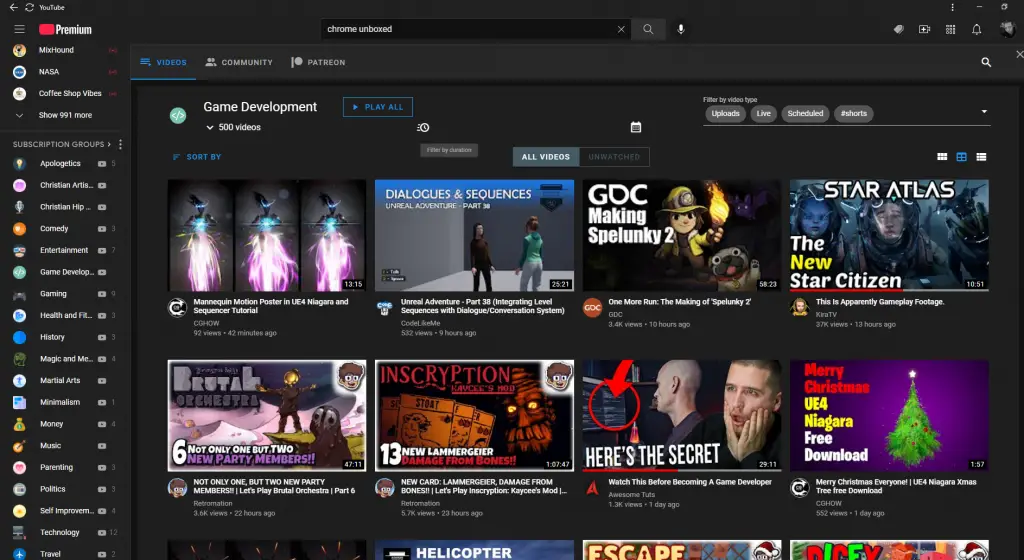
By far the most interesting aspect of this extension is its ability to let you filter out videos that you’ve yet to watch in any specific category, and you can also filter out videos from today, the last hour, and so on to get the freshest content to the top to avoid dealing with all of yesterday’s news. The only thing I don’t particularly like is that the categories pop up over your standard Youtube window instead of redirecting you to a new page.
Bookmark It
This is a fun one – Bookmark It allows you to press “B” on your keyboard to literally drop bookmarks in at any time slot of a video. Then, you can browse your video bookmarks later and return directly to that spot in the video for any purpose.
In the example below, I wanted to quickly reference the relationship chart for the characters in Final Fantasy Tactics, which is my favorite game. Obviously, there are better uses for this, and in most instances, I’d go directly to Google Image Search for this kind of thing, but it’s still pretty neat.
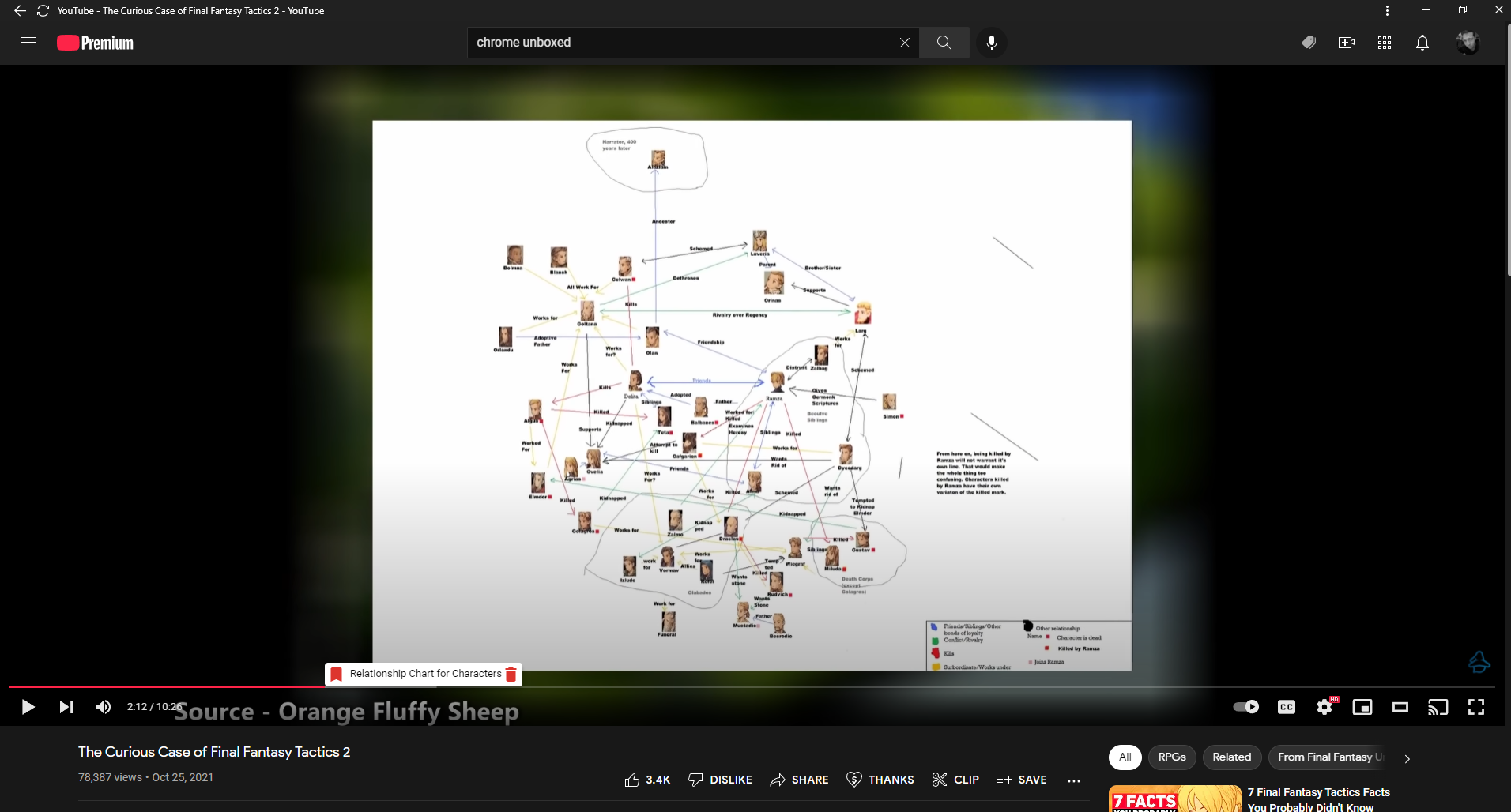
The extension’s developer states that the purpose of the tool is to let you quickly jump to the most useful information in a video without wasting your time on everything else. Additionally, there’s a built-in algorithm that lets you see the best parts of a video (Kind of like the new Youtube experiment I recently reported on), and an Android application that’s in the works so you can see all of your bookmarks on the go.
FreshView for Youtube
If you’re anything like me, you’re watching a ton of Youtube this week with the holidays and all. FreshView for YouTube lets you automatically hide any videos from your feed or from the subscription tab that you’ve already watched so that you only see new content.
It’s a rather simple script that runs and you can even change the “view threshold of watched videos” so that only after you’ve watched a very specific amount of any given video they will disappear from view. Otherwise, if you’ve watched less than the threshold, they will remain in your feed for later viewing.

I’m going to ask what I always do – why the heck hasn’t Google implemented hiding watched videos yet? Why on earth isn’t this a thing already? I can’t think of a single reason why I’d want to re-watch a video I’ve already seen, but even in an instance where someone would prefer this, why isn’t there a simple toggle at the top of the website? FreshView solves this problem, and I’ve been enjoying it quite a bit!
Youtube Full Title For Videos
This last one is the most simple yet utilitarian extension of them all. “YouTube Full Title for Videos” does exactly what it says in its name. Before installing it, video titles are clipped after a specific amount of characters (which is about 50). After you add this to Chrome, you’ll refresh Youtube and see that if a title extends beyond 50 characters, it will reveal the entire thing!
Now, I’m aware that you can simply hover over a title to see the full thing via the Chrome tooltip, but that takes time and is quite honestly annoying. I’ve yet to encounter a title on the site that’s too long and creates a visual overlap or that bumps any styling down further than it should be, and that’s primarily because content creators understand that their title can’t be too long, so this extension ends up working perfectly.

Before 
After
If you have any favorite ways to tailor Youtube to your liking, please let us know in the comments. I’m always looking to tinker with things and make them better without having to wait on Google for years to implement things, and Chrome extensions are a great way to do that!
SUBSCRIBE TO UPSTREAM
Get Chrome Unboxed delivered straight to your inbox
Upstream is our flagship, curated newsletter with the top stories, most click-worthy deals, giveaways, and trending articles from Chrome Unboxed sent directly to your inbox a few times a week. Join 31,000+ subscribers.

