

• Skip to main content
  • Skip to primary sidebar
  • Deals
  • Features
  • Guides
  • Chromebooks
  • Videos
  • Podcast
  • More +
    • Reviews
    • Unboxing
    • Upcoming Devices
    • Chromebook Plus
    • Chrome
    • ChromeOS
    • Chrome OS Flex
  • Search
  • Sign Up
  • Log In
Chrome Unboxed – The Latest Chrome OS News

Chrome Unboxed - The Latest Chrome OS News

A Space for All Things Chrome, Google, and More!

  • Deals
  • Features
  • Guides
  • Chromebooks
  • Videos
  • Podcast
  • More +
    • Reviews
    • Unboxing
    • Upcoming Devices
    • Chromebook Plus
    • Chrome
    • ChromeOS
    • Chrome OS Flex
  • Search
  • Sign Up
  • Log In

This handy trick helps you multitask better on a Chromebook in tablet mode

August 14, 2020 By Robby Payne View Comments

Support our independent tech coverage. Chrome Unboxed is written by real people, for real people—not search algorithms. Join Chrome Unboxed Plus for just $2 a month to get an ad-free experience, access to our private Discord, and more. Learn more about membership here.
START FREE TRIAL (MONTHLY)START FREE TRIAL (ANNUAL)

The other night I was doing a bit of couch-based web browsing on the Acer Chromebook Spin 713. Flipped back into presentation mode (lid open around 270 degrees) and on my lap, the 13.5-inch touchscreen does a fantastic job of being a massive canvas for web content and Chrome OS with this much horsepower is buttery-smooth with all the new tablet gestures and navigation swipes. While most convertibles make terrible tablets, an on-the-lap touch-based experience on the couch is actually quite fun to use. If you have a convertible Chromebook, I highly recommend it.

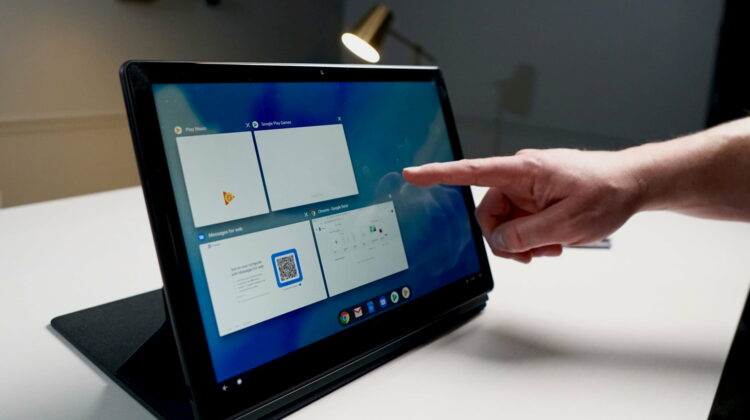
Anyway, as I was researching a few things, I needed to invoke some split-screen action for referencing a few things side by side. As I began navigating both panes, I had a moment where I needed to go back in my right-most panel and, for a second, I wasn’t sure how to do it. For those unaware, home and back on Chromebooks in tablet mode have both been replaced by gesture navigation: swipe in from the left side of the screen to go back, swipe up from the bottom to go home. As I said above, on the Acer Spin 713, it works very well and is fun.

Xremove ads

While in split screen mode, however, that back gesture only applies to the left panel. Obviously it would be odd if it affected both panels simultaneously, but I was also at a bit of a loss for how to navigate back in the right panel (I was in an app, not a web browser for the record). With no buttons and no apparent gestures to do this, I thought for a moment I’d come across a big stumble from the Chrome OS team. I was quite wrong.

As a matter of fact, the same swipe-in-from-the-left gesture works on both sides of the multitasking view, and it is shockingly good, too. Once in your split-screen setup, you can swipe to the right from anywhere on that black bar in the center of the screen and you will get a ‘go back’ navigation. The best part is this gesture doesn’t require a ton of precision and I was able to execute it every single time I went for it even though I have large fingers and have a tendency to ‘fat finger’ UI elements from time to time.

Featured Videos

Xremove ads

As the tablet mode of Chrome OS continues to mature and grow in its fluidity and abilities, small nuances like this will become increasingly important. With Android and Chrome OS heavily relying on a back button in the pre-gesture era, having a solid way to pull off this essential navigation gesture for any part of the OS is very important. Kudos to Google and the Chrome OS team for absolutely nailing it while we weren’t looking.

Shop Best Chromebooks of 2020 So Far on Chrome Shop

SUBSCRIBE TO UPSTREAM

Get Chrome Unboxed delivered straight to your inbox

Upstream is our flagship, curated newsletter with the top stories, most click-worthy deals, giveaways, and trending articles from Chrome Unboxed sent directly to your inbox a few times a week. Join 31,000+ subscribers.

Xremove ads
SUBSCRIBE HERE!

Filed Under: ChromeOS, Guides and How-To's Tagged With: videos

About Robby Payne

As the founder of Chrome Unboxed, Robby has been reviewing Chromebooks for over a decade. His passion for ChromeOS and the devices it runs on drives his relentless pursuit to find the best Chromebooks, best services, and best tips for those looking to adopt ChromeOS and those who've already made the switch.

Primary Sidebar

Googlebook

How to silence Googlebook mirrored phone notifications without turning off sync

By Robby Payne
October 23, 2026

Googlebook screen recording may soon get a webcam selfie bubble and live markup tools

By Robby Payne
October 23, 2026

ASUS Googlebook 14 unboxing: a rigid 2-pound laptop that impresses all around

By Robby Payne
October 22, 2026

Googlebook deserves a little patience: why early launch quirks don’t define its future

By Robby Payne
October 21, 2026

Googlebook OLED screens are showing washed-out blacks, but a fix is coming

By Robby Payne
October 21, 2026

More Googlebook

Xremove ads

Deals

My favorite convertible Chromebook is $150 off right now and primed for Googlebook OS

By Robby Payne
September 29, 2026

Google Pixel Buds 2a in Hazel bundled with a new Googlebook laptop at Best Buy

Score a free $129 pair of Pixel Buds 2a with any Googlebook pre-order at Best Buy

By Robby Payne
September 28, 2026

The best Chromebook deals today

By Robby Payne
September 2, 2026

The best Chromebook ever made is $350 off at Best Buy right now

By Robby Payne
August 21, 2026

The excellent, powerful Acer Chromebook Plus Spin 514 is $150 off right now

By Robby Payne
August 12, 2026

More Deals

Xremove ads

Reviews

Acer Chromebook Plus Spin 514 Review: the best convertible you can buy [VIDEO]

By Robby Payne
July 1, 2026

Lenovo Chromebook Plus 2-in-1 Review: pretty great in a vacuum

By Robby Payne
April 23, 2026

My review after 6 weeks with the Lenovo Chromebook Plus 14 [VIDEO]

By Robby Payne
August 11, 2025

One week with the best small Android tablet you can buy, and I’m sold

By Robby Payne
May 9, 2025

Best Chromebooks of 2024 [VIDEO]

By Robby Payne
November 28, 2024

More Reviews

Xremove ads

TWITTER · FACEBOOK · INSTAGRAM · YOUTUBE · EMAIL · ABOUT

Copyright © 2026 · Chrome Unboxed · Chrome is a registered trademark of Google Inc.
We are participants in various affiliate advertising programs designed to provide a means for us to earn fees by linking to affiliated sites.

PRIVACY POLICY