


Support our independent tech coverage. Chrome Unboxed is written by real people, for real people—not search algorithms. Join Chrome Unboxed Plus for just $2 a month to get an ad-free experience, access to our private Discord, and more. Learn more about membership here.
START FREE TRIAL (MONTHLY)START FREE TRIAL (ANNUAL)
The HP Chromebook x360 14c has been out in its second iteration for a few months at this point, but we’ve yet to get one in the office and unbox it. Why? Well, quite plainly, it isn’t that different than the version of this same Chromebook that came out in 2020. That’s not a bad thing by any stretch of the imagination and I’d even argue it is actually a very positive move by HP.
You see, iteration is where Chromebooks generally need to be at this point. I argued this in my review of the excellent Acer Spin 713 and I think the same thing holds true of this latest Chromebook by HP. We’re at a point where there won’t be tons of wild, new features thrown into Chromebooks moving forward. Instead, the focus really needs to revolve around fine-tuning the devices that already work quite well.
While not every Chromebook falls into that category, the HP Chromebook x360 14c from 2020 was definitely one of those devices. It had a great build, great keyboard/trackpad combo, a nice screen, and fast internals. Oh, and it was always available at a reasonable price as well. HP didn’t need to reinvent their mid-range Chromebook: they simply needed to refine it. And that’s what the latest x360 14c does.
Upon unboxing this one, I was struck by how similar it is to the 2020 model. Apart from a few, very small aesthetic changes, this Chromebook is basically the same device. While this means it retains the same great keyboard and trackpad, it also means we get the same 250 nit screen as well, and that’s a bummer. Don’t get me wrong, it looks nice: it just doesn’t get quite bright enough for all scenarios.
The internals get the needed update to 11th-gen Intel Tiger Lake Core i3 and 128GB of SSD while retaining the same 8GB of RAM from 2020. USI pen support is here as well and the new version keeps the magnetic spot for the pen to attach, too. At this price range, it is also great to see the physical camera switch on the side along with the beloved fingerprint scanner. Overall, this thing flies, has some great add-ons, and is quite beautiful and well-crafted. You can see our review from last year if you want more details, but this iteration – apart from not putting at least a 300 nit screen in here – nails nearly all points of a fantastic Chromebook experience.
Avoid buying the wrong one
The biggest issue for consumers in this new era of yearly iterations in the Chromebook space comes down to purchase decisions. If you’ve looked at the HP and decided that the collection of perks, build quality, speed, and input methods make this the right Chromebook for you, you need to pump the brakes before hitting that Buy Now button.
In listings all over the internet, this device can be easily confused for the 2020 model if you aren’t paying attention. There are countless listings on Amazon and Ebay that list last year’s model as the 2021 version. And, honestly, unless I dug into the spec sheet, I’d have a real hard time telling the two apart.
But you need to be able to do just that, and the reason comes down to price. The 2021 version of the x360 14c has regularly been on sale somewhere in the $400-$500 range and at that price, you’d kick yourself for not getting the latest version of this Chromebook instead of the 2020 version. That’s not to say the 2020 model is bad or slow: it just falls short of the speed you’ll get in the newer 2021 model.
So, how can you tell the difference? Look at the spec sheet closely, and the processor inside should look something like what we see in the Best Buy listing – 11th Generation Core i3-1115G4. Check out the spec listing on this Chromebook over on Best Buy’s website:
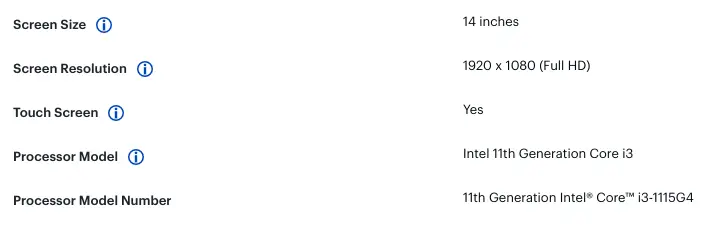
That “11” at the beginning of the model number tells you this is the 11th-gen version of the HP x360 14c. As a frame of reference, the 2020 version comes equipped with the Intel Core i3-10110U and only 64GB of storage (notice the “10” at the beginning of the processor model number). The 10th-gen Core i3 is considerably slower than the 11th-gen version, and 64GB of eMMC storage is paltry next to the 2021 model’s 128GB of SSD storage. And I wouldn’t know any of this without referencing the specs in the listing.
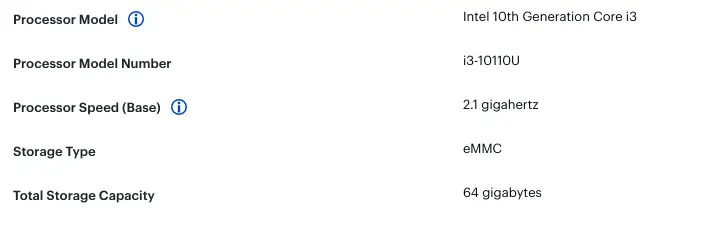
Those are some pretty big differences, yet price at Best Buy is usually similar between the two. You can’t tell me for one second that if you payed $500 for a Chromebook and then realized an updated, faster version was available for the exact same money that you wouldn’t be pretty upset about it. At the end of the day, the 2020 model of this Chromebook was great, but the 2021 is simply a better device.

So, the moral of the story is HP iterated an already-great Chromebook and made a better one, but retailers aren’t going to be too keen on making it clear which is which. If they can sell you last year’s model for the same money, don’t doubt for a second that they will absolutely do so. For your sake, take a moment on this one and research the specs before you make a purchase. If you end up upgrading to the latest model in the process, you can thank me later.
SUBSCRIBE TO UPSTREAM
Get Chrome Unboxed delivered straight to your inbox
Upstream is our flagship, curated newsletter with the top stories, most click-worthy deals, giveaways, and trending articles from Chrome Unboxed sent directly to your inbox a few times a week. Join 31,000+ subscribers.

