

• Skip to main content
  • Skip to primary sidebar
  • Deals
  • Features
  • Guides
  • Chromebooks
  • Videos
  • Podcast
  • More +
    • Reviews
    • Unboxing
    • Upcoming Devices
    • Chromebook Plus
    • Chrome
    • ChromeOS
    • Chrome OS Flex
  • Search
  • Sign Up
  • Log In
Chrome Unboxed – The Latest Chrome OS News

Chrome Unboxed - The Latest Chrome OS News

A Space for All Things Chrome, Google, and More!

  • Deals
  • Features
  • Guides
  • Chromebooks
  • Videos
  • Podcast
  • More +
    • Reviews
    • Unboxing
    • Upcoming Devices
    • Chromebook Plus
    • Chrome
    • ChromeOS
    • Chrome OS Flex
  • Search
  • Sign Up
  • Log In

The exclusive Chromebook Plus wallpapers need to expand or go away

February 20, 2025 By Robby Payne View Comments

Support our independent tech coverage. Chrome Unboxed is written by real people, for real people—not search algorithms. Join Chrome Unboxed Plus for just $2 a month to get an ad-free experience, access to our private Discord, and more. Learn more about membership here.
START FREE TRIAL (MONTHLY)START FREE TRIAL (ANNUAL)

Back about a year and a half ago when Chromebook Plus began, the features that actually launched were quite sparse. We complained about it back then, and by the following spring in 2024, all the promised AI bits and pieces were largely delivered to the platform in a way that truly helped Plus models stand out a bit from the rest.

One holdover of that slightly awkward transition phase, however, are the remnants of Chromebook Plus exclusive wallpapers and screensavers that were part of the only new features initially introduced. They were fun for a minute, but alongside the AI-generated wallpapers, they feel out of place and flat-out weird now.

Xremove ads

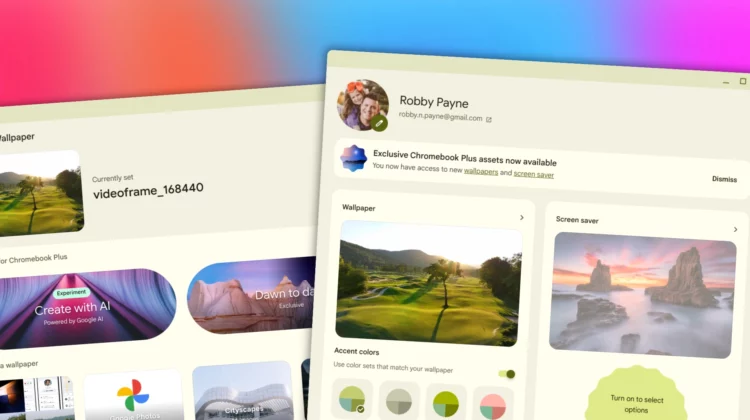
For starters, there are still only 2 “exclusive” wallpapers available. The exact same two that have been there for about 17 months, and it just feels a tad off-putting that when you go to select a wallpaper, you get a little nudge to try out these exclusive wallpapers and screensavers that are beyond old news at this point. There’s even language that says “You now have access to new wallpapers and screen savers.”

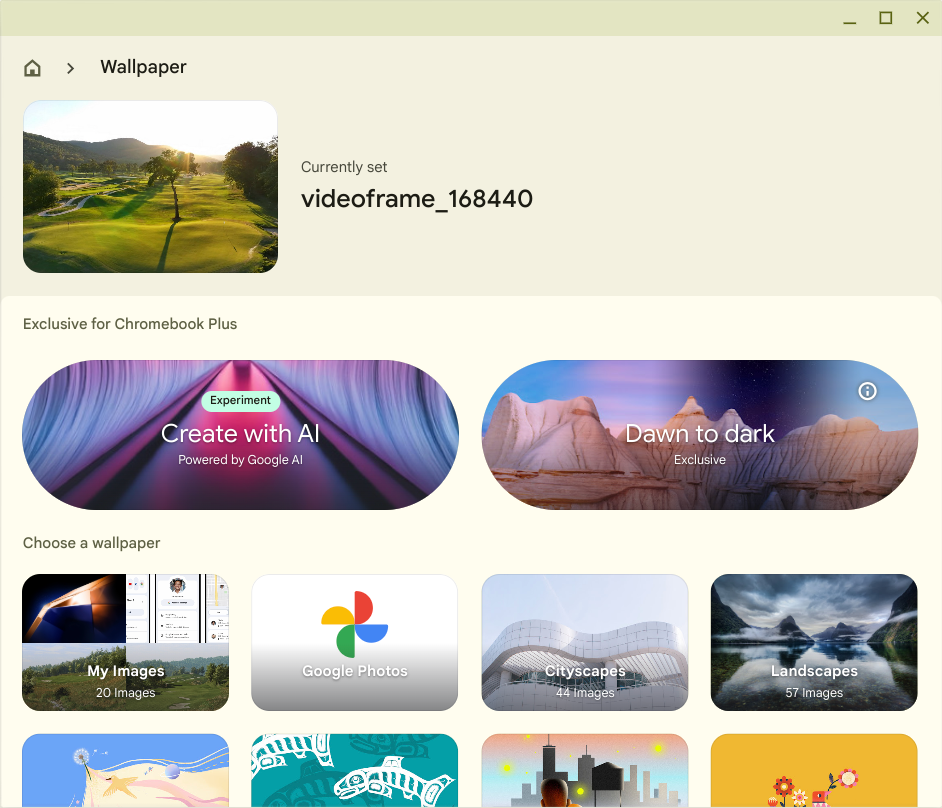
Then we have to talk about the AI-generated wallpapers that are still pre-chosen, hand-held options that make decently interesting wallpapers that are still terrible to look at on any screen of a higher resolution than 1080p. These wallpapers were cool when the end goal was to allow users to simply type a prompt and create a background, but we’ve never graduated to that and the resulting images for now are still basically unusable on a QHD or 4K display.

Featured Videos

Xremove ads

Am I complaining? Sure, but all I’m saying is, if you aren’t going to update these areas of the OS, just get rid of them. It’s super awkward for ChromeOS to still be showing me the option to use exclusive wallpapers, screensavers, and AI-generated wallpapers when none of these options have been touched since they were announced.

I think a massive collection of Chromebook Plus wallpapers and an open-ended AI-generated library of wallpapers would be awesome, but what we have right now is anything but that. Instead, this feels like the ChromeOS team is far more focused on other stuff and has left a few initial features to die on the line. And if that is the case, they just need to be done away with. It’s a tad bit embarrasing.

SUBSCRIBE TO UPSTREAM

Get Chrome Unboxed delivered straight to your inbox

Upstream is our flagship, curated newsletter with the top stories, most click-worthy deals, giveaways, and trending articles from Chrome Unboxed sent directly to your inbox a few times a week. Join 31,000+ subscribers.

Xremove ads
SUBSCRIBE HERE!

Filed Under: ChromeOS, Editorial

About Robby Payne

As the founder of Chrome Unboxed, Robby has been reviewing Chromebooks for over a decade. His passion for ChromeOS and the devices it runs on drives his relentless pursuit to find the best Chromebooks, best services, and best tips for those looking to adopt ChromeOS and those who've already made the switch.

Primary Sidebar

Xremove ads

Deals

Lenovo Legion Tab Gen 3 drops to $399, ahead of the much pricier Gen 5 release

By Joseph Humphrey
April 18, 2026

How to get 50% off YouTube Premium for a full year with Google One

By Robby Payne
April 16, 2026

The Pixel 10a just dropped to $449, but here’s why you should buy the Pixel 10 instead

By Joseph Humphrey
April 13, 2026

Save up to $200 on the two best Chromebooks on the market

By Robby Payne
April 13, 2026

The best Chromebook deals today

By Robby Payne
April 13, 2026

More Deals

Xremove ads

Reviews

Acer Chromebook Plus Spin 514 Review: Kompanio Ultra power in a convertible

By Robby Payne
December 24, 2025

My review after 6 weeks with the Lenovo Chromebook Plus 14 [VIDEO]

By Robby Payne
August 11, 2025

One week with the best small Android tablet you can buy, and I’m sold

By Robby Payne
May 9, 2025

Best Chromebooks of 2024 [VIDEO]

By Robby Payne
November 28, 2024

Samsung Galaxy Chromebook Plus Review: Samsung is back! [VIDEO]

By Robby Payne
October 28, 2024

More Reviews

Xremove ads

Guides

This Chromebook trackpad shortcut is definitely not new, but is blowing my mind

By Robby Payne
March 11, 2024

How to reduce broadcast delay on YouTube TV to stop live spoilers

By Robby Payne
December 8, 2023

Windows PC keyboard and Chromebook

How to use a Windows keyboard with a Chromebook

By Joseph Humphrey
December 8, 2023

How reset and revert your Chromebook to the previous version of Chrome OS

By Robby Payne
November 29, 2023

My Chromebook Plus features disappeared: here’s how I fixed it

By Robby Payne
November 24, 2023

More Guides

TWITTER · FACEBOOK · INSTAGRAM · YOUTUBE · EMAIL · ABOUT

Copyright © 2026 · Chrome Unboxed · Chrome is a registered trademark of Google Inc.
We are participants in various affiliate advertising programs designed to provide a means for us to earn fees by linking to affiliated sites.

PRIVACY POLICY